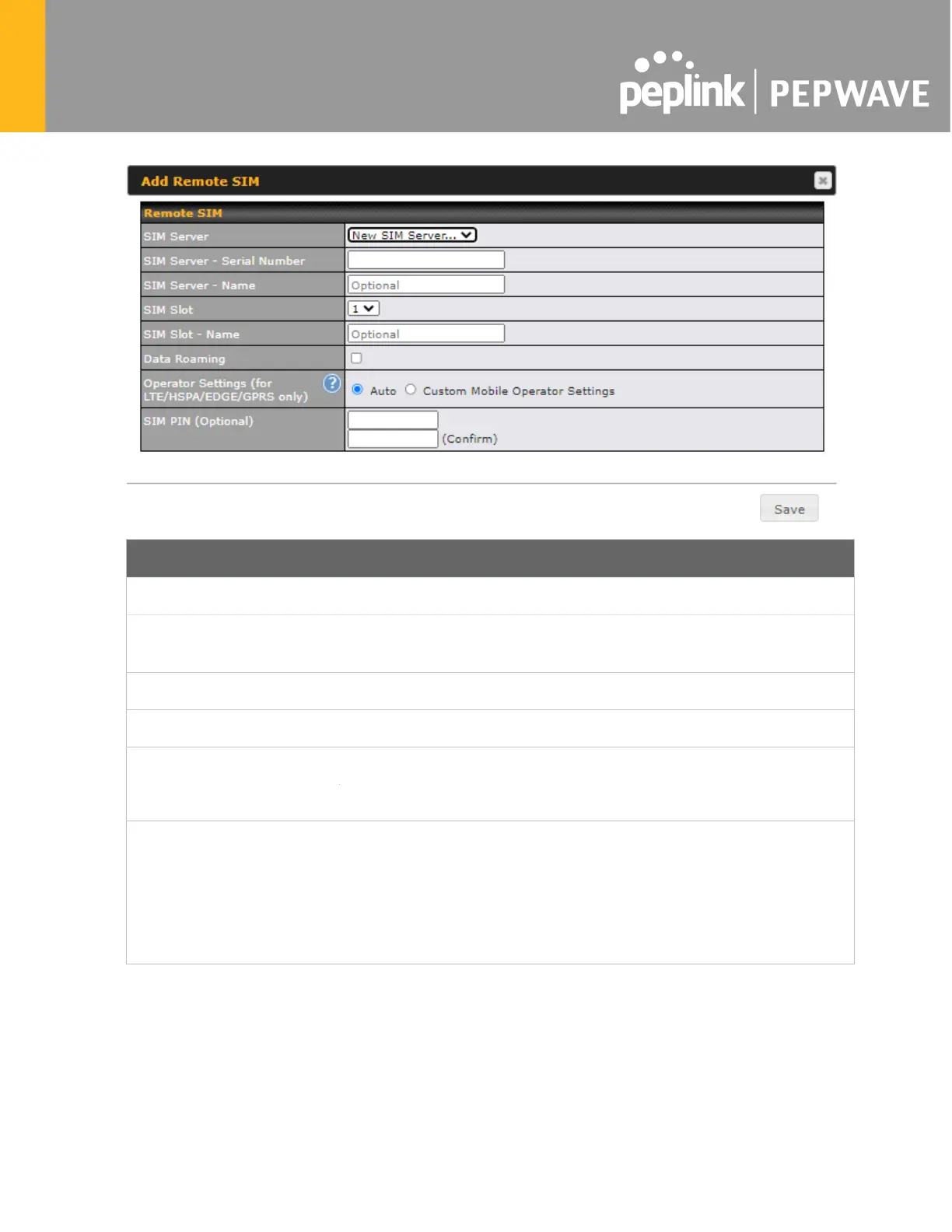
Add Remote SIM Settings
SIM Server
Add a new SIM Server
SIM Server - Serial
Number
Enter the serial number of SIM Server
SIM Server - Name
This field is optional to allow you define a name for the SIM Server
SIM Slot
Click the drop-down menu and choose which SIM slot you want to connect.
This field is an option to allow you define a name for the SIM slot.
This checkbox enables data roaming on this particular SIM card.
Operator Settings (for
LTE//HSPA/EDGE/GPRS
Only)
This setting allows you to configure the APN settings of your connection. If
Auto is selected, the mobile operator should be detected automatically
.
The connected device will be configured and connection will be made
automatically. If there is any difficulty in making a connection, you may
select Custom
to enter your carrier’s APN, Username and Password
settings manually. The correct values can be ob
tained from your carrier.
The default and recommended setting is Auto.
22.11 SIM Toolkit
The SIM Toolkit, accessible via Advanced > Misc Settings > SIM Toolkit, supports two
functionalities, USSD and SMS.








 To Next Page