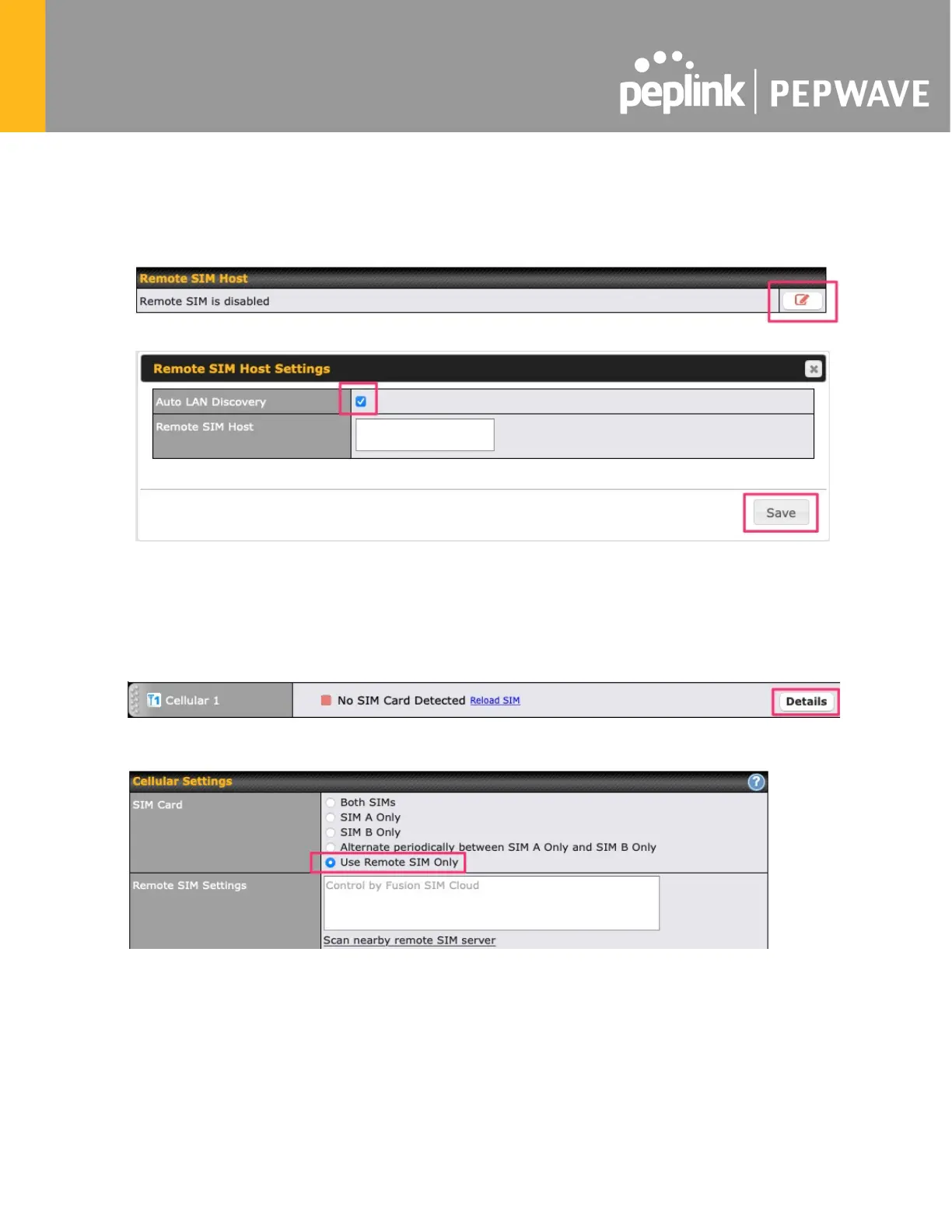
1a. If you are using a Balance cellular router, go to the Network tab (top navigation bar).
1b. If you are using a MAX cellular router, go to the Advanced tab (top navigation bar).
2. Under Misc. settings (left navigation bar) find Remote SIM Management.
3. In Remote SIM Management, click on the edit icon next to Remote SIM is Disabled.
4. Check the Auto LAN discovery checkbox and click Save and Apply Changes.
5. Click Save and then Apply Changes.
Step 2. Enable RemoteSIM for the selected Cellular interface.
1. Go to Network (top navigation bar), then WAN (left navigation bar) and click Details for a
selected cellular WAN. This will open the WAN Connection Settings page.
2. Scroll down to Cellular settings.
3. In the SIM Card section, select Use Remote SIM Only.
4. Enter configuration settings in Remote SIM Settings section. Click on Scan nearby
remote SIM server to show the serial number(s) of the connected SIM Injector(s). Available
configuration options for cellular interface are shown below:
A. Defining SIM Injector(s)
- Format: <S/N>
- Example 1: 1111-2222-3333








 To Next Page