clients will be displayed at Status>WINS Clients.
BOOTP
Check this box to enable BOOTP on older networks that still require it.
Extended DHCP
Option
In addition to standard DHCP options (e.g. DNS server address, gateway address,
subnet mask), you can specify the value of additional extended DHCP options, as
defined in RFC 2132. With these extended options enabled, you can pass additional
configuration
information to LAN hosts. To define an extended DHCP option, click
the Add
button, choose the option to define, and then enter its value. For values that
are in IP address list format, you can enter one IP address per line in the provided
text area input control. Each option can be defined once only.
DHCP
Reservation
This setting reserves the assignment of fixed IP addresses for a list of computers on
the LAN. The computers to be assigned fixed IP addresses on the LAN are identified
by their MAC addresses. The fixed IP address assignment is displayed as a cross-
referen
ce list between the computers’ names, MAC addresses, and fixed IP
addresses.
Name
(an optional field) allows you to specify a name to represent the device. MAC
addresses should be in the format of 00:AA:BB:CC:DD:EE. Press
a new record. Press
to remove a record. Reserved clients information can be
imported from the Client List, located at Status>Client List
please refer to Section 22.3.
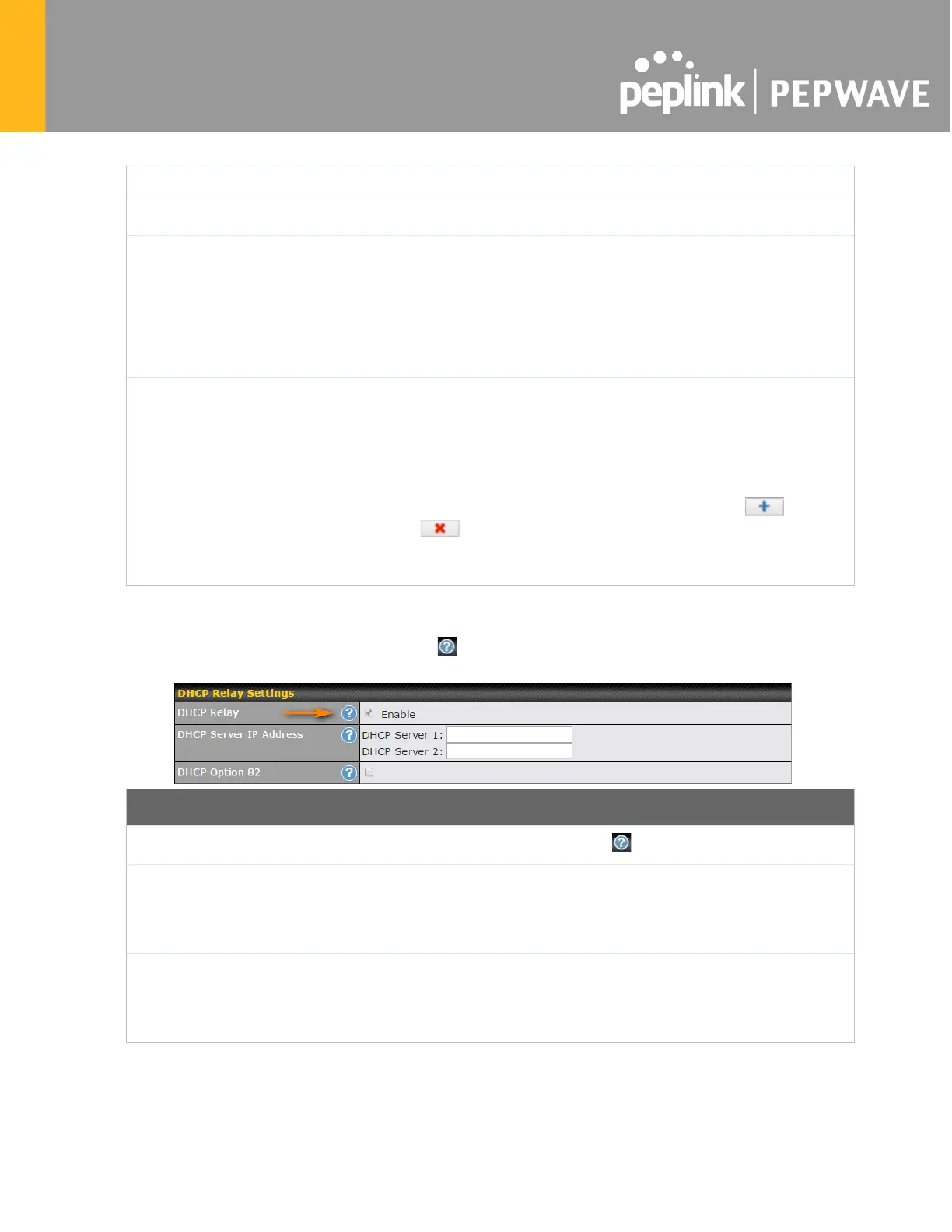
To configure DHCP relay, first click the button found next to the DHCP Server option to
display the settings.
Enable
Check this box to turn on DHCP relay. Click the icon to disable DHCP relay.
DHCP Server IP
Address
Enter the IP addresses of one or two DHCP servers in the provided fields. The
DHCP servers entered here will receive relayed DHCP requests from the LAN. For
active-
passive DHCP server configurations, enter active and passive DHCP server
relay IP addresses in DHCP Server 1 and DHCP Server 2.
DHCP Option 82
DHCP Option 82 includes device information as relay agent for the attached client
when forwarding DHCP requests from client to server. This option also embeds the
device’s MAC address and network name in
circuit and remote IDs. Check this box
to enable DHCP Option 82.
Once DHCP is set up, configure LAN Physical Settings, Static Route Settings, WINS Server
Settings, and DNS Proxy Settings as noted above.








 To Next Page