210 KENR9126
Troubleshooting Section
g02191980
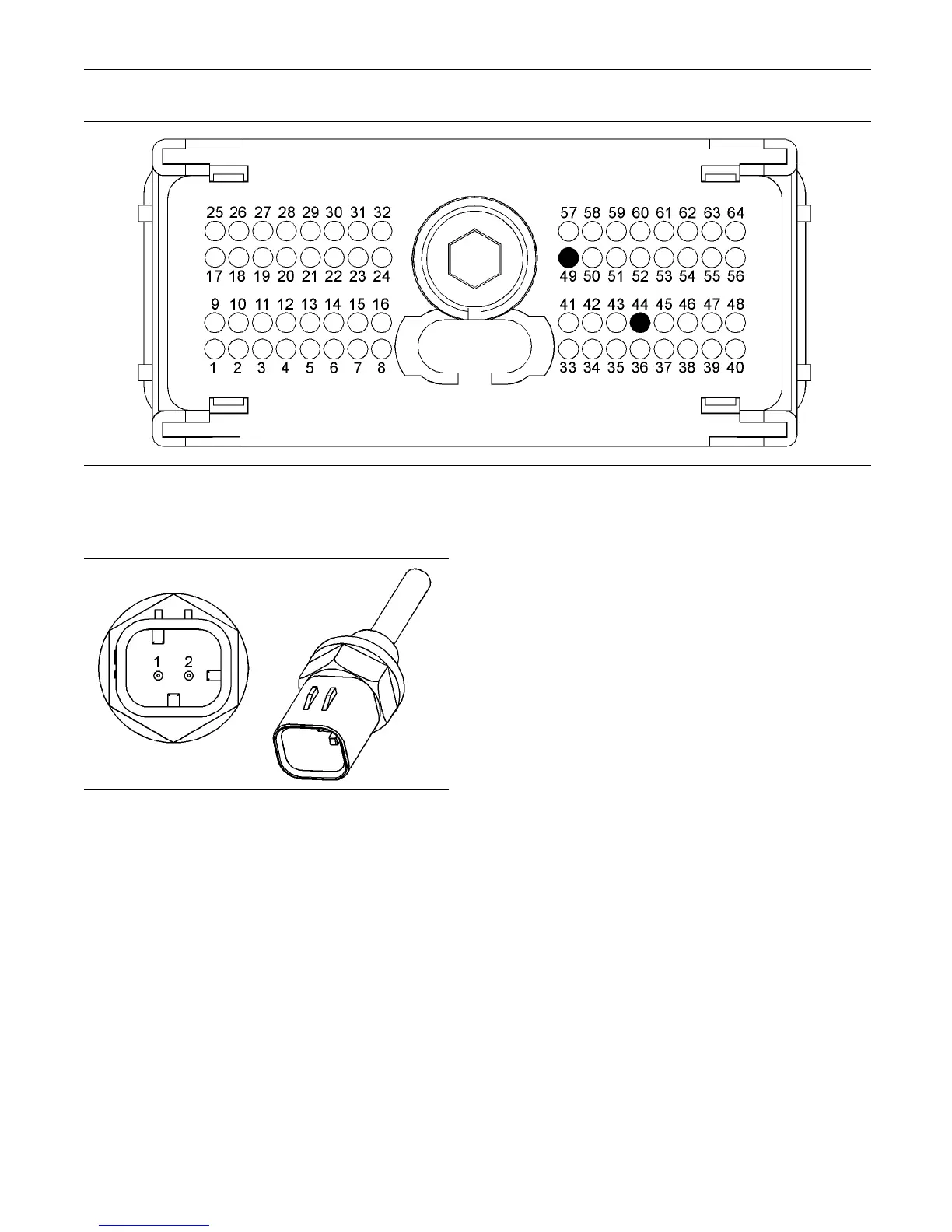
Illustration 91
P2 terminals that are associated with the m arine transmission oil temperature sensor
(P2-44) Return (P2-49) Marine transmission oil temperature
g01170313
Illustration 92
Typical exam ple of marine transmission oil temperature sensor
(1) S ignal
(2) Return
C. Perform a 45 N (10 lb) pull test on each of
the wires that are associated with the marine
transmission oil temperature sensor.
D. Check the allen head screw on each ECM
connector for the proper torque. Refer to the
diagnostic functional test Troubleshooting,
“Electrical Connectors - Inspect”.
E. Check the harness and wiring for abrasions and
for pinch points from the marine transmission oil
temperature sensor to the ECM.
Expected Result:
All connectors, pins, and sockets are completely
coupled and/or inserted. The harness and wiring are
free of corrosion, of abrasion, and of pinch points.
Results:
•
OK – The connectors and wiring are OK. Proceed
to Test Step 2.
•
Not OK – There is a problem in the connectors
and/or wiring.
Repair: Repair the wiring and/or the connectors.
Replace parts, if necessary. Ensure that all of the
seals are properly in place and ensure that the
connectors are completely coupled.
Verify that the repair eliminates the problem.
STOP.
Test Step 2. Check fo r A ctive D iagnostic
Codes
A. Connect the electronic service tool to the service
tool connector.
B. Restore the electrical power to the ECM.
C. Monitor the active diagnostic code screen on
electronic service tool. Check and record any
active diagnostic codes.
Note: Wait at least 30 seconds in order for the
diagnostic codes to become active.
D. Look for an 03 diagnostic code or an 04 diagnostic
code for the marine transmission oil temperature
sensor.



 To Next Page