14
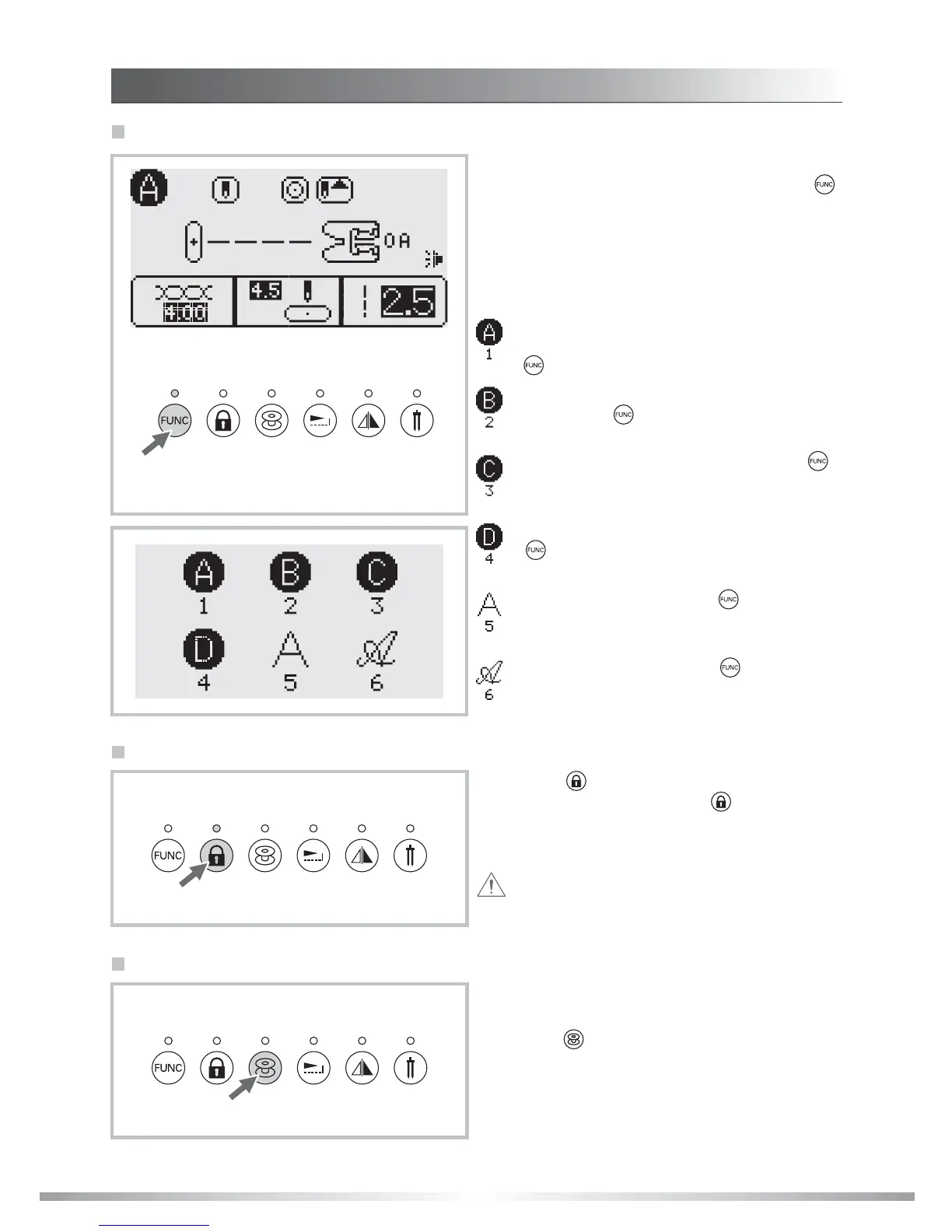
Press the " " button to lock the Function and
Selection buttons. Press the " " button again
to unlock. Lock buttons to prevent stitch settings
from accidentally being changed.
Attention: While the key lock button is locked
the Function and Selection buttons cannot be
operated.
Key lock button
FUNC selection button
The LCD screen will be set at direct mode A when
you turn on the machine. By pressing the " "
button, the LED light will turn on. LCD screen
enters the stitch group screen automatically. Press
the numbered button corresponding to the group
of stitches. For example : Press FUNC, then 2 for
group B. Then press the 2 digit stitch number from
group B on the stitch chart.
Direct mode stitch selection (Group 1-A)-
Select stitch from the numbered buttons or
" ", and then 1 to reenter direct selection.
Utility and decorative stitch mode (Group 2-
B)- Press " ", then 2, and then stitch
number by using the numbered buttons.
Quilt stitch mode (Group 3-C)- Press " ",
then 3, and then stitch number by using the
numbered buttons.
Decorative stitch mode (Group 4-D)- Press
" ", then 4, and then stitch number by
using the numbered buttons.
Block letter mode - Press " ", then 5, and
then stitch number by using the numbered
buttons.
Script letter mode - Press " ", then 6, and
then stitch number by using the numbered
buttons.
Put the empty bobbin on the bobbin winder shaft.
Push the bobbin winder switch to the left.
Press the " " button to wind the bobbin.
The LED light will be on while the bobbin is
winding.
Bobbin can wind in any operation mode.
Bobbin winding button
FUNCTION BUTTONS
INSTRUCTIONS









 To Next Page