8:9
Embroidery mode - edit
A
B
C
D
22
23
0RUHRSWLRQV
*ULG$
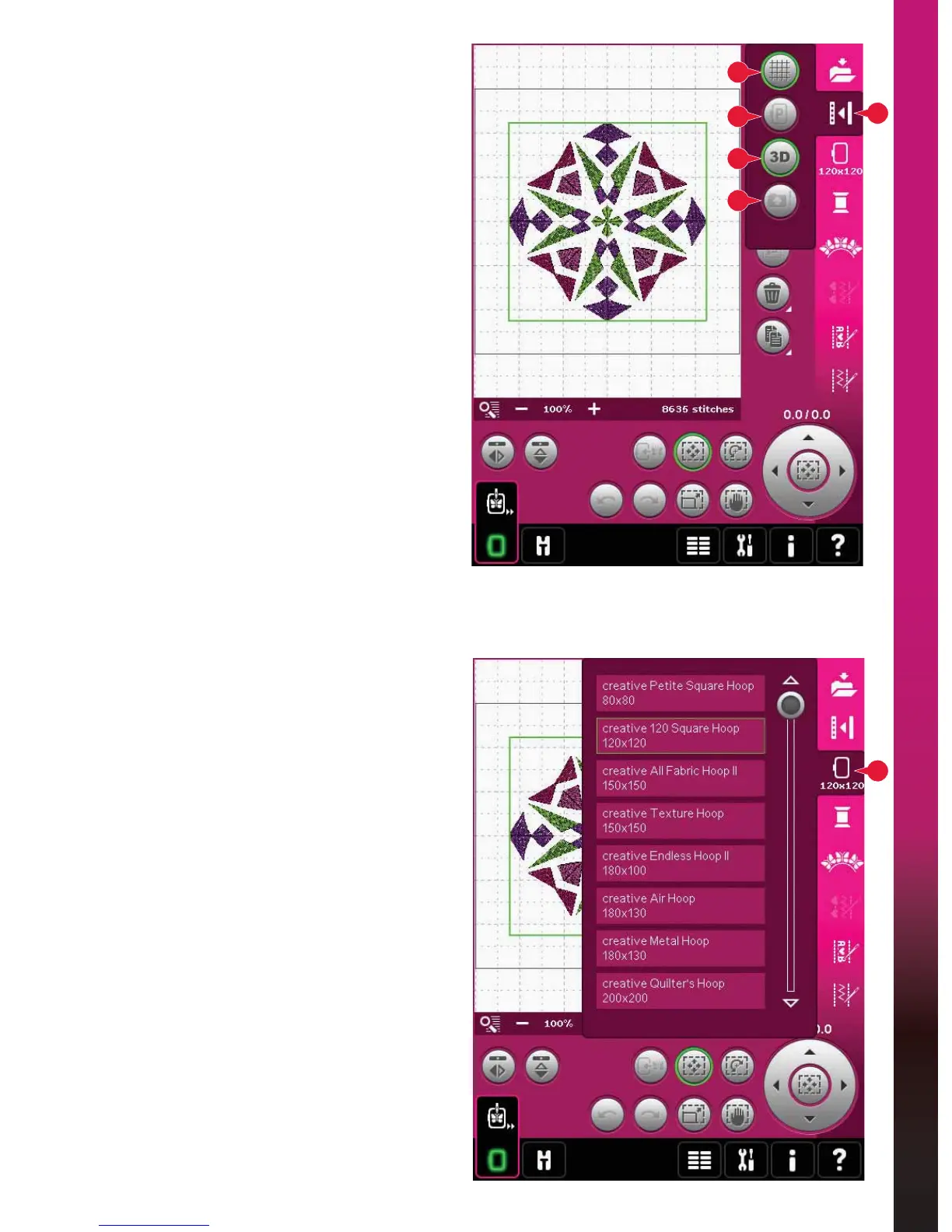
Touch the grid icon (A) to activate/deactivate a grid
RQWKHHPEURLGHU\ÀHOG7KHJULGLVXVHGDVDJXLGH
when combining or placing designs. The distance
between the grid lines equals 20mm. As you zoom
LQRQWKHHPEURLGHU\ÀHOGWKHGLVWDQFHEHWZHHQ
these lines reduces to 10mm and 5mm, indicated
with lighter lines.
Move to SDUNSRVLWLRQ%
Touch the park position icon (B) to move the
embroidery arm to park position for storing the
embroidery unit.
7KHKRRSPXVWEHUHPRYHGÀUVWWRDYRLGGDPDJH
GLPHQVLRQDOYLHZ&
Touch the 3-dimensional view icon (C) to turn on
or off a 3-dimensional view of the designs in the
HPEURLGHU\ÀHOG
By default, the designs are displayed in
GLPHQVLRQDOYLHZLQWKHHPEURLGHU\ÀHOG,Q
2-dimensional view, the designs load faster on the
screen and it is easier to see the color blocks in the
design. The view setting remains as selected even
when you turn your machine off.
5HVWRUHFXUUHQWVWDWH'
If you have stopped embroidery and saved your
current position before turning your machine off,
you can reload your design by touching restore
current state (D). You will start to embroider the
design where you stopped. When touching restore
current state you will automatically move from
Embroidery edit to Embroidery stitch-out.
If any design is loaded to Embroidery edit when
you restore current state, it will be deleted.
Select KRRS
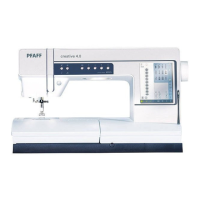
To select the correct hoop size, touch the hoop
selection icon (23). A pop-up will appear with the
hoop choices, including hoops that are available to
purchase from your authorized PFAFF
®
dealer.
After selecting your hoop size, the pop-up will close
automatically.
Note: Hoops that can only be used with the 350x360 size
embroidery unit are indicated with a lighter background.









 To Next Page