9:3
Embroidery mode - stitch-out
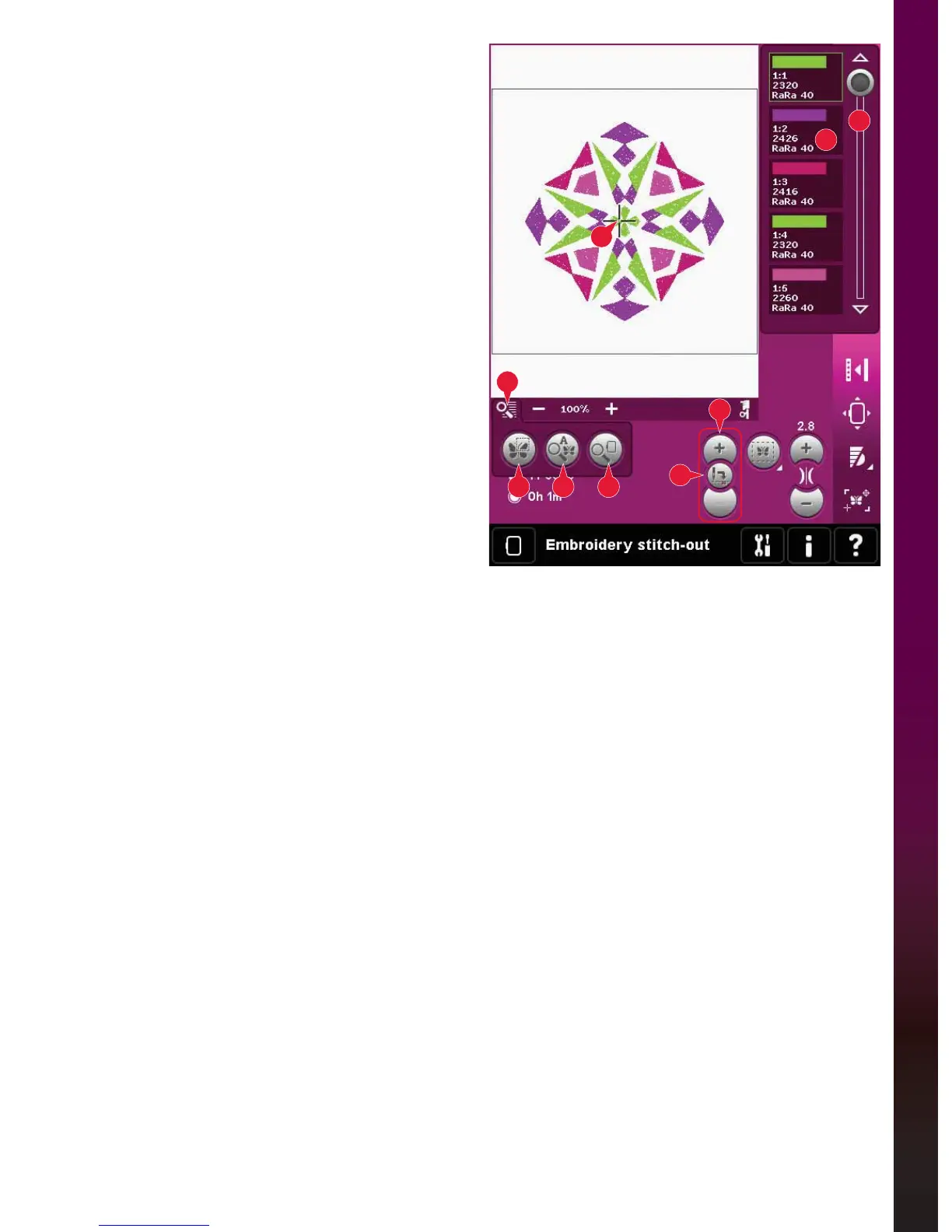
2
A
B C D
1
3
6
5
&URVVKDLU
When embroidering, a crosshair indicates current
needle position on the screen.
&RORUOLVW
All colors in the loaded design(s) are shown in the
order they will be embroidered. Each listed color
shows color order and number. Also shown are
the thread manufacturer, thread weight and color
number. Use the scroll bar to see all of the colors in
the list. To go to the next color block, just touch it in
the color list.
Thread manufacturer and thread number are
displayed for designs in .VP3 and .VIP-format. If
changing color, some information might be lost.
Example (A): 1:2, RaRa 40, 2426 means the second
WKUHDGFRORULQWKHÀUVWORDGHGGHVLJQLV5RELVRQ$QWRQ
weight rayon, color number 2426.
To make changes to the color list, return to
Embroidery edit.
=RRPRSWLRQV
Use the + and - icons to zoom in or out in the
HPEURLGHU\ÀHOG7RXFKWKH=RRPRSWLRQVLFRQWR
open a list of choices.
Zoom to box (B) lets you decide how much and
where to zoom in the embroidery area. First, select
zoom to box in the pop-up. The zoom icon starts
ÁDVKLQJLQGLFDWLQJWKDW]RRPWRER[LVDFWLYH,QWKH
HPEURLGHU\ÀHOGRQWKHVFUHHQWRXFKDQGGUDJZLWK
\RXUVW\OXVWRGHÀQHWKHDUHDWREH]RRPHG=RRP
to box will then be deactivated.
Note: How much you can zoom in depends on the
selected hoop.
Zoom to all (C) will show all the designs in the
embroidery combination in the largest view
possible.
Zoom to hoop (D) will adjust the view to show the
selected hoop.
&XUUHQWVWLWFK
Touch + to step forward and - to step backwards
stitch by stitch. Use the - icon to move backwards
a few steps if the needle thread breaks or runs
out. Touch and hold to move through the stitches
quickly. The crosshair will follow the stitches in the
HPEURLGHU\ÀHOG
*RWRVWLWFK
To move to a particular stitch in the design touch
the go to stitch icon. A pop-up will appear, where
you can enter the desired stitch number. Current
stitch will then move to that stitch number. If the
number entered is too large, current stitch will
move to the last stitch in the design(s).









 To Next Page