17
2.2.3 DC Power Supply Input Installation
Step 1: Check the Power Supply Type and Voltage
Make sure that the mains power supply is a DC power supply, and its voltage is 0 ~ 800 Vdc.
Step 2: Find out the DC Power Input Terminals
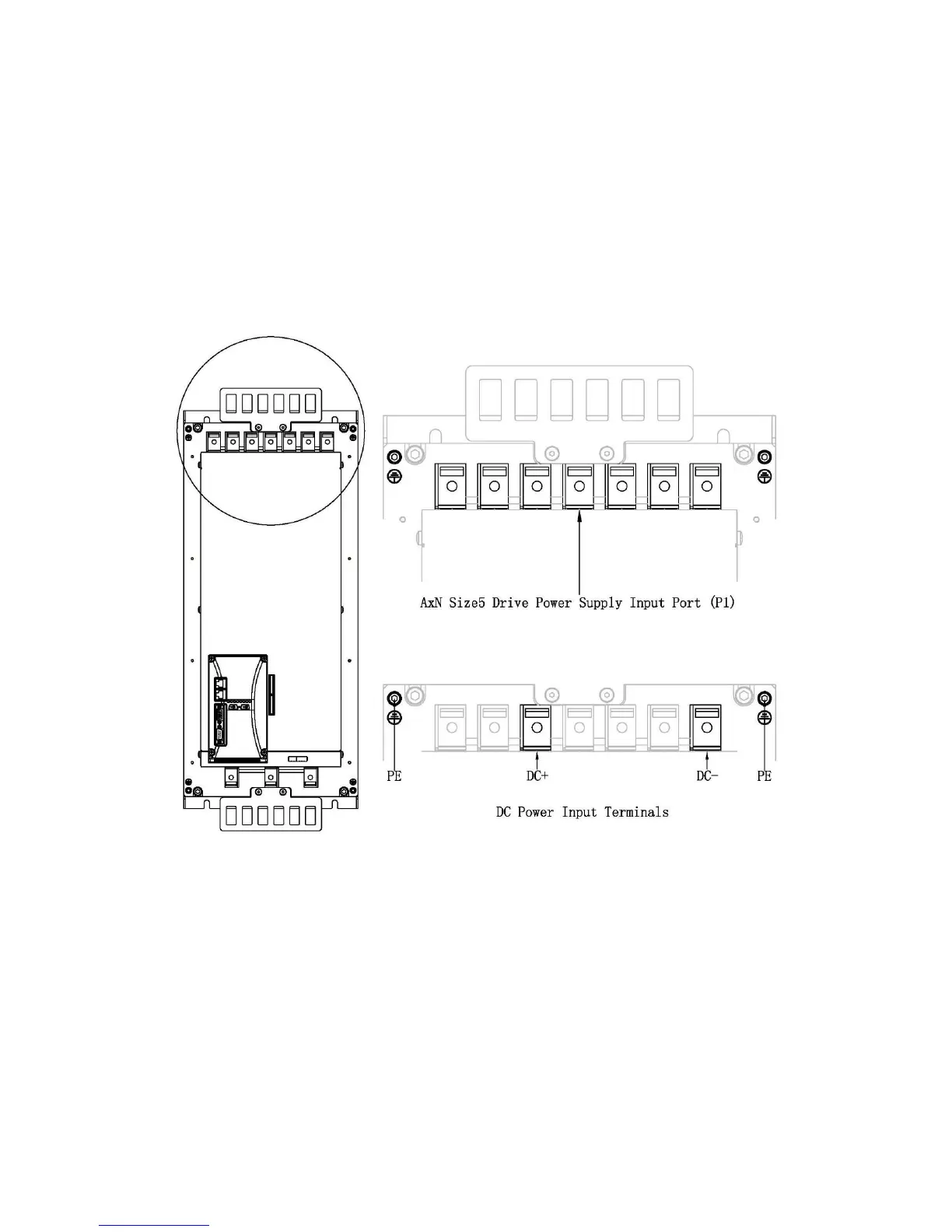
PE, DC+ and DC-, these are the three terminals called DC Power Input Terminals. AxN Size5 Drive’s
DC Power Input Terminals are in the Power Supply Input Port (P1) which is on the top of the drive.
Refer to the following figures for exact locations and terminal Assignment.
Step 3: Install DC Power Wires (DC+ and DC-)
Use a 6mm blade screw driver to loosen the screws on DC+ and DC- Terminals which are in the
drive’s Power Supply Input Port (P1). Insert the DC power supply cable’s power wires into the
corresponding terminals: DC+ to DC+ and DC- to DC-. Then use a 6mm blade screw driver to tight
the screws.



 To Next Page