95
Background Image
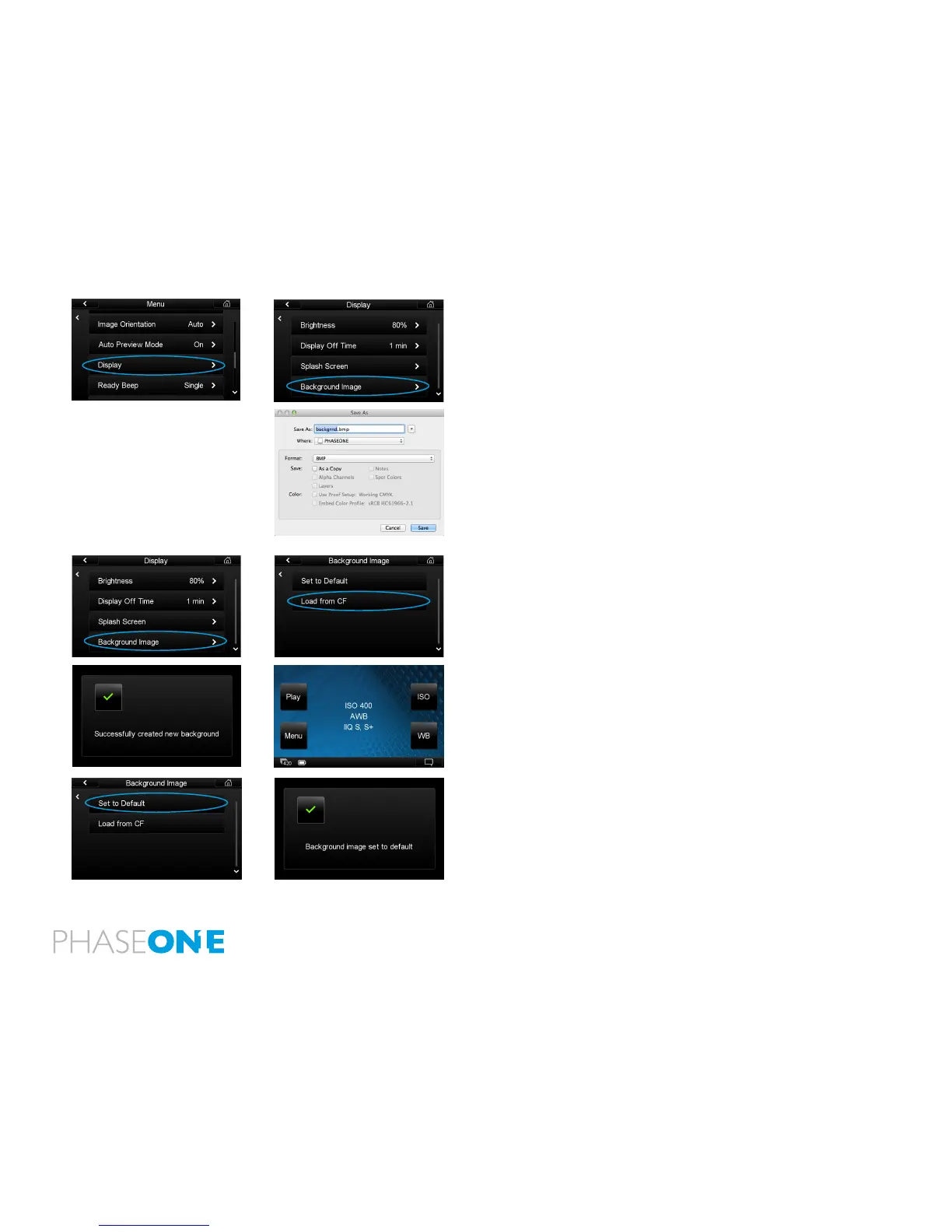
Customize the background image on the IQ back Home Screen.
1.Save the image le to a maximum 800 x 480 pixels resolution
(landscape format). A smaller le will also be accepted and placed in
the center of the screen with the surrounding space lled with black.
2. Save the le as a 24 bit BMP or 24 bit TIF format le. Name the le
‘backgrnd’ followed by the le extension. E.g. backgrnd.bmp or
backgrnd.tif. Transfer the backgrnd.bmp or backgrnd.tif le onto
a CompactFlash card. Ensure it is not in any sub-folder.
3. Insert the CompactFlash card into the IQ back and select Menu
> Display > Background Image > Load from CF. An error screen will
appear if the le is in a sub-folder or named incorrectly.
4. A conrmation screen will appear stating that a ‘Successfully
created new background’. The image will now appear on the Home
Screen.
5. Select Set to Default to remove a background image and return to a
blank black Home Screen. A conrmation screen will appear stating
‘Background image set to default’.



 To Next Page