Mechanical Instructions
EN 12 LC7.2E LB4.
4.3.9 LCD Panel
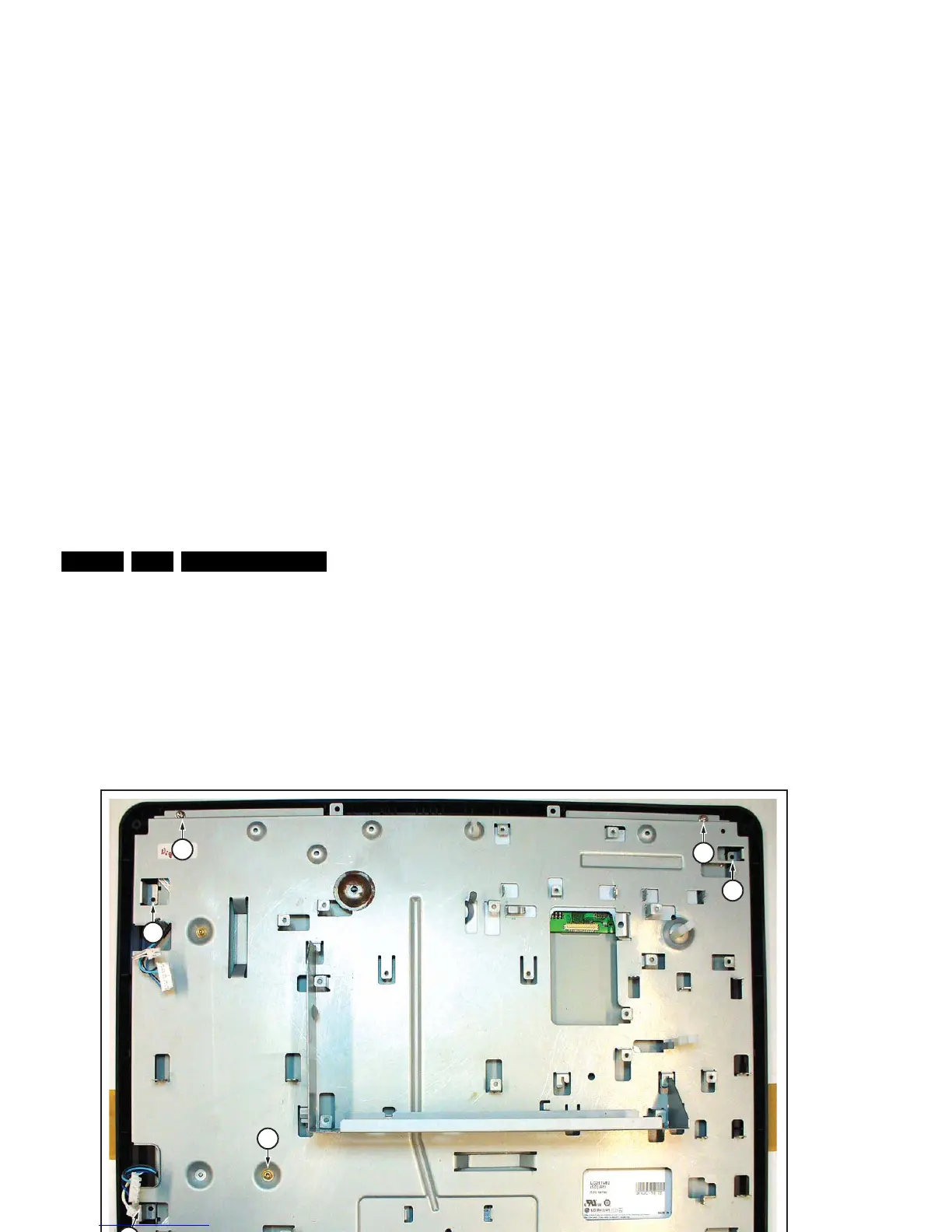
The disassembly method for the LCD panel differs per panel
type, so the following description is generic. The number and
position of screws is panel-specific. Therefore, not all screws
necessarily need to be present!
Refer to next figure for details.
1. Remove the Main Supply Panel from the set as earlier
described.
2. Unplug the connectors from the loudspeakers.
3. Do NOT forget to unplug the LVDS connector from the
LCD Interface Board. Important: Be careful, as this is a
fragile connector!
4. Remove all other remaining connectors.
5. Remove the screws [1] of the central sub-frame.
6. Lift the entire central sub-frame from the front cabinet (incl.
SSB, and Side I/O boards and wiring).
7. Now remove the screws [2] of the LCD panel.
8. The central sub-frame can now be lifted from the LCD
panel.
Figure 4-11 LCD panel
4.4 Set Re-assembly
To re-assemble the whole set, execute all processes in reverse
order.
Notes:
• While re-assembling, make sure that all cables are placed
and connected in their original position. See figure “Cable
dressing”.
• Pay special attention not to damage the EMC foams.
Ensure that EMC foams are mounted correctly (one is
located above the LVDS connector on the display, between
the LCD display and the metal sub-frame).
H_17170_032.eps
310707
1
1
2
2
1
2
2
11
1
1







 To Next Page