Main Menu 10
250ML Lighting Control Consoles
Operation Guide
CONSOLE SETUP
1. Main Menu
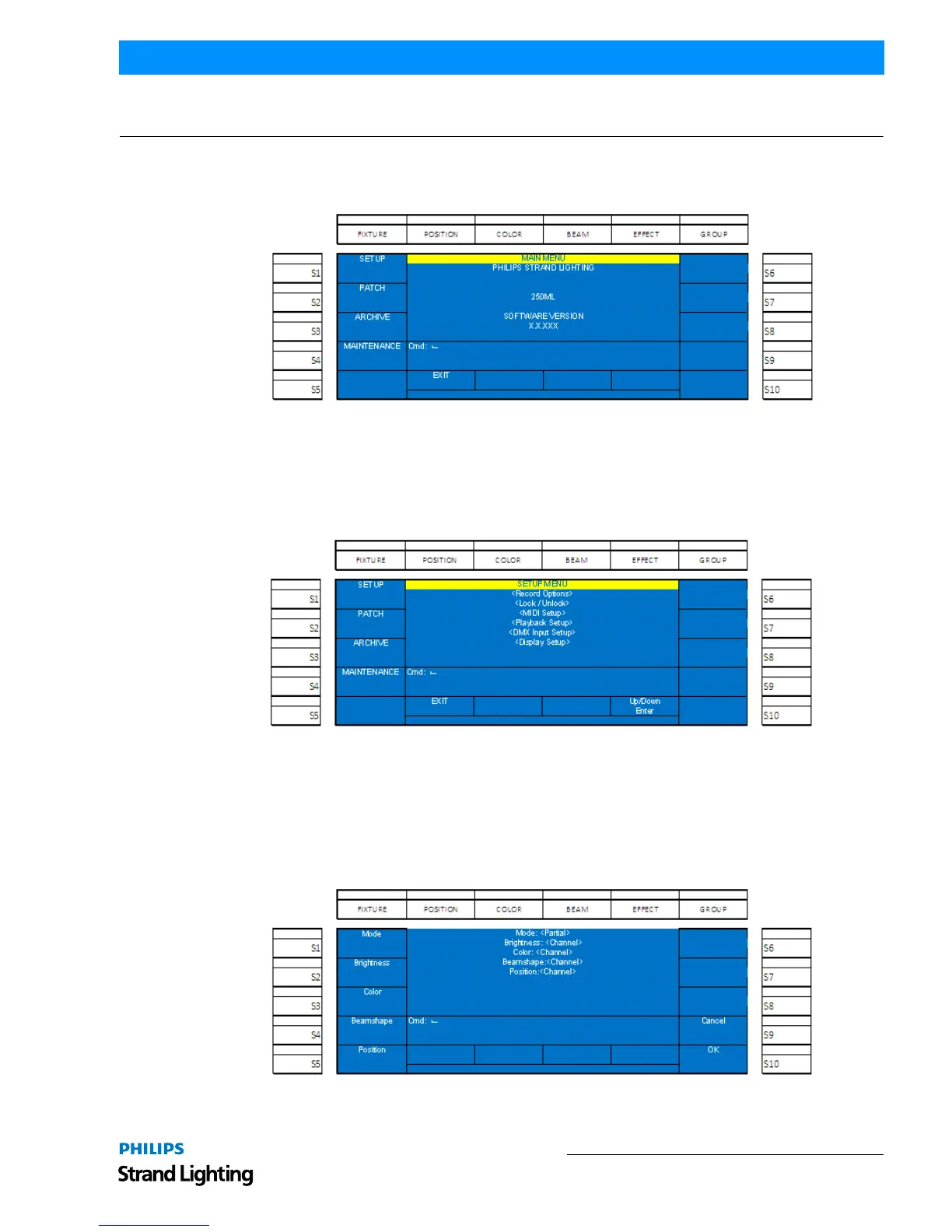
Holding down the [SHIFT] + [UNTAG] for 3 seconds will launch into the Setup portion of the 250ML Console.
Figure 3: Main Menu
The following options are available for the 250ML Control Console:
Setup
(S1 - Setup): Setup allows the user to adjust the console to work the way that's most comfortable for the user. Any
options within the main screen on the Setup Menu can be navigated to using Encoder D to scroll Up/Down the list of
setup options.
Figure 4: Setup Menu
Within Setup, there are options that determine how the console functions. The setup options are…
Record Options
Record Options determine how the record action works. By default the Mode (which refers to the Record Mode is set
to Full. That means that everything that is being outputted from the console will be stored. By pressing S1 the Mode
can be changed. If the Mode is set to Partial, then the other softkeys shall control how Brightness (Intensity), Color,
Beamshape and Position parameters shall be stored.
Figure 5: Record Options


 To Next Page