Operation Guide 250ML Lighting Control Consoles
51 OPERATION
WARNING! This action is password protected for the safety of the show data. This action is not recoverable, nor
reversible. Password: 168168.
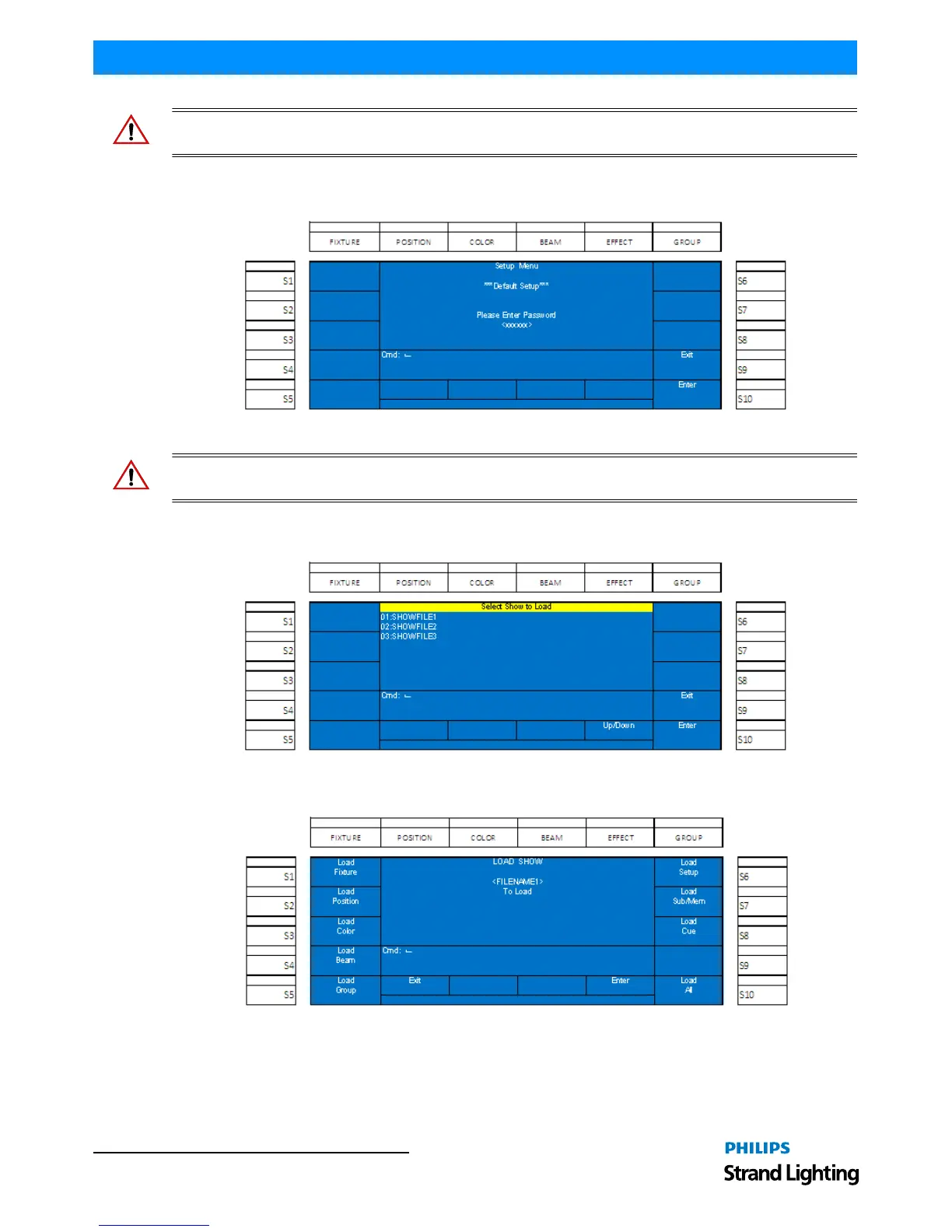
Default Setup
This maintenance action shall default all of the setup options for the 250ML Control Console.
Figure 78: Setup Menu - Resetting to Default Setup
WARNING! This action is password protected for the safety of the show data. This action is not recoverable, nor
reversible. Password: 168168.
Load Show
This maintenance action allows the loading of a previously stored showfile.
Figure 79: Loading a Showfile
Using Encoder D, scroll up/down to highlight the show to load and select (S10 - Enter) to confirm the showfile.
Figure 80: Showfile Loading
With the softkeys, the user can select which items within the showfile will be loaded. All selected items shall have the
appropriate softkey lit in red. Press [Encoder D - Enter] when the selection settings are correct.
While the showfile is loading, progress will be reported in the center of the color screen.


 To Next Page