Reset Desk 54
250ML Lighting Control Consoles
Operation Guide
MAINTENANCE
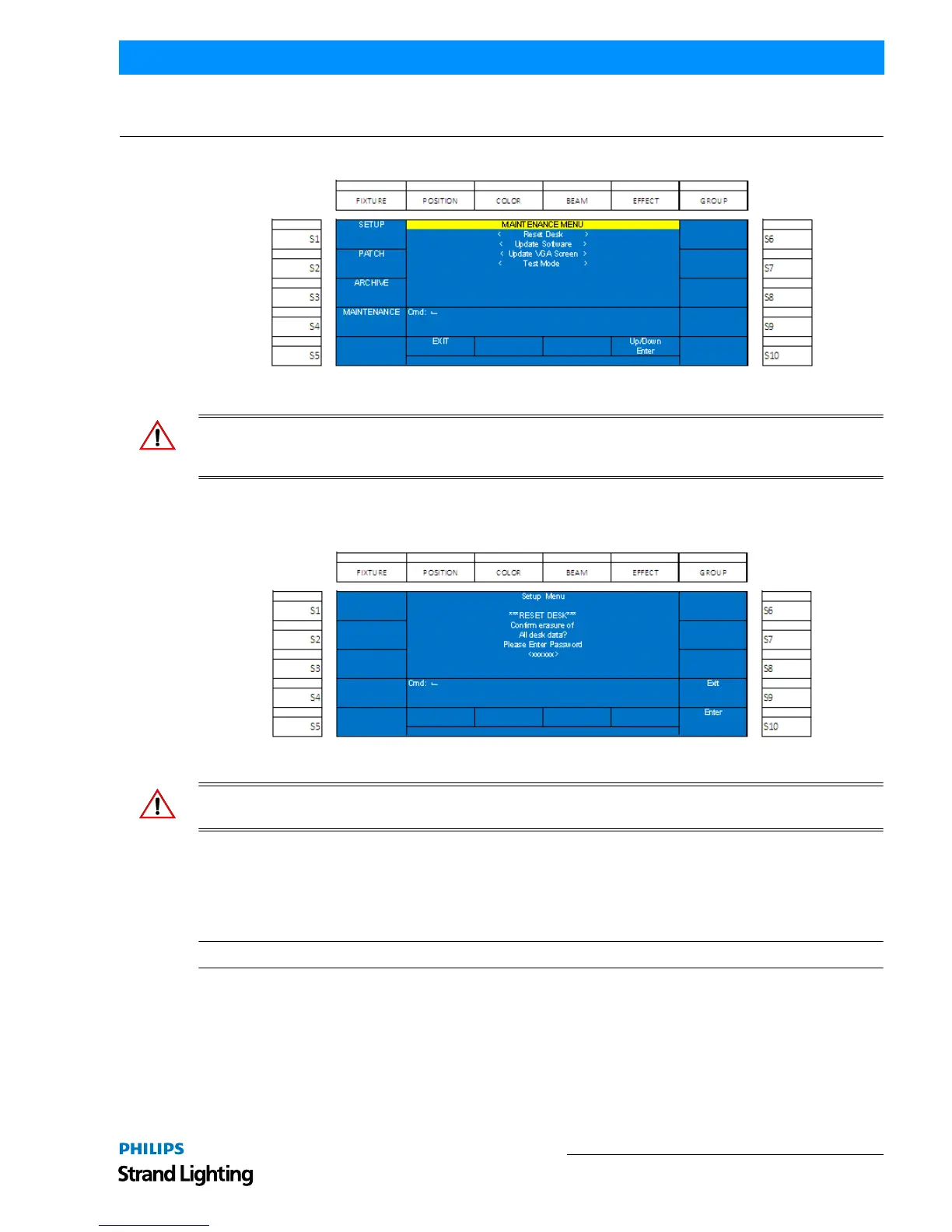
The Maintenance section provides tools for resetting, testing and upgrading the 250ML Control Console.
Figure 85: Maintenance Menu Screen
WARNING! The items described in this section are password protected for the safety of the show data. These
actions, once executed, are not recoverable, nor reversible. Should you have questions regarding executing any of the
maintenance items in this section, please consult your Philips Selecon dealer or technical support.
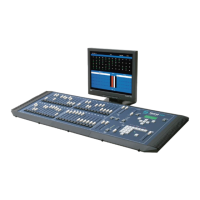
1. Reset Desk
This shall remove all show data and default the console back to its original settings.
Figure 86: Maintenance Screen - Reset Desk Option
WARNING! This action is password protected for the safety of the show data. This action is not recoverable, nor
reversible. Password: 168168.
2. Update Software
This shall allow the user to update the operational software of the 250ML Control Console. Please download the
latest version of the 250ML software from www.strandlighting.com. Insert the USB key with the software into the
USB port on the top of the console.
Note: Do not use the port on the back plate of the desk as this is reserved for a USB light.


 To Next Page