Patch 20
250ML Lighting Control Consoles
Operation Guide
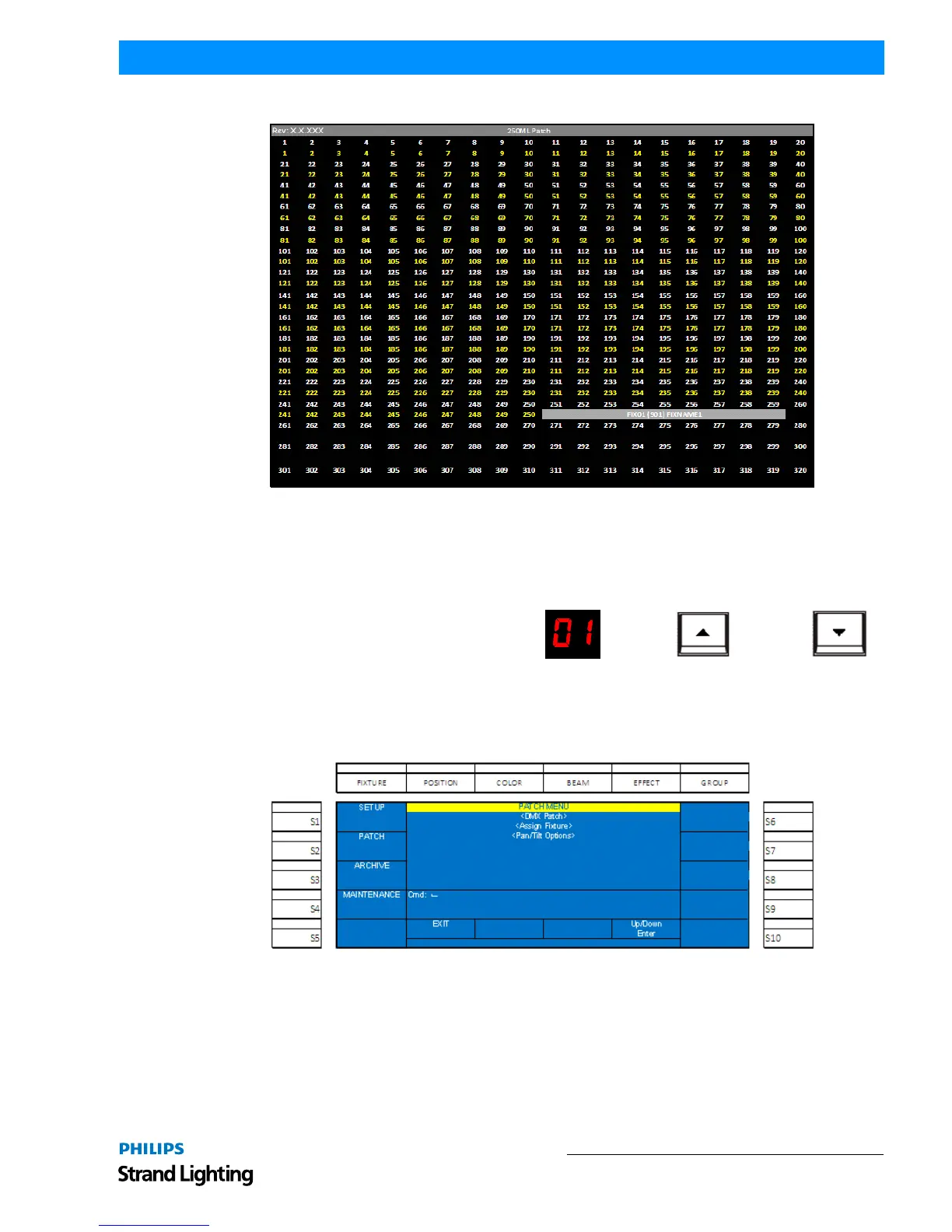
When patched, you'll see the new patch information on the VGA monitor as shown in Figure 22.
Figure 22: VGA Monitor Patch Screen
The grey bar shows the range of DMX channels that are being used for fixture 1. In the example above, it is nine
addresses. Repeat the above operations to assign additional fixtures.
Fixture Pages
As illustrated in Figure 23, use the Arrow Up and
Arrow Down next to the LCD screen to identify the
fixture page to which the units are being patched. Page
1 shall be fixtures 1 thru 10 accessed by (S1) - (S10).
Page 2 shall be fixtures 11 thru 20 and page 3 will be
fixtures 21 thru 30.
Pan/Tilt Options
There are many pan/tilt options to allow the customization of the operation of any patched moving light.
Figure 24: Patch Menu Options Screen
LCD Screen Arrow Up Arrow Down
Figure 23: Fixture Pages - LCD and Arrow Buttons


 To Next Page