Glossary of Terms 8
250ML Lighting Control Consoles
Operation Guide
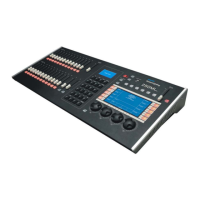
• A and B Master - master inhibitive sliders for A and B playbacks. A is at 100% at the top end of its travel
while the B is at 100% at the bottom end of its travel. This allows the execution of dipless crossfades by moving
both sliders in the same direction.
•
GO - advances the next available cue.
•
LOAD - allows the preparation for the next cue advanced by the [GO] button.
•
Programming LCD Display - this small LCD display will display pertinent information based on the active
item being programmed or played back. This screen also shows the function of the four softkeys labeled (F1) -
(F4).
•
Programming Buttons - these allow for traditional Command Line operation for setting levels and storing
items like Cues and Subs.
•
Record - command used to store information.
•
Cue - cues are items to be played back in time and in sequential order.
•
ON - level of 100%. Example: [1] [ON]
•
Thru - allows a collection of a range of channels. Example: [1] [THRU] [5] [ON].
•
0 thru 9 - numerical entry key for Command Line operation.
•
Plus "+" - allows the addition of channels to a Command Line string. Example: [1] [+] [2] [ON]. Also if pressed
without a pre-existing channel list, it will Page Up the channel display. If the Fixture button is selected, it will Page
Up the Fixture display.
•
Minus "-" - allows the subtraction of channels to a Command Line string. Example: [1] [THRU] [5] [-] [3] [ON].
This will place 1, 2, 4, and 5 at Full. Also if pressed without a pre-existing channel list, it will Page Down the chan-
nel display. If the Fixture button is selected, it will Page Down the Fixture display.
•
AT "@" - command that tells the desk that the next numerical entry is a level of brightness. Example: [1] [@] [5]
[0] [ENTER].
•
CLR - clears the Command Line plus releases channels. CLR will remove the last command entered into the
Command Line. In the event that there is nothing entered into the Command Line, [CLR] [CLR] will release all
Selected Channels (in the Red Box) a third [CLR] shall release all Adjusted Channels (Red Text).
•
Decimal "." - allows the entry of DMX values rather than percentage values. Example: [1] [@] [.] [2] [5] [5]
[ENTER].
•
ENTER - allows the completion of any command entered into the Command Line. Example: [1] [@] [5] [0]
[ENTER], [RECORD] [CUE] [1] [ENTER].
•
Arrow Up and Arrow Down (adjacent to the small LCD screen) - Allows the ability to change pages.
•
Untag - This button has multiple functions. It can untag (deselect) fixtures, attribute families or individual
attributes. See Tagging and Untagging for details. Selecting SHIFT + UNTAG allows the user entry in the Setup
pages for system configuration settings.
•
Home - sets the channel or fixture back to its default position.
•
Fixture - fixture is the term for attributed luminaires (LEDs and Moving Lights). This button allows access to the
patched attributed luminaires.
•
Position - allows access to programming for position attributes on an attributed luminaire.
•
Color - allows access to programming for color attributes on an attributed luminaire.
•
Beam - allows access to programming for beam parameters on an attributed luminaire.
•
Effect - allows access to programming for effect parameters on an attributed luminaire.
•
Group - Allows access to programming a collection of channels or fixtures.
•
Grand Master - an inhibitive master for all outputting intensity levels.
•
Blackout Button - single button access that will set all outputting intensity levels to zero.


 To Next Page