9
English
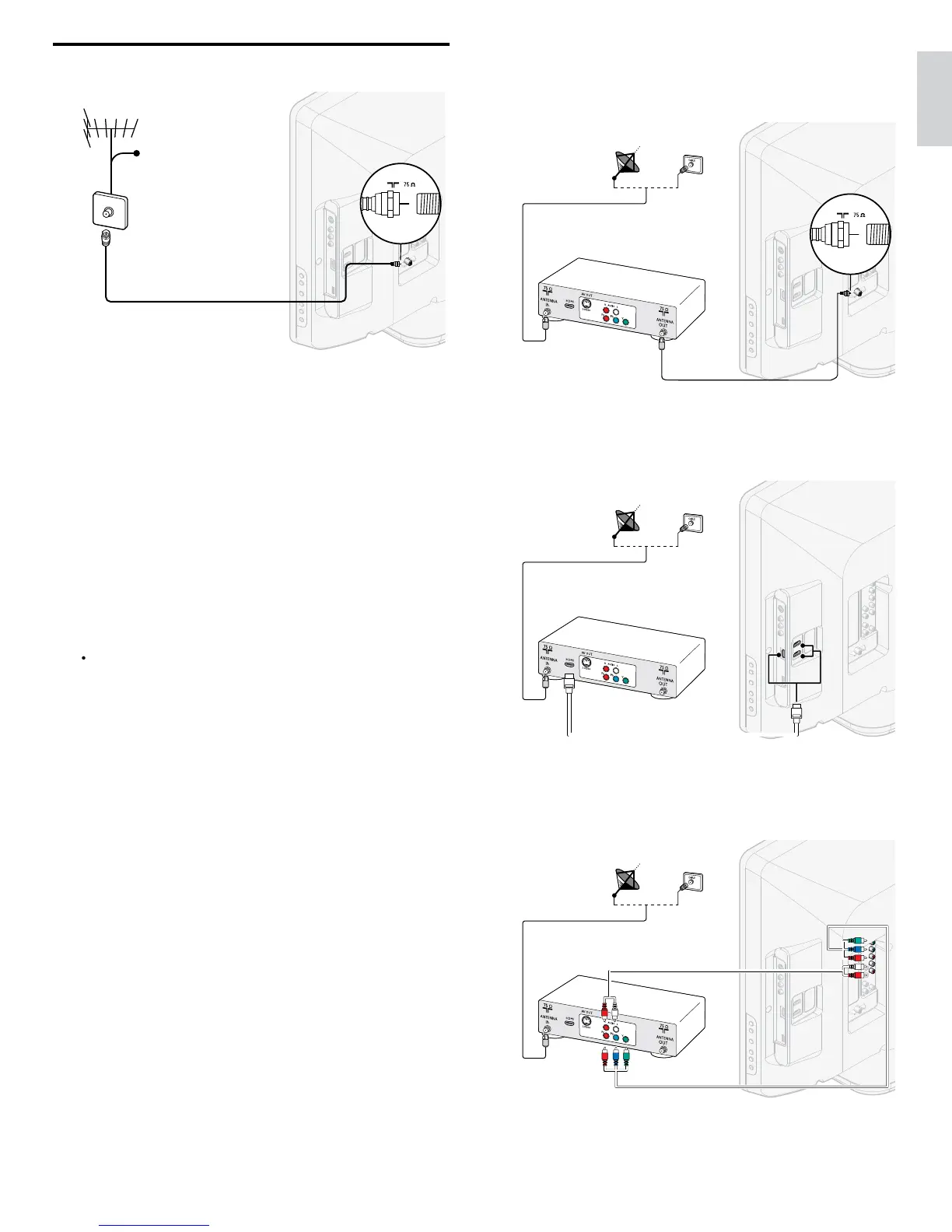
If you connect a set-top box through RF IN / OUT
If the TV is connected to a cable box or satellite set-top box via a
coaxial connection
set the TV to channel 3 or 4
or to the channel
specifi ed by the service provide
.
OUT
IN
IN
IN
If you connect a set-top box through HDMI
If the TV is connected to a cable box or satellite set-top box via HDMI
ma
e sure you se
ect t
e correct
source
y us
ng SOURC
on
his unit
s remote control
IN
IN
HDMI
HDMI
OUT
IN
If you connect a set-top box through component video inpu
If the TV is connected to a cable box or satellite set-top box via
component v
eo
nput, ma
e sure you se
ect t
e correct component
v
eo source
y us
ng SOURC
on this unit
s remote control
IN
OUT
OUT
YPbPr
IN
OUT
IN
Connecting the antenna or cable
IN
If you connect to an antenn
n
DTV
ro
rams that are broadcast in
our area can be received fo
free throu
h an antenna connection
ontact your local content provider or your local electronics retailer i
ou are unsure a
out w
at
programs are ava
a
e
n your area
Broadcasters are transitioning from analog to digital TV. This means that
a g
ven
roa
caster can
ave c
anne
s ava
a
e e
t
er
n ana
og or
n
g
ta
, or
ot
ana
og an
g
ta
at t
e same t
me
he TV produces stereo sound only if a stereo signal is broadcast
If you connect to a cable
When your TV is connected to the cable socket, you might receive free
i
ital and hi
h defi nition
ro
rams
de
endin
on
our cable
rovider
he channel number for di
ital and hi
h defi nition channels includes a
ot
”. For exam
le, 11.1, 46.30, 108.201. Contact
our cable
rovide
for more information
If you connect to a DBS
Direct Broadcast Satellite
)
here are two main DBS s
stems : DirecTV and DishNetwork. These
s
stems re
u
re a se
arate,
ro
r
etar
set-to
ox to
eco
e s
na
s
and send them to the TV. The set-to
box contains a di
ital TV tuner fo
receivin
off-air di
ital broadcasts
ontact your local DBS provider for more information about the
connect
ons an
t
e
c
anne
s
If you connect to a set-top box
cable box or satellite set-top box can be connected to the TV
hrough the following connections
NT
/V (Composite Video and Audio)
-Video
PbPr
Com
onent Video In
ut
or information about how to connect a set-top box, see the Quick
tart Guide provided











 To Next Page