25
English
Channel list
e c
anne
s se
ecte
ere can
e s
ppe
w
en se
ect
ng t
e c
anne
s
us
ng
H + / −
ose c
anne
s can st
e se
ecte
w
t
e
um
er
utton
ress
on t
e remote contro
an
se
ect
Setu
>
hannel Lis
Pi
t
r
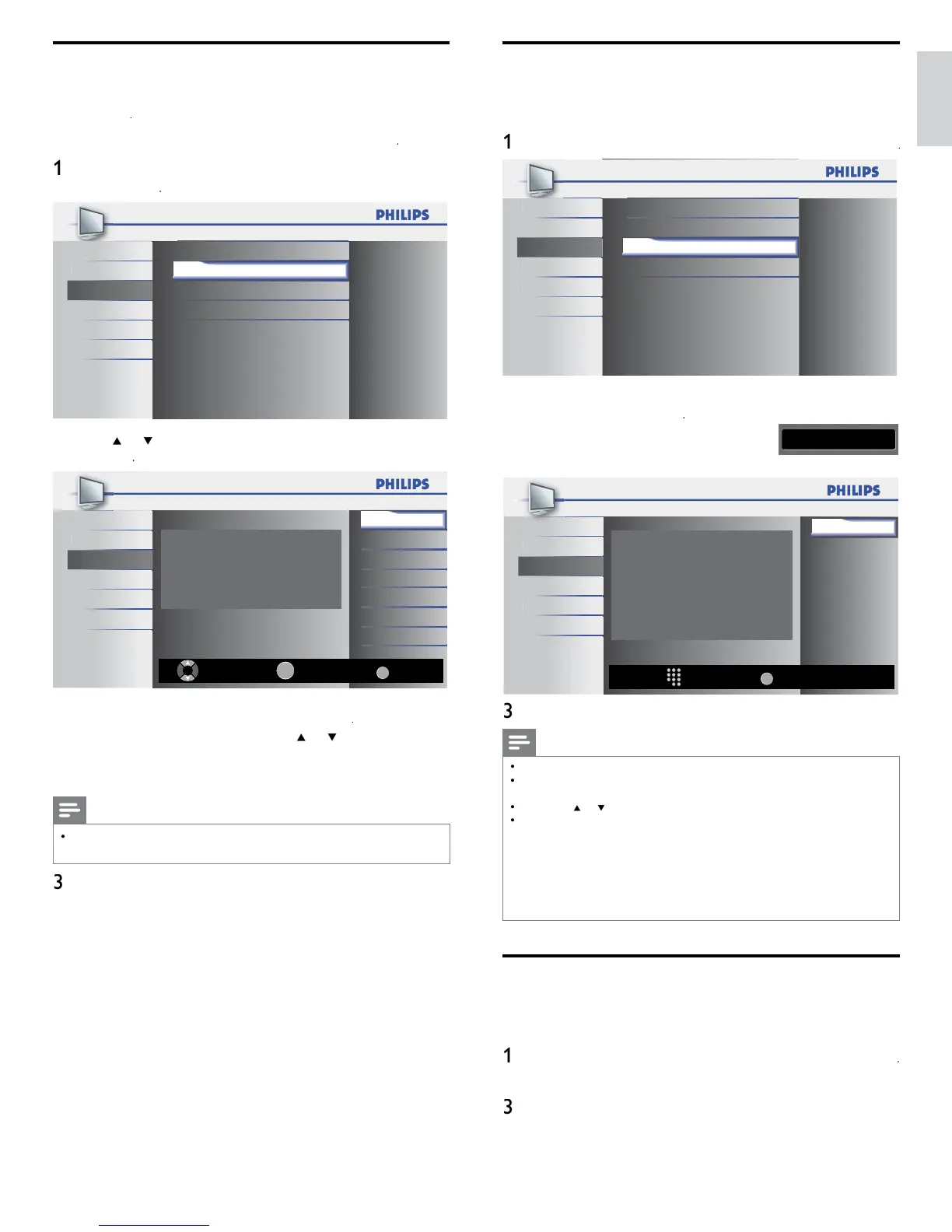
Autoprogram
Channel List
Setup
Add Channels
F
t
r
Antenna
angua
USB
2
ress
o
to se
ect t
e c
anne
you want to remove, t
en
press
Ch Select Watch/Skip
Back
BACK
OK
40.2
40.3
DTV
DTV
DTV 40.1
ctur
Highlight channels for Ch Up/Down key
selection.
oun
Setup
es
angua
USB
he channel dis
la
for the removed channel darkens. You will not
e a
e to se
ect t
e c
anne
a
a
n us
n
H+ / −
o react
vate a remove
c
anne
, press
o
an
press
.
e
reg
stere
c
anne
s are
g
g
te
en you remove a ma
or c
anne
,
ts m
nor c
anne
s are
remove
as we
Note
e c
anne
w
t
t
e
indicated on the display is ATSC. Otherwise the channel
s NTSC
ress
to ex
t
Add channels
his function lets you add the channels that were not added by the
autoprogram
ue to t
e recept
e con
t
on at t
e
n
t
a
setup
ress
on t
e remote contro
an
Setu
>
dd Channel
t
r
Autoprogram
oun
Channel List
Setup
Add Channels
eature
Antenna
anguag
USB
2 Press a number (1 to 135) to enter the number of the channel you
ant to a
, t
en press
11
Ch Change
Back
BACK
For analog channels,
select a channel to be
added using number keys.
For digital channels,
you must perform
Autoprogram function.
Add channels
oun
Setup
eature
anguage
USB
ress
to ex
t
Note
If setup completes successfully
dded to the channel lis
s
sp
aye
If external in
ut is used, it is not
ossible to re
ister the channel and
navai
a
e
w
e
sp
aye
on t
e
screen
y press
ng
o
you can se
ect t
e memor
ze
c
anne
s on
y
n most cases,
ta
c
anne
s are not
roa
cast on t
e
c
anne
on w
c
t
e
a
ear on
our
.
o a
ta
c
anne
s
ou nee
to
now t
e
c
anne
on w
c
the digital channel is being broadcast. E.g. If there is a digital channel 9.1 which is being
broadcast on RF channel 25,
ou need to enter 25 while
erformin
a weak channel
nstallation. To fi nd out the RF channel on which a
articular di
ital channel is bein
roa
cast,
ease contact
our
oca
serv
ce
rov
e
.
nsta
n
ta
c
anne
s us
n
Add channel
mi
ht not work for direct cable
connections and if the di
ital si
nal is too weak for the TV to
rocess
Optimizing the signal quality from your antenna
You can optimize your signal quality by tuning in ATSC channels with
wea
s
gna
s, an
a
ust
ng t
e antenna
ress
on t
e remote contro
an
se
ect
Setu
>
ntenn
2
ress
to confi rm your choice
Press a number (1 to 135) or press
H
o
H − to se
ect t
e
channel for which you want to check the digital signal strength
ress
to ex
t











 To Next Page