27
English
9 Connect devices
This section describes how to connect various devices with different
connectors and supplements examples provided in the Quick Start
Guide.
Connection overview
f
g
i
j
h
*
a
b
c
e
f
g
h
i
j
k
d
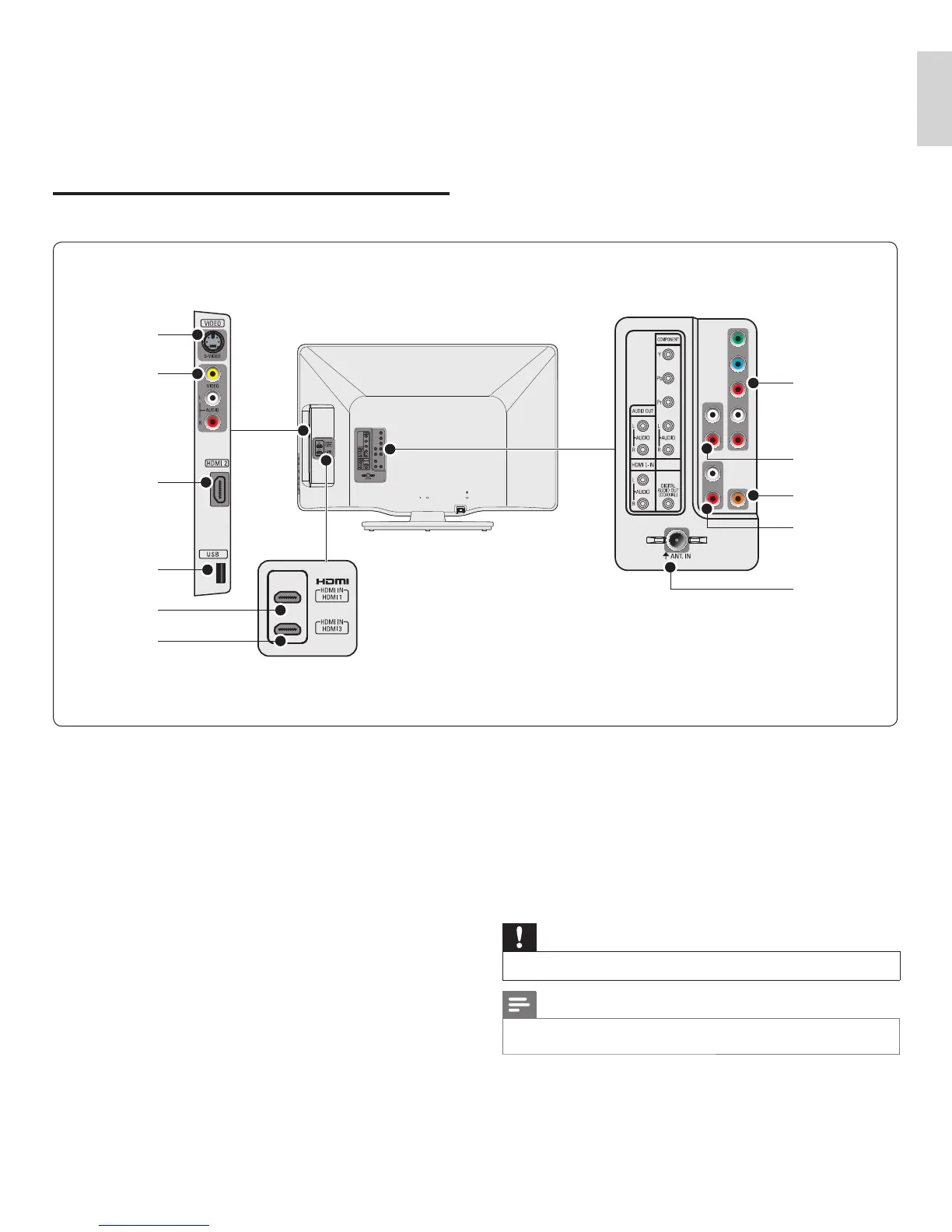
a S-Video input jack
S-Video input connector to be used with Audio L/R connectors for
camcorder, game console, etc. When you use the S-Video for video
signals, do not use Composite video for video signals.
b Composite video and audio input jack
Video input for analog devices such as DVD, camcorder, game
console, etc. To be used with audio input.
c HDMI 2 input jack
Second HDMI in connector.
Digital audio and video input from high defi nition digital devices
such as Blu-ray players.
d USB terminal
Data input from USB storage devices only. Do not connect any
device to this terminal such as; digital camera, keyboard, mouse, etc.
e HDMI 1 input jack
First HDMI in connector.
f HDMI 3 input jack
Third HDMI in connector.
g Component video and audio input jack
Video input from analog devices such as DVD, receiver, game
console, etc. This connector is used with audio input.
h Analog audio output jack
Audio cable connection for an external device.
i Digital audio output jack
Digital audio output to home theaters and other digital audio
systems.
j Audio input jack for HDMI 1 and PC
k Antenna input jack
Signal input from an antenna, cable or satellite.
Caution
•
Disconnect the AC power cord before connecting devices.
Note
•
Different types of connectors may be used to connect a device to your TV, depending
on availability and your needs.
EN











 To Next Page