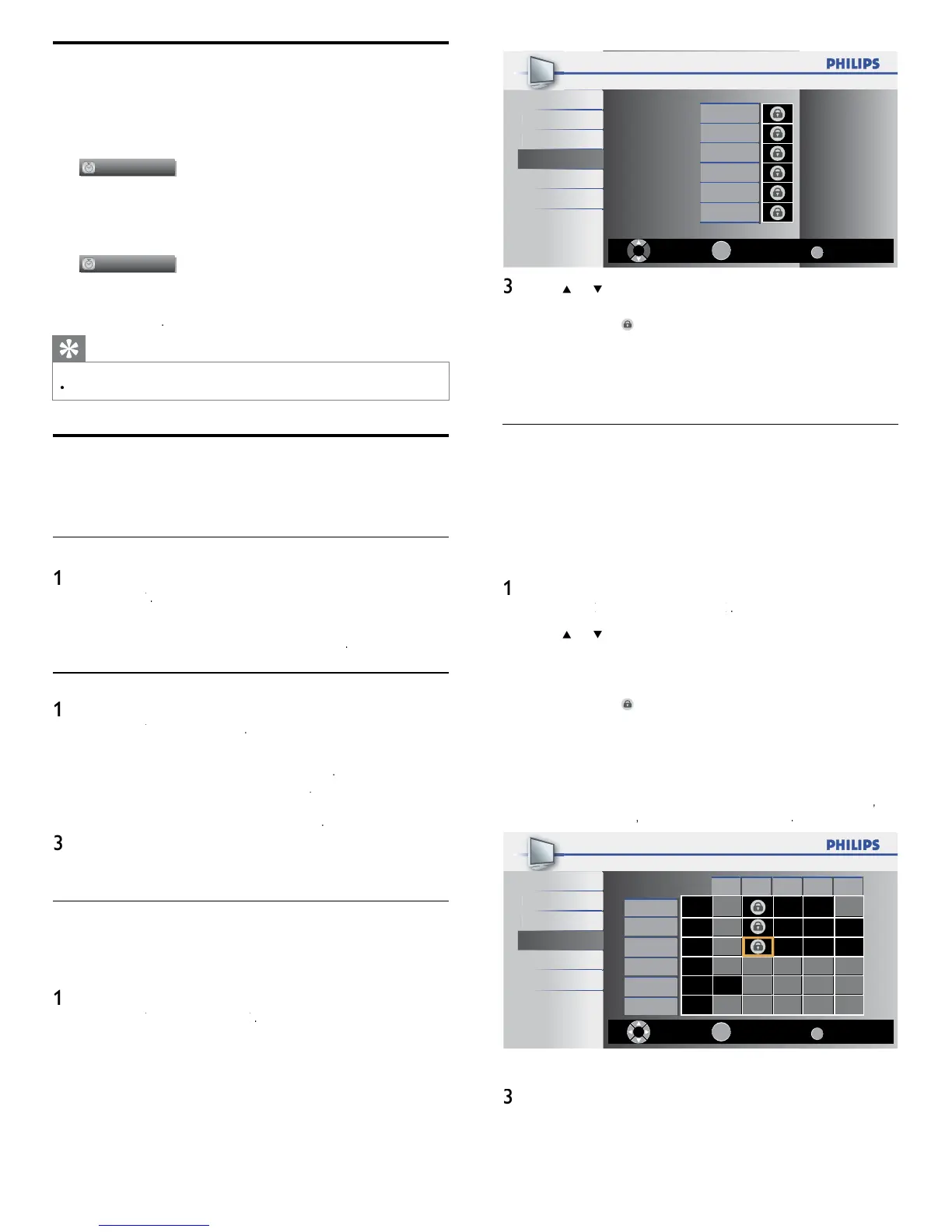
18
Back
BACK
View/BlockSelect
40.1 DTV
OK
Video
Component
HDMI 1
HDMI 2
HDMI 3
t
r
ou
Setu
Features
anguag
USB
ress
o
an
t
en pre
s
repeate
y to sw
tc
etween
oc
e
an
not
oc
e
box with
n
cates t
at t
e c
anne
or
nput source
s
oc
e
n empty box indicates that the channel or input source is
ot
oc
e
ress
to ex
t
Using the TV ratings lock
our
s equ
ppe
w
t
a
-c
p t
at a
ows you to contro
access to
n
v
ua
programs
ase
on t
e
r age rat
ng an
content rat
ng.
e
program content a
v
sory
ata are sent
y t
e
roa
caster or
y t
e
program prov
er.
If
ou receive channels throu
h a set-to
box or cable box connected
,
ou cannot use t
e
rat
n
s
oc
.
our set-to
ox or ca
e
box must be connected throu
h RF or AV connectors
ress
on t
e remote contro
an
se
ect
eature
>
hild Loc
>
2
ress
o
o
o
an
t
en press
repeate
y to sw
tc
etween
oc
e
an
not
oc
e
ac
rat
ng has a box-graphic in front of it to indicate whethe
programs carry
ng t
at rat
ng are
oc
e
box with
n
cates t
at a
tems
n t
e content rat
n
s
st
are
oc
e
n empty box indicates that no items in the content ratings
st are
oc
e
n em
t
box indicates that some content ratin
s are
eselected. For exam
le, for ratin
TV-14,
ou can deselect
ne or more of the following content ratings
(Dialog)
(Language)
S
(Sex)
o
(Violence)
Back
BACK
View/BlockSelect
OK
FV V S L D
TV-MA
TV-14
TV-PG
TV-G
TV-Y7
TV-Y
ctur
ou
etup
Features
anguag
USB
en
ou
oc
a rat
n
, a
rat
n
s
n t
e
oun
er a
e
ate
or
es are automat
ca
oc
e
ress
to ex
t
Sleeptimer
ou can a
ways put your
n stan
y mo
e ear
er or reset t
e
s
eept
mer
ur
ng t
e count
own
ress SLEE
to set t
e s
eep t
me
.
Sleep Off
leep timer display appears on the TV screen
ress SLEE
repeatedly to change the amount of time (in increments of
0 minutes up to 120 minutes)
Sleep 120min
Each press o
SLEEP will increase the time by 30 minutes
fter setup, the sleep timer display can be called up for checking by
press
ng SLEE
Tip
To Cancel the Sleep Timer
ress SLEE
repeatedly until “Sleep Off ” is displayed on the TV screen
Child and rating locks
ou can prevent yo
r children from watching certain programs o
certa
n c
anne
s
oc
ng t
e
contro
s an
y us
ng rat
ngs
Setting your PIN
ress
on t
e remote contro
an
se
ect
eature
>
hild Loc
Enter a 4-di
it
on
e
um
er
utton
of the remote control
If
ou have not set u
ou
en
e
00
Changing your PIN
ress
on t
e remote contro
an
se
ect
eature
>
hild Loc
>
hange PIN
2 Enter a 4-digit
on
e
um
er
utton
of the remote control
If
ou have a
, en
er
our curren
If you do not have a
en
e
00
If you have forgotten you
, unplug the AC power cord fo
0 seconds to restore the
o
00
nter you
aga
n
o confi rm
ress
oex
t
Locking a channel or input source
his section describes how to lock in
ut sources or s
ecifi ed channels
e c
anne
s can
e se
ecte
ut t
e screen
s
an
e
out an
t
e
au
o
s mute
ress
on t
e remote contro
an
se
ect
eature
>
hild Loc
>
hannel Loc
2
nter you
(see ‘Setting your PIN’ on page 18













 To Next Page