Alignments
EN 101EJ2.0U LA 8.
8.4 Option Settings
8.4.1 Introduction
The microprocessor communicates with a large number of I
2
C
ICs in the set. To ensure good communication and to make
digital diagnosis possible, the microprocessor has to know
which ICs to address. The presence / absence of these specific
ICs (or functions) is made known via the option codes.
Notes:
• After changing the option(s), save them by pressing the OK
button on the RC before the cursor is moved to the left,
select STORE in the SAM root menu and press OK on the
RC.
• The new option setting is only active after the TV is
switched "off" and "on" again with the Mains switch (the
NVM is then read again).
8.4.2 Dealer Options
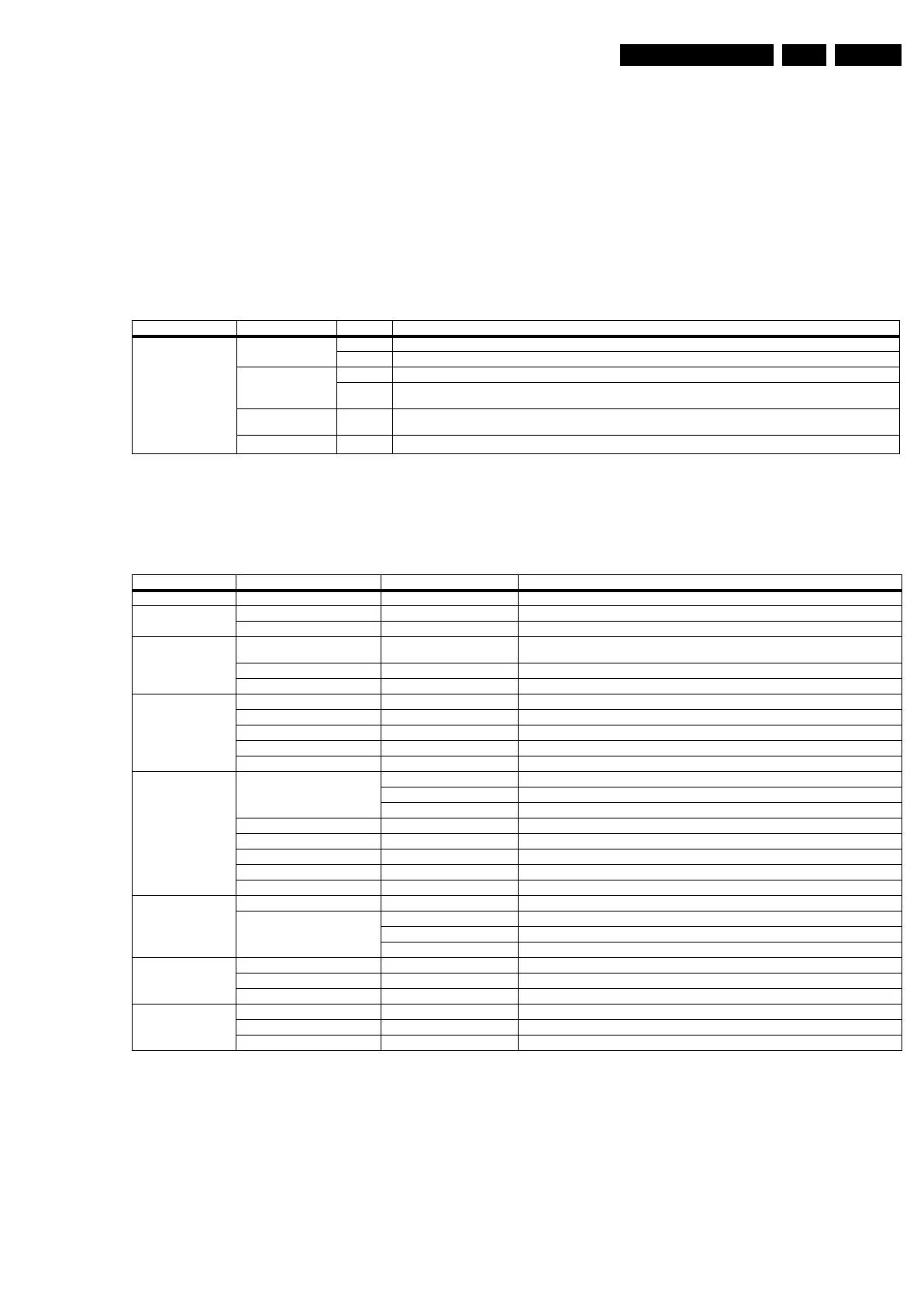
Table 8-3 Dealer options
8.4.3 (Service) Options
Select the sub menu's to set the initialization codes (options).
Table 8-4 Options
8.4.4 Opt. No. (Option numbers)
Select this sub menu to set all options at once (expressed in
two long strings of numbers).
An option number (or "option byte") represents a number of
different options. When you change these numbers directly,
you can set all options very quickly. All options are controlled
via eight option numbers.
When the NVM is replaced, all options will require resetting. To
be certain that the factory settings are reproduced exactly, you
must set both option number lines. You can find the correct
option numbers on a sticker inside the TV set.
Example: The options sticker gives the following option
numbers (depending on the model):
• 00016 00006 00033 14979
• 01035 00000 04768 00000
The first line (group 1) indicates hardware options 1 to 4, the
second line (group 2) indicates software options 5 to 8.
Menu item Subjects Options Description
Personal Options Picture Mute On Picture mute active in case no picture detected
Off Noise in case of no picture detected
Virgin Mode On TV starts up (once) with a language selection menu after the Mains switch is turned "on" for the first time (virgin mode)
Off TV does not start up (once) with a language selection menu after the Mains switch is turned "on" for the first time (virgin
mode)
2CS Korea (only for AP
region)
Off
Self learning TV
Off
Menu-item Subjects Options Description
PIP/DS Dual Screen One tuner dual screen DS with one tuner
Data EPG Off Feature not present
RRT Yes / No Parental control is enabled via the Regional Rating Table (RRT)
Display Screen “Value” Used screen size, type, and resolution (see table “Display code overview” in chapter “Service
Modes”for the values)
Scanning Backlight On / Off Feature present / not present
Dimming Backlight On / Off Feature present / not present
Video Repro Picture Processing No Spider Feature not present
Combfilter None / 2D / 3D Only selectable with Columbus in set: No/without RAM/with RAM
Ambient Light Off / Stereo Off / Two inverters stereo
MOP On / Off Feature present / not present (for sets with AmbiLight this is “on”)
POD Off no POD implemented
Source Selection HDMI 1 None No HDMI
With analogue audio DVI
Without analogue audio HDMI
HDMI 2 None No HDMI
USB version 1.1 USB 1.1 in side I/O panel
IEEE1394 Not present Connector not present
Ethernet Off Connector not present
SPDIF inputs None No connector present
Audio Repro Subw. Internal Present Yes / No Internal sub woofer present / not present
Acoustic System (Cabinet design,
used for setting dynamic audio
parameters).
None n.a.
Others n.a.
ME6 2K6 for this set
Miscellaneous Alternative Tuner Philips Tuner brand
Tuner Type TD1336S Tuner type
Hotel mode Off
Opt. no. Group 1 xxxxx xxxxx xxxxx xxxxx (see set sticker)
Group 2 xxxxx xxxxx xxxxx xxxxx (see set sticker)
Store



 To Next Page