10
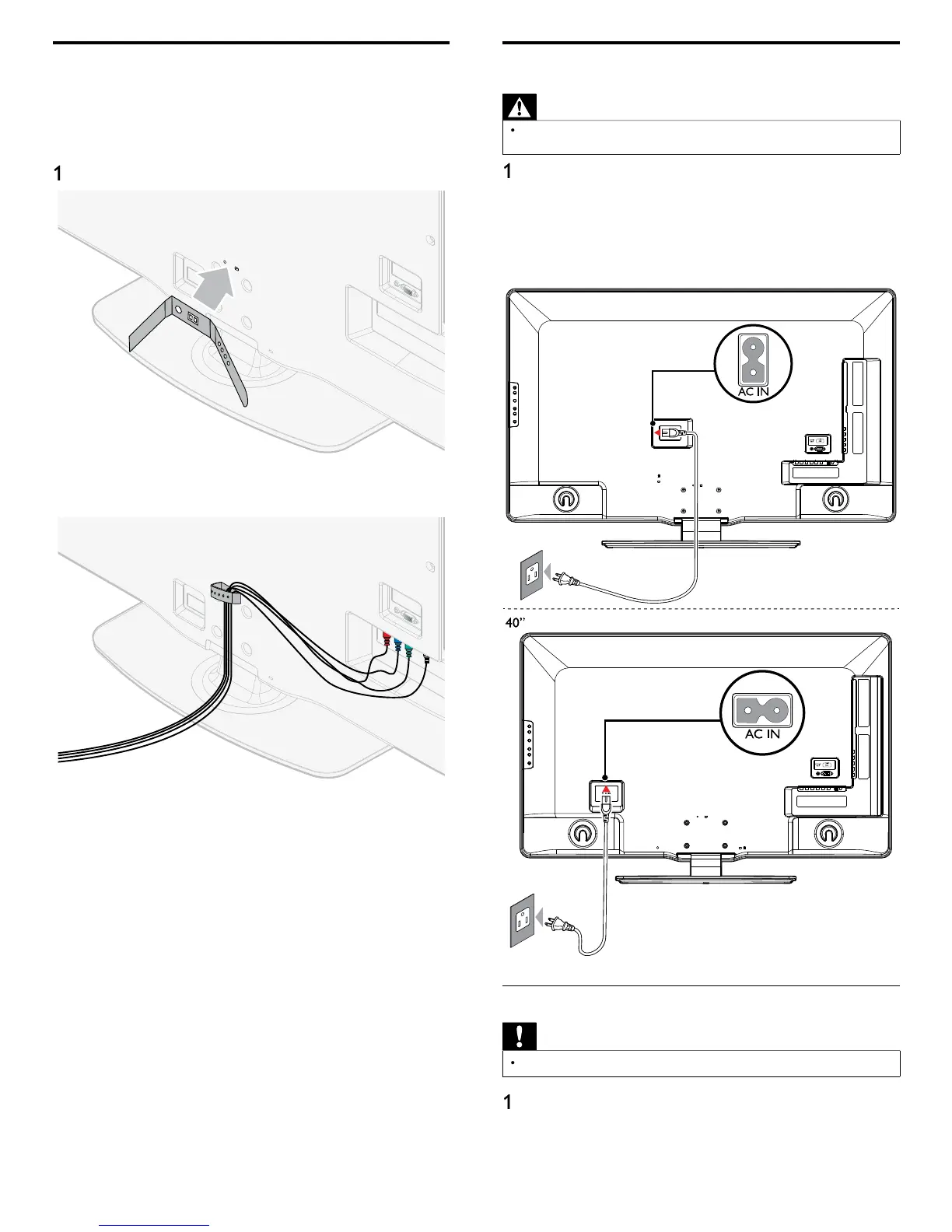
Connecting the AC power cord
Warning
Verify that your power voltage corresponds with the voltage printed at the back of
he TV. Do not insert the AC power cord if the voltage is different
Locate the power connector at the back of the TV. The location o
e power connector var
es accor
ng to
mo
e
2 Insert the AC power cord fully into the power connecto
.
3 Connect the AC
ower cord
lu
to the
ower outlet. Ensure that
e cor
s t
t
secure
at
ot
en
s
5” / 46
Disconnect the TV from the power outlet
Caution
Pull the AC
ower cord b
the
lu
; do not
ull on the AC
ower cord
Un
lu
the AC
ower cord from the
ower outlet
2 Unplug the AC power cord from the power connector at the back
of the TV
Managing cables
oute
our antenna ca
e an
a
ot
er ca
es t
rou
t
e ca
e
management tie at the back of the TV. The holder helps keep you
ca
es t
y an
eas
y managea
e
ttach the cable management tie as illustrated below
2
ass ca
es t
roug
t
e ca
e management t
e to avo
tang
es












 To Next Page