42
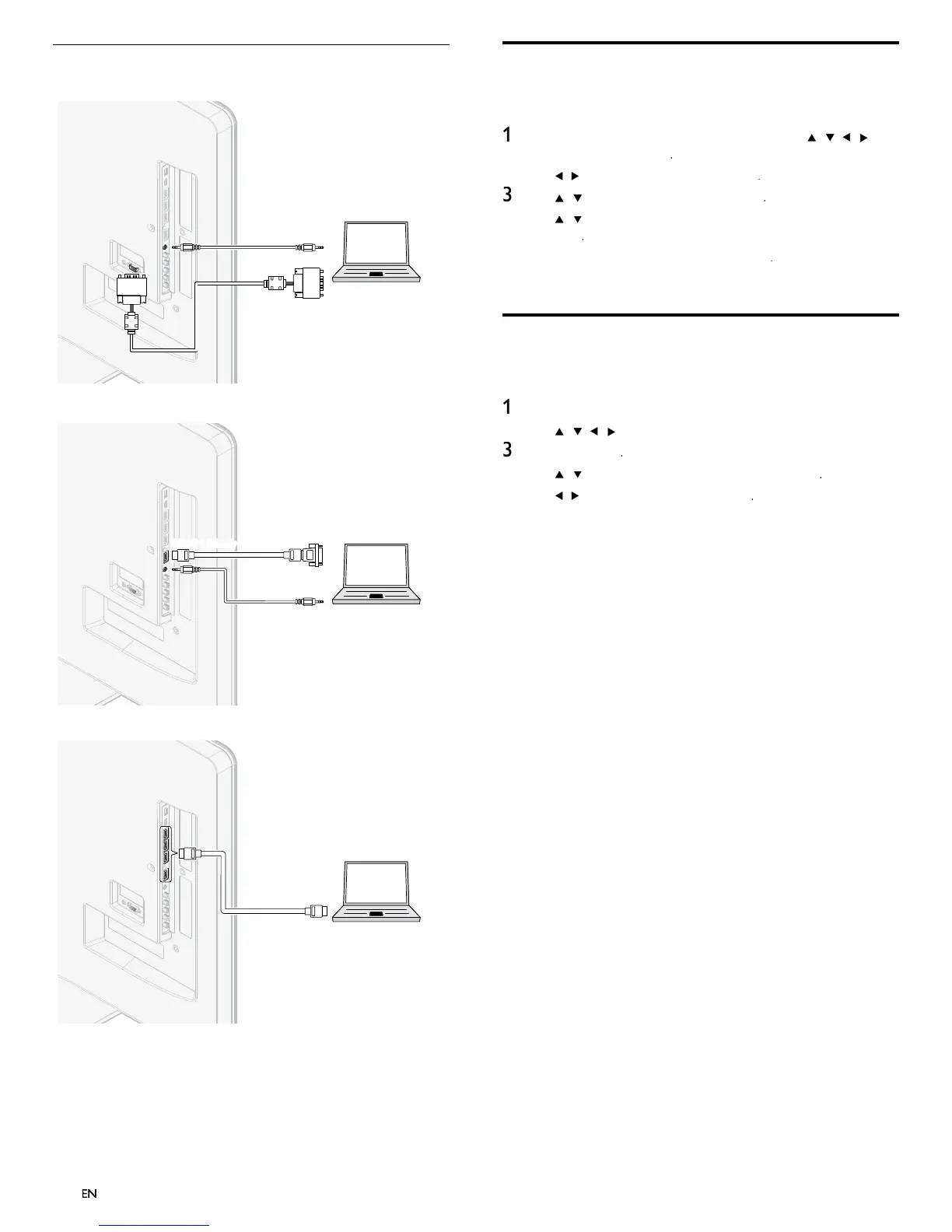
Connecting a PC
If
ou connect a PC with a VGA connector at the back
AUDIO
OUT
AUDIO
IN
AUDIO
IN
PC
OUT
IN
IN
VGA
VGA
If you connect a PC with a HDMI-DVI connecto
.
AUDIO
OUT
AUDIO
IN
AUDIO
IN
DVI OUT
PC
If
ou connect a PC with an HDMI connecto
.
PC
OUT
IN
IN
HDMI
HDMI
Add devices
fter connecting devices, assign the device attached to each connecto
.
his allows you to easily identify devices connected to your TV
ress
on t
e remote contro
an
t
en use
/
/
/
o
se
ect
dd new device
2
se
to se
ect
Star
, t
en
ress
se
/
to se
ect a
ev
ce an
ress
se
/
to se
ect t
e connector your
ev
ce
s connecte
to an
press
If there is video and audio output, press
epeat t
e proce
ure unt
a
ev
ces are correct
y ass
gne
to connectors
Remove devices
If a device is no longer connected to the TV, remove it from the home
menu
ress
on t
e remote contro
se
/
/
to se
ect a
ev
ce to remove
ress
PTIONS
se
/
to se
ect
emove
evice
, t
en
ress
se
to se
ect
, t
en
ress












 To Next Page