20
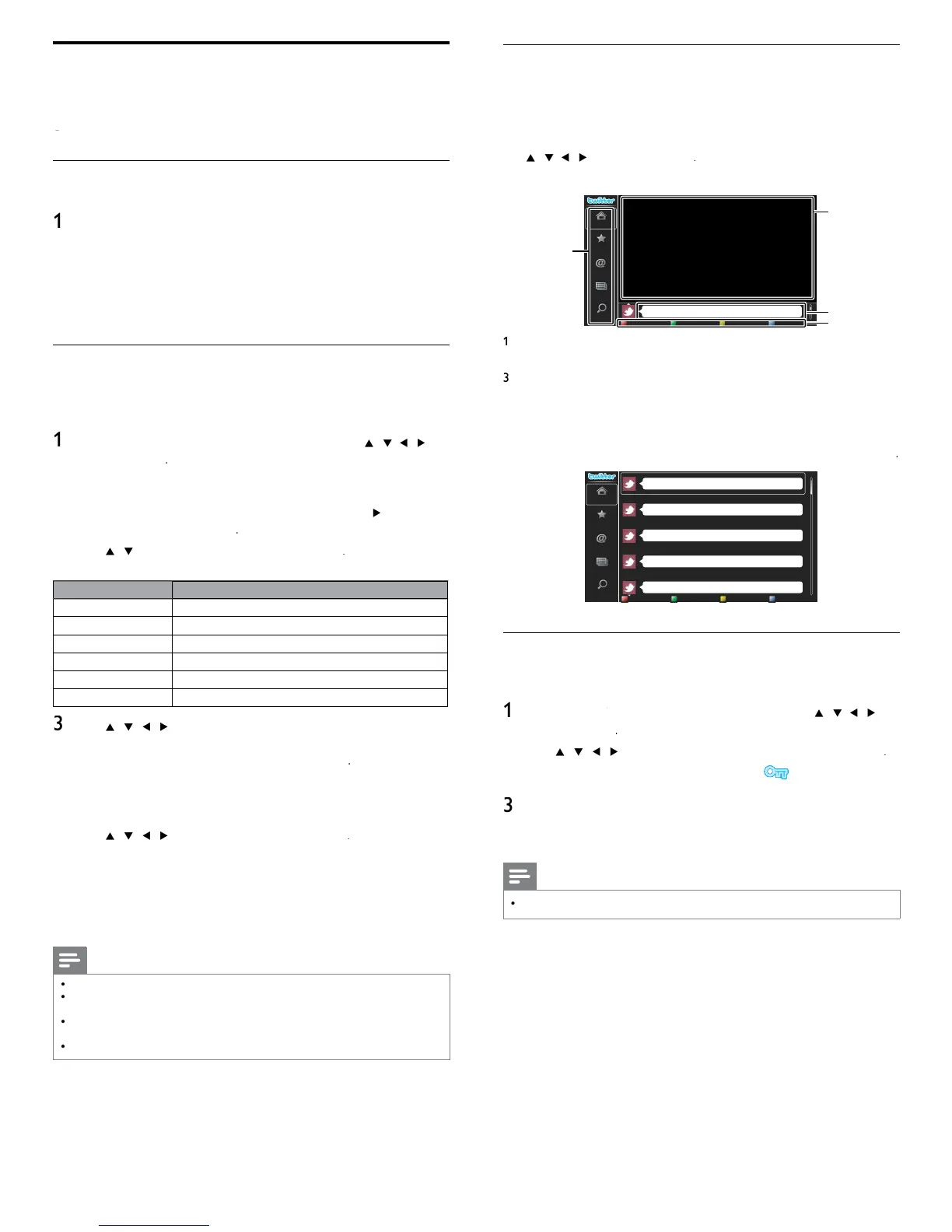
Guide to Twitter menu screen
witter Home Screen
witter Home Screen consolidates browsin
of tweets and some
functional menus for Twitte
.
o ca
u
t
e screen,
ress
on the remote control and then
se
/
/
o se
ect
witter
Sin
le View
Phily and Maggy
1
2
3
4
Home
Favorite
Mentions
List
Trends
i
ht as rain. That was a sense o
humor...
th
n 1 min
t
enu
List of functional menus
2
ew
ng c
anne
sp
ays current
y watc
ng c
anne
me
ne
s
a
s current
tweet
n
on
w
tte
.
O
eration
uide
Dis
la
s Color buttons
red /
reen /
ellow / blue
u
e
ull View
ingle view switches to Full view when you select timeline then press
Peter’s rock star
Propatanga
Tinner Loberto
Perseverance prevails.
Phily and Maggy
Home
Favorite
Mentions
List
Trends
i
ht as rain. That was a sense of humor...
th
n 1 min
t
I'll be there, textbook in hand!
th
n 1 min
t
reetin
s, I am lookin
or a small tin
stove in which to heat once a da
th
n 1 min
t
Would
ou like the strai
htforward reasons that people believe in it?
th
n 1 min
t
It
s not so rich a countr
as
our countr
.
th
n 1 min
t
Viewing tweets on the TV
fter lo
in
in to Twitter,
our TV will download the latest 20 tweets to
sp
ay
ress
on the remote control and then use
/
/
o
se
ect
witter
2
se
/
/
/
to se
ect t
e
es
re
user name, t
en press
If
ou have not stored the
assword
w
a
ear
es
e
e user name
When the unit is logged in successfully, Twitte
ome
menu w
appear at the left and the timeline will appear at the bottom of the
screen
Note
4 user names (accounts) can be stored in this unit
Using Twitter
ou can view your Twitter feeds and more using the Twitter application
n t
s un
t
or more
eta
s a
out
w
tter, p
ease v
s
t www
w
r
m
Before Logging in to Twitter
ollow the
rocedure below before lo
in
in to Twitte
.
Connect this unit to the internet
See ‘Connectin
the TV to the internet usin
an Ethernet cable
r ‘Connectin
the TV to the internet usin
a USB wireless LAN
ada
ter’ on
a
e 41.
2 Set up the necessary network connection settings
(See ‘Network’ on page 30.)
Logging in to Twitter
fter you set up the network connection, you must log in with you
w
tter account
Make sure the unit is not in Netfl ix
vTuner
VUDU or Browse USB mode
ress
on the remote control and then use
/
/
o
se
ect
witter
o
n screen w
a
ea
.
or the fi rst time only
etwor
service
isc
aime
screen
ill a
ear. After confi rmin
the content, use
Í
/
to se
ect
gree
, t
en press
se
/
to se
ect
sername
, t
en
ress
oftware ke
board will a
ea
.
eys on t
e
ey
oar
ction
haracter
elect each one of characters from the list
lear Delete the last character in the entr
field
All clear Delete all characters in the entr
field
/A/
witch case and symbols
ancel
ancel the input
Determine the input Username and/or Password.
se
/
/
/
to
n
ut
ou
sername
an
asswor
nto the entr
fi elds. Select
after
ou have fi lled in all the
necessar
items in the entr
fi eld, then
ress
asswor
can
e s
ppe
next t
me onwar
s once you
ave
se
ecte
emem
er me
w
en re
ster
n
t
e user name
oftware keyboard will disappea
.
se
/
/
/
to se
ect
tar
, t
en
ress
e un
t w
now esta
s
a connect
on w
t
t
e
w
tte
server and perform authentication
When the unit is lo
ed in successfull
, Twitte
ome
menu w
appear at the left and the timeline will appear at the bottom of the
screen
Note
ser name an
passwor
are case-sens
t
ve
ser name w
not accept your e-ma
account.
se on
y your user name reg
stere
on t
e
w
tter serve
.
If you select
Start
with no user name, the unit logs in as
Public
. In this case you can
isplay
Public timeline
and
Trends
only
or quest
ons regar
ng
w
tter, p
ease v
s
t www
w
r
m












 To Next Page