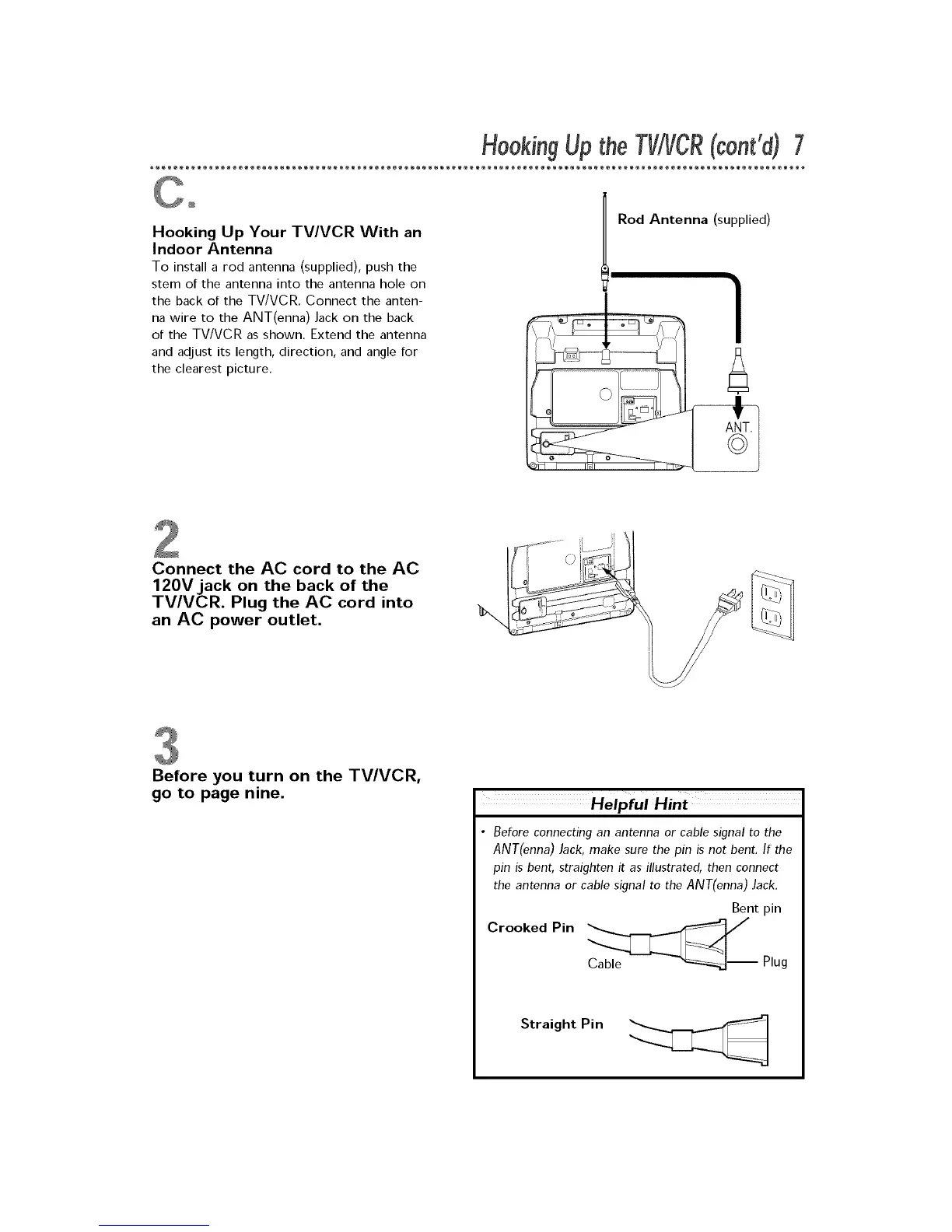
Hooking Up Your TV/VCR With an
Indoor Antenna
To install a rod antenna (supplied), push the
stem of the antenna into the antenna hole on
the back of the TV/VCR. Connect the anten-
na wire to the ANT(enna) Jack on the back
of the TV/VCR as shown. Extend the antenna
and adjust its length, direction, and angle for
the clearest picture.
Connect the AC cord to the AC
120V jack on the back of the
TV/VCR. Plug the AC cord into
an AC power outlet.
Before you turn on the TV/VCR,
go to page nine.
Helpful Hint
• Before connecting an antenna or cable signal to the
ANT(enna) Jack, make sure the pin is not bent. If the
pin is bent, straighten it as illustrated, then connect
the antenna or cable signal to the ANT(enna) Jack.
Bent pin
Crooked Pin _ _/
Plug
Straight Pin










 To Next Page