12 EN
Install remote control battery
Caution
Risk of explosion! Keep battery away from heat,
Note
not to be used for a long time.
Battery contain chemical substances. It should be
disposed of properly.
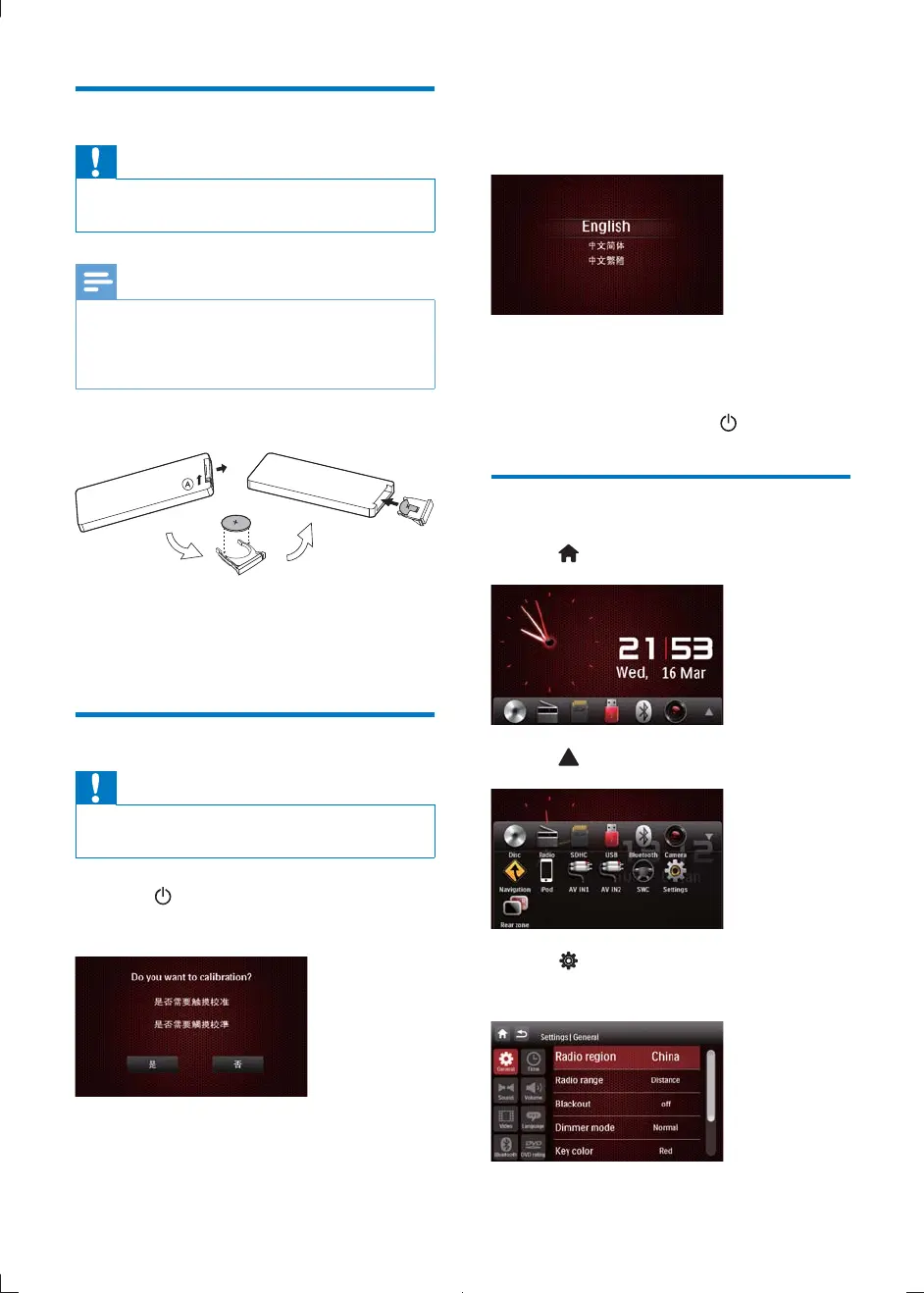
1 Open the battery compartment.
2 Insert one CR2025 battery with correct
polarity (+/-) as indicated.
3 Close the battery compartment.
Turn on
Caution
Risk of road accidents! Never watch video or adjust
settings while you drive.
1 Press to turn on the unit.
» Calibration requests displayed.
2 Tap YES and follow the on-screen display
(OSD) to complete calibration.
3 Tap anywhere on the screen to save.
» The available OSD languages are
displayed.
4 Tap a language.
» The OSD language is changed to the
selected language immediately.
To turn off the unit, press
.
Set date and time
1 Tap to display main menu.
2 Tap to display the full menu.
3 Tap .
» The setup menu is displayed.
CID2780_98_UM_V1.1.indb 12 2012/3/19 10:42:55



 To Next Page