9
Playback and Erasure
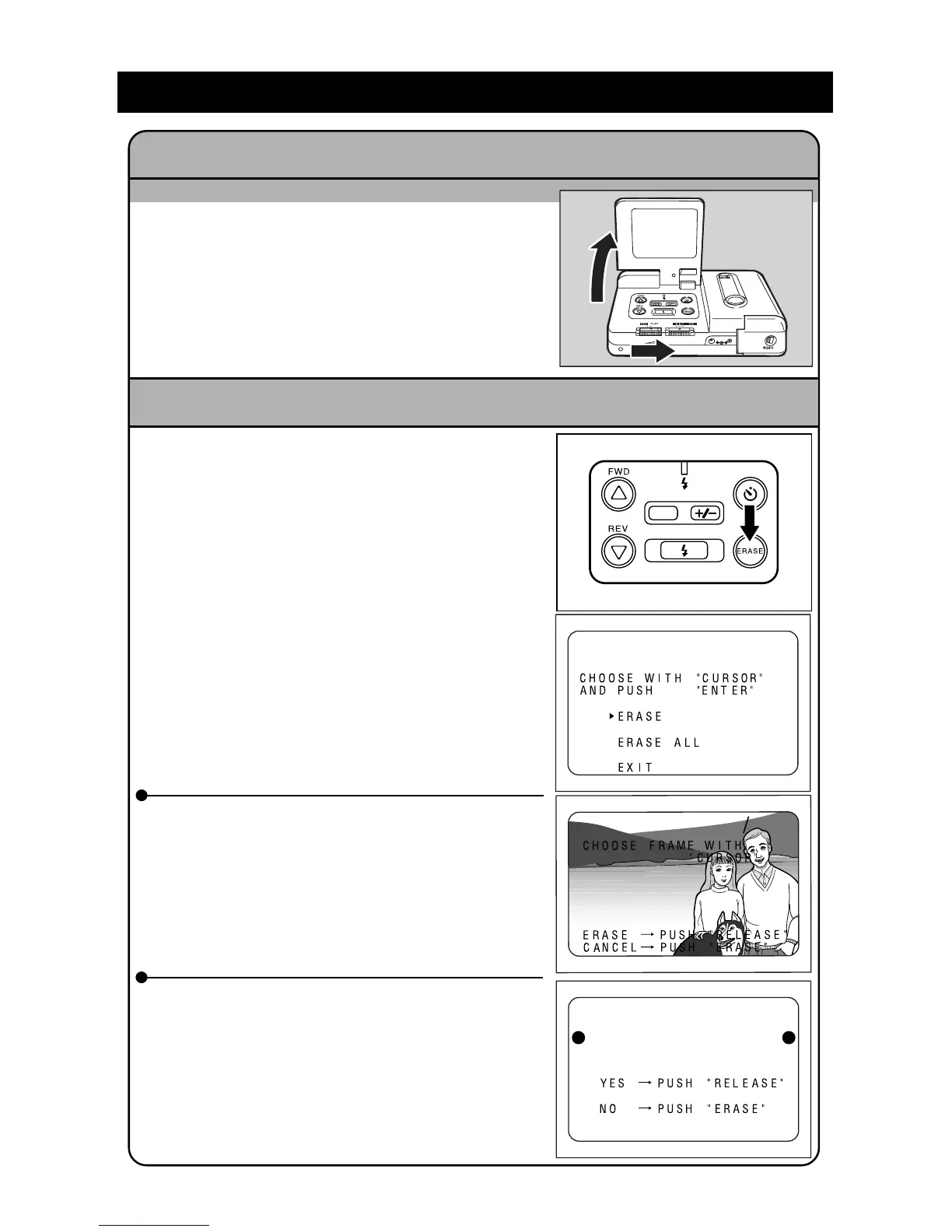
q Open the LCD monitor and set the REC(ord)/
PLAY switch to PLAY.
w Press the
UU
UU
U and
TT
TT
T buttons to move through
the files.
Viewing a File (File Playback) Page 50
q Open the LCD monitor and slide the
REC(ord)/PLAY switch to PLAY.
w Press the ERASE button.
Add a note:
The Release button is also referred to as the
ENTER button in the LCD monitor.
Erasing a File Pages 52 - 54
e To erase one file, press the
UU
UU
U and
TT
TT
T buttons
to select ERASE, then press the Release
button. Press the
UU
UU
U and
TT
TT
T buttons to select
the file to be erased. Press the Release but-
ton be consistent. Repeat as desired.
e To erase all the files, press the
UU
UU
U and
TT
TT
T but-
tons to select ERASE ALL, then Press the
RELEASE button to erase all files. Or, press
the Erase button if you do not want to erase
all files.
Erased files cannot be restored.
Check the contents of the file carefully be-
fore erasing the file.
DATE
ERASE
ERASE ALL?














 To Next Page