Mechanical Instructions
EN 15Q552.1A LA 4.
2010-Jun-25
back to
div. table
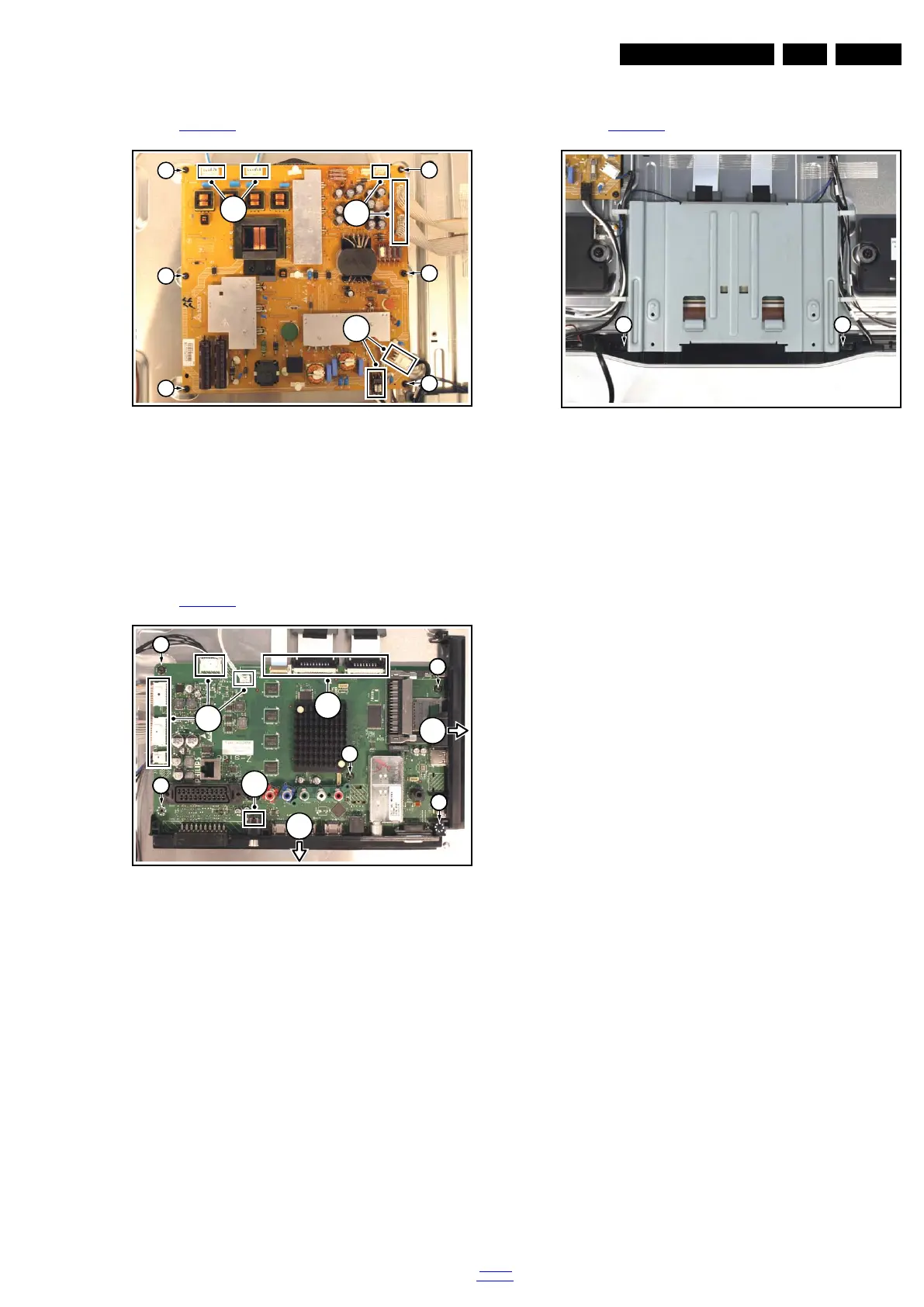
4.4.3 Main Power Supply
Refer to Figure 4-6
for details.
Figure 4-6 Main Power Supply
1. Unplug all connectors [1].
2. Remove the fixation screws [2].
3. Take the board out.
When defective, replace the whole unit.
4.4.4 Small Signal Board (SSB)
Refer to Figure 4-7
for details.
Figure 4-7 SSB
1. Unplug all connectors [1].
2. Slide the side cover sidewards [2].
3. Remove the fixation screws [3].
4. Lift the clip [4].
5. Remove the bottom cover downwards [5].
6. Take the board out.
4.4.5 IR & LED Board
Refer to Figure 4-8
for details.
Figure 4-8 IR & LED Board
1. Remove the stand.
2. Remove the IR & LED board cover [1].
Now the IR & LED board can be accessed.
When defective, replace the whole unit.
18771_108_100504.eps
100504
1
1
1
2
22
22
2
2
2
18771_109_100504.eps
100505
1
4
2
5
1
3
3
3
3
3
18771_110_100504.eps
100504
31 31












 To Next Page