Mechanical Instructions
EN 17Q552.1A LA 4.
2010-Jun-25
back to
div. table
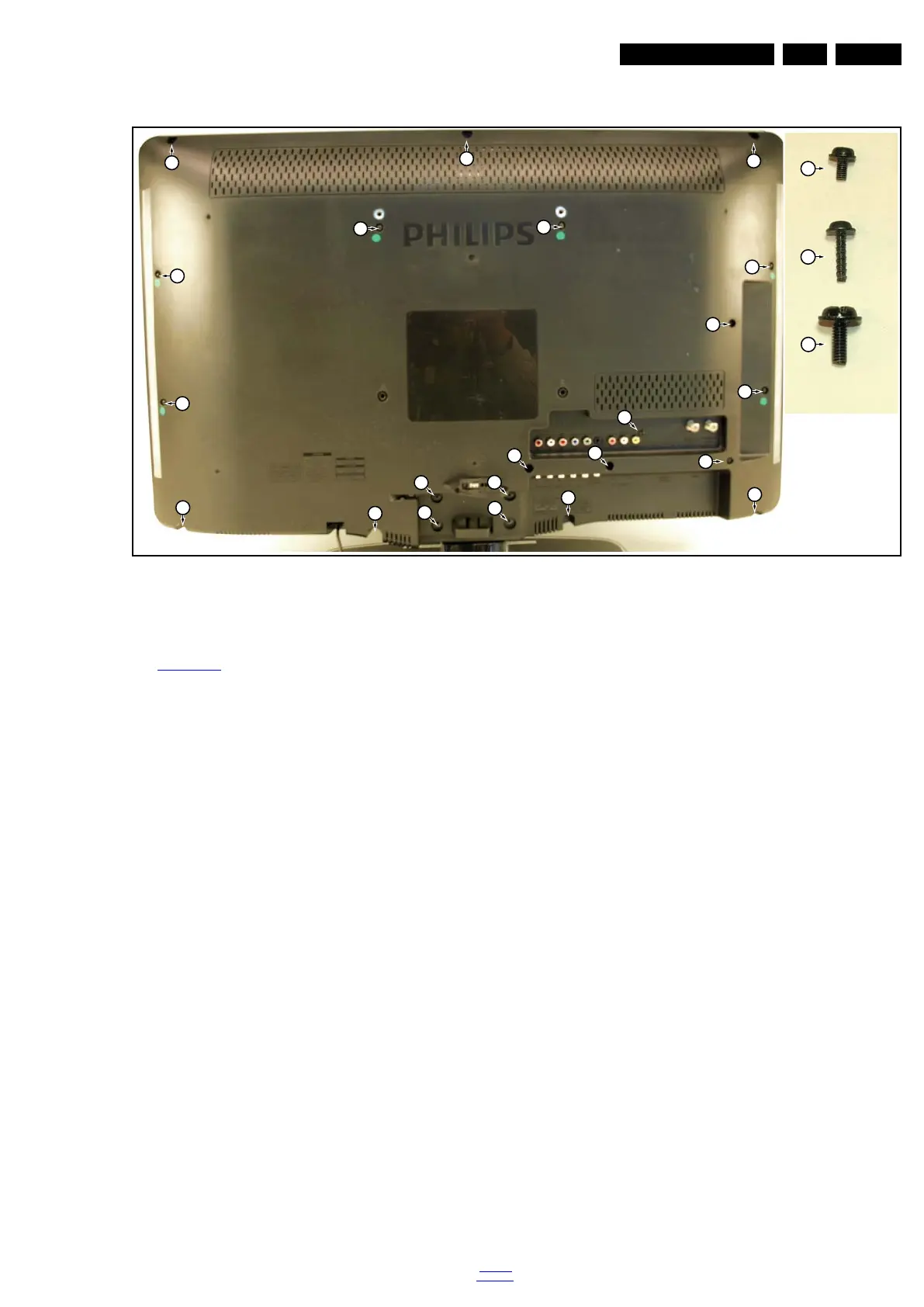
4.5.1 Rear Cover
Figure 4-11 Rear cover removal (32")
Warning: Disconnect the mains power cord before removing
the rear cover.
See Figure 4-11
.
1. Remove fixation screws [2] and [3] that secure the rear
cover. It is not necessary to remove the stand first [1].
2. Lift the rear cover from the TV. Make sure that wires and
flat foils are not damaged while lifting the rear cover from
the set.
4.5.2 Speakers
Tweeters (when applicable)
Each tweeter unit is mounted with one screw.
When defective, replace the whole unit.
Loudspeaker/subwoofer
The loudspeaker/subwoofer is located in the centre of the set,
and is fixed with two screws.
When defective, replace the whole unit.
18970_113_100326.eps
100326
3
3
2
2
2
2
2
2
2
2
2
1
1
1
1
2
2
2
3
3
3
3
2
3
1












 To Next Page