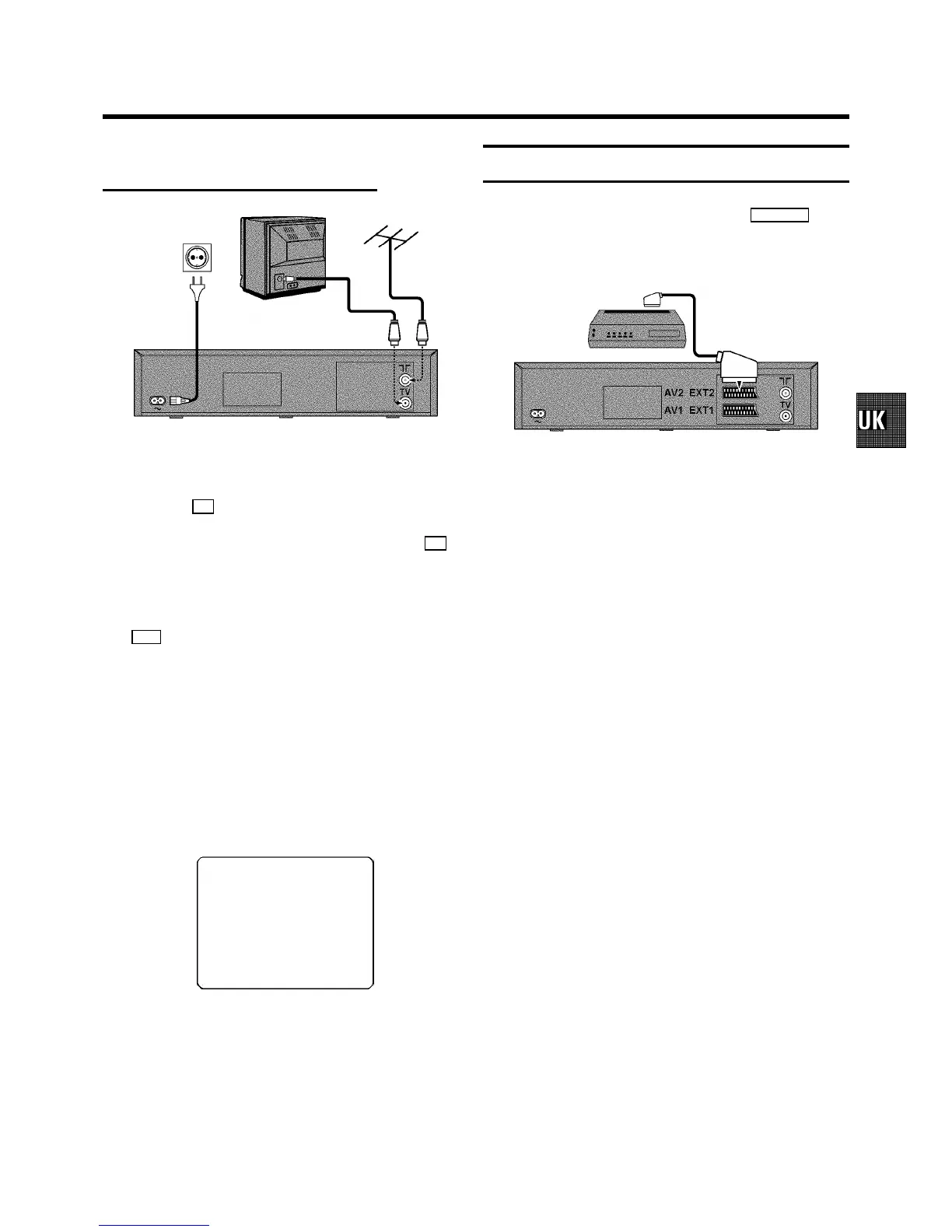
Connecting without a scart cable
a Switch off the TV set.
b Remove the aerial cableplug from your TV setand insert
it into the 2 socket at the back of the videorecorder.
c Plug one end of the aerialcable provided into the 3
socket on the videorecorder and the other end intothe
aerial input socketon your TV set.
d Insert one end of themains cable into the mainssocket
4 at the back of the videorecorder and plug the other
end into the wall socket.
e Switch on your TV set and selectthe programme number
that you have chosen forvideo playback (seeinstruction
manual TV set).
f Tune in the TV set inthe UHF wave band until the
following picture appears.
DThe video recorder will now sendon channel
CH36/frequency 591MHz:
CONGRATULATIONS ON THE
PURCHASE OF YOUR NEW
PHILIPS VIDEO RECORDER
TO CONTINUE PRESS OK
g Then read ’Initial installation’in the chapter ’INSTALLING
YOUR VIDEO RECORDER’.
Connecting a decoder or other equipment
You can connect additional equipmentto the EXT.2AV 2
socket. For example:a decoder, a satellite receiver or a
camera recorder.
5



 To Next Page