EN 47
5 Recording
Before using the device, please read carefully the following
instructions.
(1) In the stop state of voice mode, press “STOP” button to
select the folder you prefer.
(2) press “REC” button to start recording; the red “Record”
indicator is on; please place the built-in microphone
towards the source of sound.
(3) Press “REC” button to pause recording, then the red
“Record” indicator red light starts flashing, and the display
shows the recording “Pause” status icon and flashing .
(4) Press “REC” button again to resume recording.
(5) press “STOP” button to “STOP” to end recording, the
device returns to the stopped playing interface of current
recorded file.
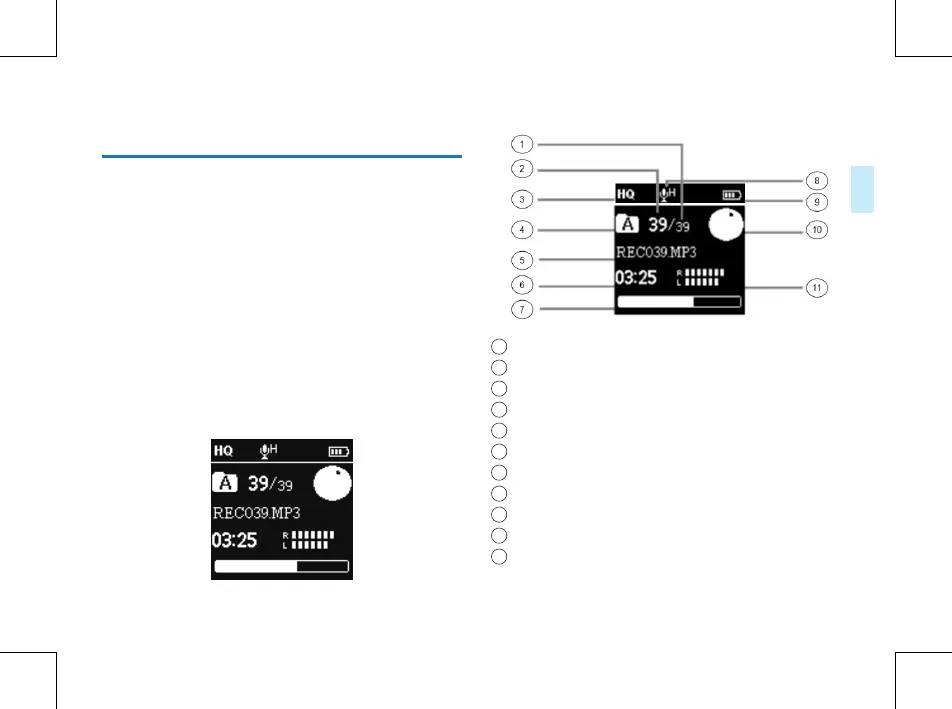
Recording Interface Reference:
Illustration of Recording Interface:
1
Already existing file number
2
The current file’s number
3
Record type
4
Current Folder
5
Current file name
6
Current Time
7
Recording the progress bar
8
Mic gain
9
Battey
10
Record State
11
Recording the energy bar















 To Next Page