48
English
11. Network setting
11.1 Connecting to external
Wi-Fi network
The external Wi-Fi network is a Wi-Fi
Infrastructure network, or a Wi-Fi network with
an Access Point (AP).
To connect the Center to an external Wi-Fi
network, start the networking procedures on
the Center.
For music playback within the external network,
see 9.3 UPnP: UPnP playback.
11.1.1 Network setting on Center
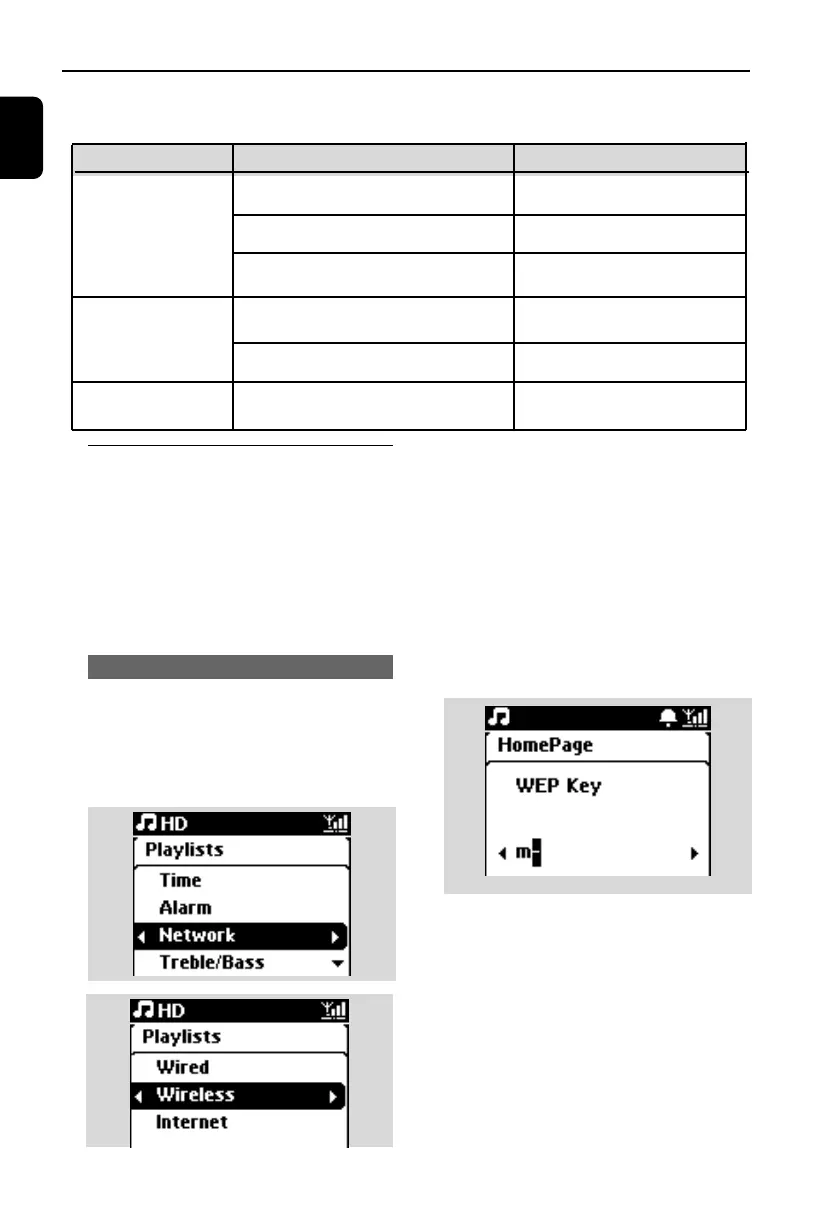
1 On the Center, search for networks
a. Press MENU to enter the menu screen
b. Press the navigation controls 3 or 4 and 2
to enter Settings,followed by Network
and Wireless.
c. Press 2 to continue.
➜ The display shows: Searching for Networks
➜ The list of networks appears
➜ The display shows: Network Not Found if
no network is found
2 a. Select the Wi-Fi network where your desired
UPnP device is located.
b. Press 2 to continue
3 If you already know the WEP/WPA/WPA2 key
for the Wi-Fi network:
a. Use the remote control to enter the WEP
or WPA/WPA2 key
b. Press OK/2; to confirm
If there is no WEP/WPA/WPA2 key for
the Wi-Fi network:
Press OK/2; to skip
Simple Network Setting
Adding a Station to the Center’s Wi-Fi
network
Section 11.5
Connecting to PC for configuration and
management
Connecting to internet for Gracenote
Internet service
See Connect to PC
section A
1
See 12.Gracenote CD
Information
Advanced Network Setting
Connecting to external Wi-Fi network
Connecting to external wired network
Section 11.1
Expert Network Setting
Connecting to two different networks
Section 11.3
You can add WAC3500 to your existing home network. Set your network according to
your needs as follows:
Type
What you want
Go to
Section 11.2
p1-67-wac3500_ifu_UK 2007.6.20 5:49 PM Page 48















 To Next Page