50
English
11. Network setting
5 As prompted, select Ye s to apply the settings
➜ The Center is connected to the external
wired network
➜ On the display, the icon is changed to
Applicable cases:
Has wired network (Hub/Switch/Router) in home
already.
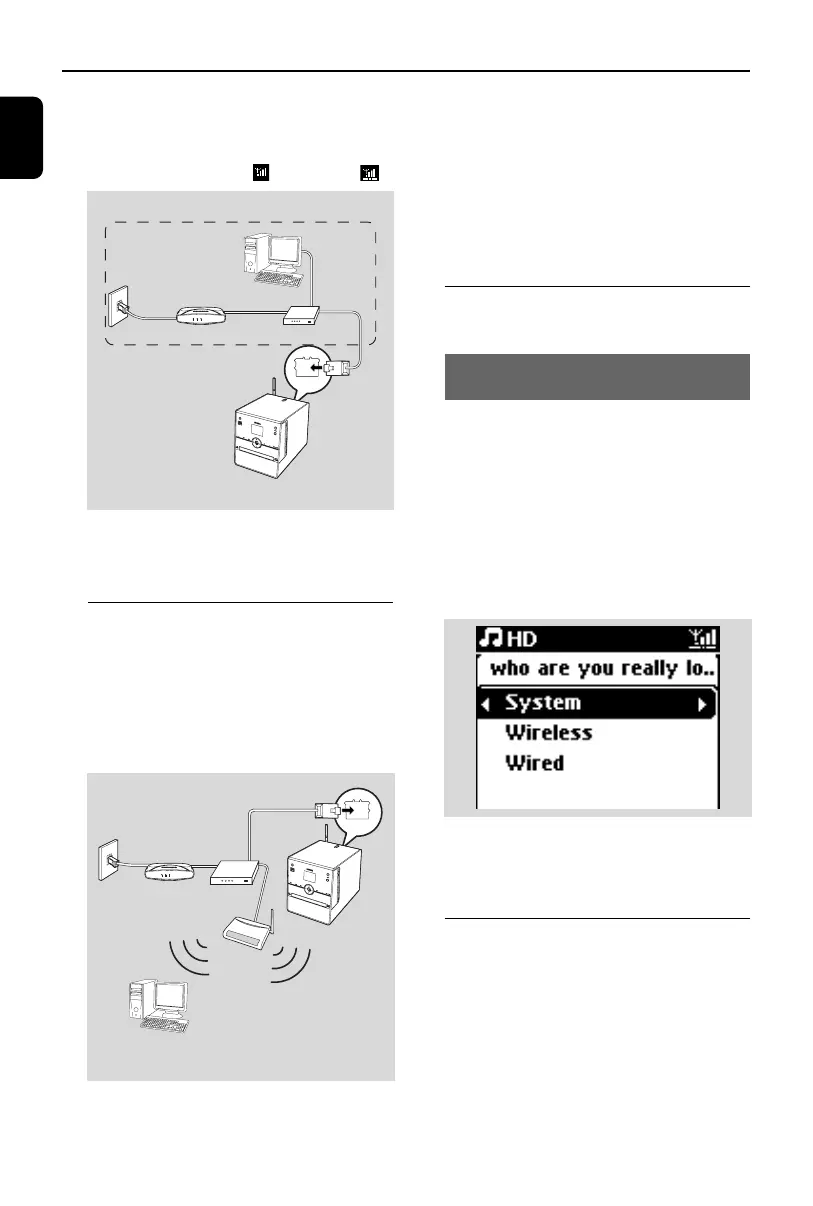
11.3 Connecting to two
different networks
WAC3500 can be added into two different
networks via wired and wireless network port.
Please refer to the advanced network setting
section. But you must be careful that the IP
addresses of the two network ports cannot be
in the same subnet.
Applicable cases:
Has two networks
IMPORTANT!
– Once the WAC3500 Center is added into the
Wi-Fi network, all Wi-Fi Ad-Hoc connections
with the WAC3500 will be shut down.
– WAC3500 cannot shadow the IP of the
network device that is not activated. Please be
careful of the IP address setting to avoid IP
address conflict between the wired and Wi-Fi
ports.
11.4 Viewing connection
status
11.4.1 Viewing the connection
with external network
1 Check that the Center is in HD source
2 Select Information on the Center
a. Press MENU to enter the menu screen
b. Press the navigation controls 3 or 4 and 2
to enter Information menu.
➜ The display shows: System, Wireless and
Wired
3 Press the navigation controls 3 or 4 and 2 to
select Wireless or Wired
➜ The display shows:
In Wireless: information about the Wireless
settings on the set.
In Wired: information about the Wired settings
on the set.
11.5 Adding a Station to
the Center’s Wi-Fi
network
Up to 5 Stations can be connected to the
WAC3500 Center. When adding a Station to
the Center’s Wi-Fi network, you can play the
Center’s music library on the Station or move
music playback between the Center and
Stations (see 15). To add a Station to the
Center’s Wi-Fi network, proceed as follows:
ETHERNET
Internet
Wireless Base Station 11g T
Wireless Base Station 11g T
rue T
urbo
Wireless
Modem PC
Power
External Wired network
DSL modem
Router/Hub/Switch
PC (UPnP device)
for illustration only
ETHERNET
Internet
Wireless Base Station 11g T
Wireless Base Station 11g T
rue T
urbo
Wireless
Modem PC
Tw o external networks
DSL modem
Router/Hub/Switch
PC (UPnP device)
for illustration only
Access point
p1-67-wac3500_ifu_UK 2007.6.20 5:49 PM Page 50















 To Next Page