32
English
Music recognition technology and
related data are provided by
Gracenote
®
.Gracenote is the
industry standard in music
recognition technology and related
content delivery.
For more information, visit www.gracenote.com.
CD and music-related data from Gracenote,
Inc., copyright © 2000-2006 Gracenote.
Gracenote Software, copyright © 2000-2006
Gracenote.This product and service may
practice one or more of the following U.S.
Patents: #5,987,525; #6,061,680; #6,154,773,
#6,161,132, #6,230,192, #6,230,207,
#6,240,459, #6,330,593, and other patents
issued or pending. Some services supplied
under license from Open Globe, Inc. for U.S.
Patent: #6,304,523.
Gracenote and Gracenote music recognition
database are registered trademarks of
Gracenote.The Gracenote logo and logotype,
and the “Powered by Gracenote” logo are
trademarks of Gracenote.
To r ecord from CD at fast speed
(for audio CDs, MP3/WMA/M4A CDs)
1 Check that the Center is switched on (See 5.
Basic functions).
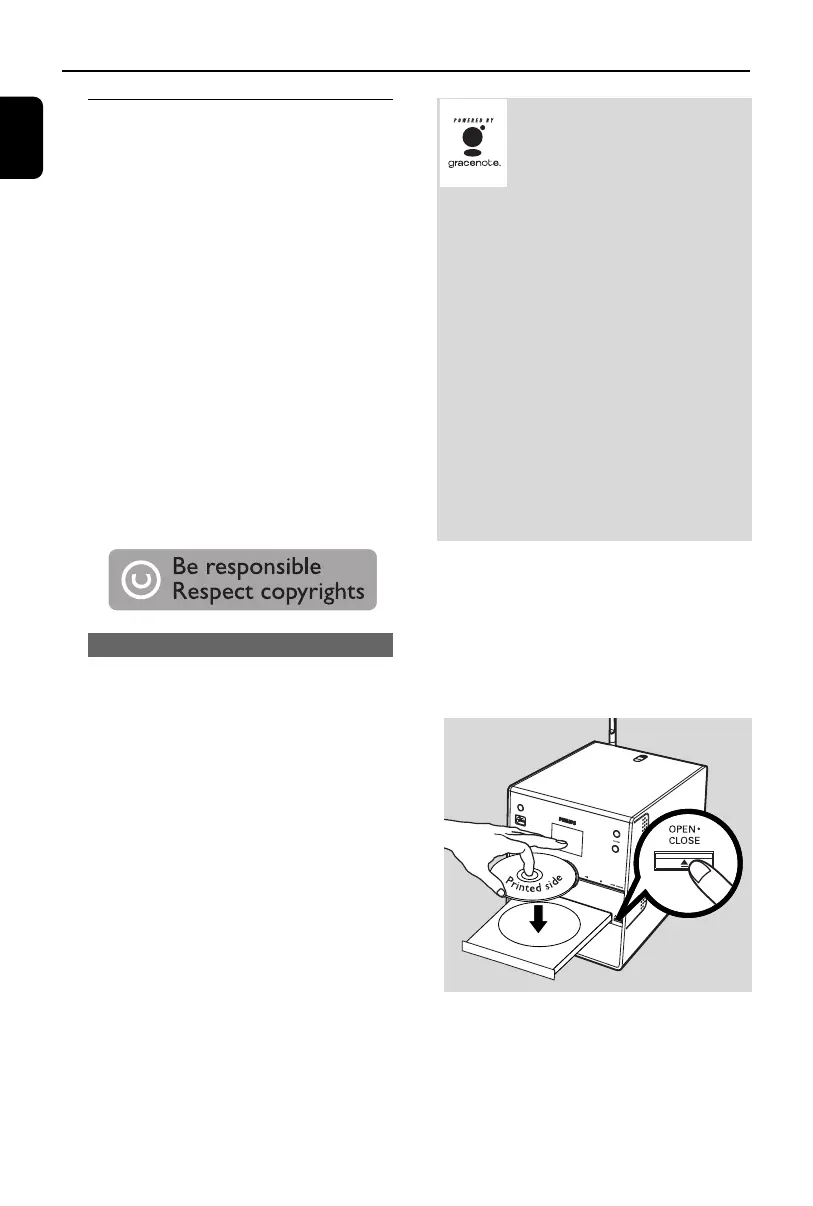
2 Press OPEN•CLOSE/ on the set to open
the CD compartment.
3 Insert a disc with the printed side facing up.
Press OPEN•CLOSE/ again to close the
compartment.
➜ Display shows: Reading CD
➜ List of tracks appears.
6. HD
6.5 Building music library
on the Center
You can build a music library in the hard disk of
the Center by recording from CDs, importing
from PC and recording from external sources.
IMPORTANT!
– Recording is permitted only if there is
no infringement of copyrights or any
other rights of third parties.
– For CDs encoded with copyright
protection technologies used by some
record companies, recording will be
restricted.
– The making of unauthorized copies of
copy-protected material, including
computer programmes, files, broadcasts
and sound recordings, may be an
infringement of copyrights and
constitute a criminal offence.This
equipment should not be used for such
purposes.
6.5.1 Recording from CDs
With WAC3500, you can record audio CD
tracks from your CDs and store them as MP3
files in the Center’s hard disk.The Gracenote
®
music recognition service enables your set to
look up CD information (including album, artist,
genre, track information) from its database. It
allows the recorded CD tracks to be properly
categorized (for example, under Artists, Albums,
Genres or All tracks) and also merged with the
existing tracks in the hard disk.To update your
Gracenote
®
music recognition service database,
see the manual Connect to your PC.
p1-67-wac3500_ifu_UK 2007.6.20 5:49 PM Page 32















 To Next Page