PicoQuantGmbH MultiHarpSoftwareV.3.1.0.0
4.6. The Trace Mapping Dialog
TheMultiHarpsoftwarecanrecordandstorehistogramsinupto512datablocksinmemoryandfiles.Outof
these,upto16curvescanbedisplayedatthesametime.Itmayseemoddthatwhenthehardwarehase.g.64
channelsthatonly16tracescanbedisplayed.However,itissimplygettingtooclutteredwhensomanytraces
aredrawnonthesamescreen.Thelimitationto16isstillallowingreasonablydistinguishablecolorsandkeep-
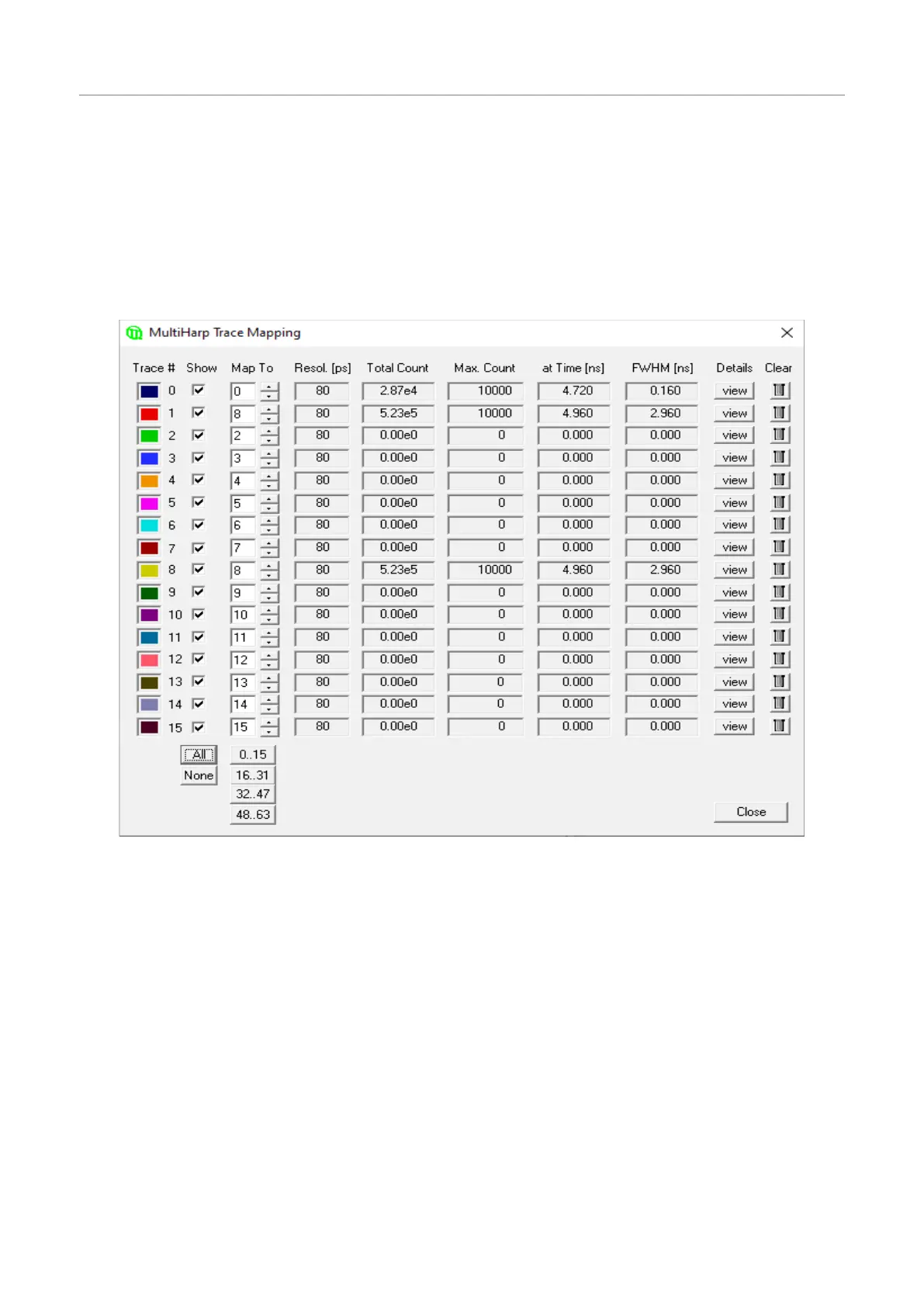
ingtheviewreasonablytidy.TheTrace Mappingdialogisusedtoselectthecurvestodisplay.Italsoallowsto
viewcurvedetailsandtocleanup.YoucanusetheTrace MapbuttonontheToolbarorclickthecurvecolorin-
dicatorinthecontrolpaneltolaunchthedialog.
IntheTrace Mappingdialogyoucanticktheindividualboxes‘Show’todisplayacurve.Youcanalsoselectthe
indexofthememoryblockyouwishtomaptheindividualdisplaycurvesto.
Thedialogalsoprovidessomestatisticsoneachcurve(centralmatrixoffigures).Resolutionisthebinwidthof
thehistograminpicoseconds.NextistheMax. Count,thecountinthehighestpointofthecurve.Thecolumn
at TimeshowsthetimecorrespondingtotheMax. Countbin.LeftmostthereistheFullWidthHalfMaximum
(FWHM)ofthecurvepeak(usuallymeaningfulonlyforIRFtraces).
Therearealsosomebuttonsforfrequentlyrequiredactions:Thebutton'view'canbeclickedtoseemorede-
tailedcurveinformationsuchastimeofrecording,acquisitionsettingsandcountrates.ThebuttonAllcanbe
clickedtotickalltracesasshown,thebuttonNonedoestheopposite.Thebutton0..15canbeclickedtosetthe
defaultmappingoftrace0..15 toblock0..15. Similarly,thebuttonsbelowallowmappingtothesubsequent
groupsof16blocks.Thisallowsquickaccesstotheuppertraceswhenthedevicehasmorethan16channels.
TheClearbuttons(trashcans)canbeclickedtodeletethecontentsofindividualblocks.
NotethattheTraceMappingdialogisnon–modal.Thismeansthedialogcanremainopenwhileameasurement
isinprogress,sothatadjustmentscanbemadeunderimmediatevisualcontrol,similartotheoperationofthe
controlpanel.Notealsothatameasurementcanberunninginablockthatisnotmappedorshown.
Theindividualtracemappingpanelitemsareexplainedfurtherinthesection6.6.“TraceMapping“ intheCon-
trolsandCommandsReference.
Page29



 To Next Page