PicoQuantGmbH MultiHarpSoftwareV.3.1.0.0
5.3.4. Running a basic TTTR Mode Measurement
ATTTRmodemeasurement(T2orT3mode)willtypicallybestartedafterallcontrolpanelsettingshavebeen
testedinnormalinteractivehistogrammingmode(oscilloscopeorintegration).Theacquisitiontime(measure-
menttime)andthefileforsavingthedataaretheonlyparametersthatcanbesetseparately.
AtypicalapproachtosetupaTTTRmodemeasurementwouldbebyfirststartingoscilloscopemodewithan
acquisitiontimeofe.g.,1second.Thenallcontrolpanelsettingsshouldbeoptimizedtoreliablyobtaintheex-
pecteddata.
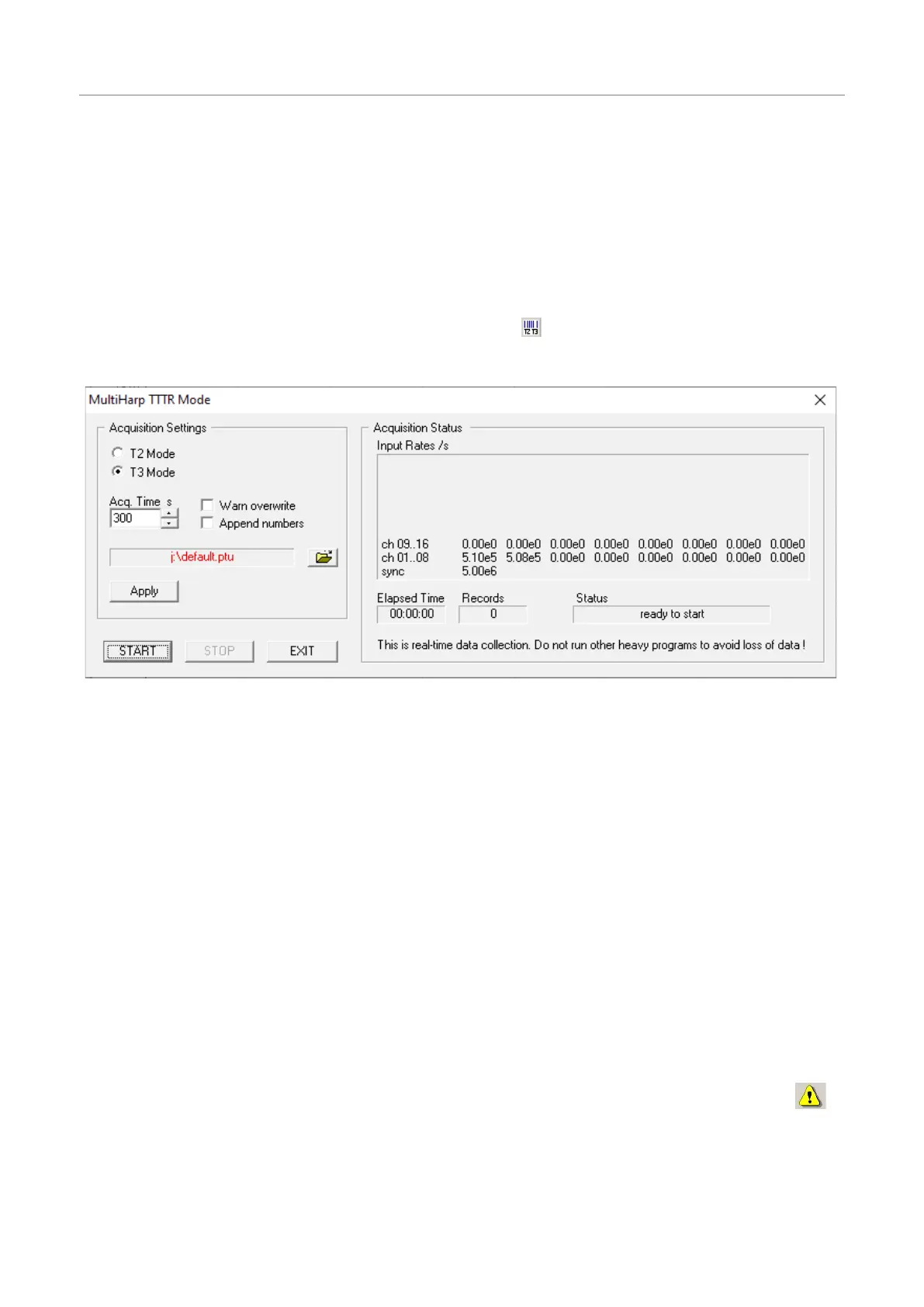
Onceallsettingsaresatisfactory,clickthe“TTTR Mode“button onthetoolbar.Thiswillbringupthe“TTTR
Mode“dialog.
Thedialogsection Acquisition Settings allowsselectingthemeasurementmode(T2/T3),overallacquisition
time,andfilename.NotethatswitchingbetweenT2andT3modetakessometimebecausethehardwaremust
bereconfigured.Normallysuchaswitchingshouldnotoccuroftenbecausethetwomodesusuallyrequireadif-
ferentexperimentsetup.
ThesectionAcquisition Settingsalsohastwotickboxesforthehandlingofexistingfiles.Youcanturnona
warningand/orautomaticallyhavenumbersappendedtothefilenames,sothatyoucanconvenientlyperform
seriesofmeasurements.Thefilenameisshowninredifthefilealreadyexists.Thebuttonwiththefileiconwill
openastandardWindowsfiledialog.Youcanselectanexistingfileorchooseanewname.The MultiHarp
TTTRmodefileshavetheextension".ptu".Formaximumcountratethroughputyoushouldchooseafiledes-
tinationonafastlocalharddiskasoutlinedabove.Networkdrivesareoftentooslow.
ThedialogsectionStatusshowselapsedtime,thecountratesandthenumberofcollectedrecords.Thenum-
berofshowninputratesdependsonhowmanychannelsyourMultiHarphas.Belowthesefiguresisastatus
lineshowingwhatiscurrentlyhappening.FurtherbelowtherearebuttonsforStart,StopandExit.Startand
StopcontroltheactualTTTRmeasurementrun.ExitisforleavingtheTTTRmodedialog.
TheTTTRmodemeasurementwillstartassoonasyouclicktheStartbutton.Youwillthenbeabletowatchthe
progressofyourmeasurementinthestatusboxesshowingtheelapsedmeasurementtimeandthenumberof
eventsthathavebeenrecorded.Notethatthisincludesoverflowandmarkerrecords.Therefore,thenumberof
recordswillbesomewhatlargerthanthetruephotoncounts.Theoverflowandmarkerrecordswilllaterbefil-
teredoutbythedataanalysis/processingsoftware.
Nexttothestatuslineyoumayseeawarningicon.WhentheTTTRmodedialogisrunningitcontin-
uouslycollectsinformationabouttheinputsignalsandthecurrentacquisitionsettings.Iftheseset-
tingsinconjunctionwiththeinputratesindicatepossibleerrors,thesoftwarewilldisplaythewarning
icon.Thewarningiconcanbeclickedtoshowalistofcurrentwarningstogetherwithabriefexplana-
tionofeachwarning(seealsosection8.1).Inordertofixwrongsettingsyoumayhavetoclosethe
TTTRmodedialogandreturntothecontrolpanel.
Page38



 To Next Page