11
Performing a test start
With the standard set up procedure, the system does
not come into full operation until you press the RUN
button. It’s at that point you discover whether all the
slaves are properly responding. In some situations,
particularly where the Evo installation is about to
replace a large set of fixed signals, it is important to
confirm that all units are correctly co-operating before
the fixed signals are switched off. By performing a
test start, the Evo master will begin running as normal,
however, it will inform all heads to not show any
signals.
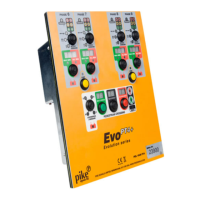
To initiate a test start
1 Before starting operation (as described
left), press the PEDESTRIAN ONLY/
LIGHTS OFF button until the LIGHTS OFF
indicator illuminates.
2 Proceed with the usual start up, as
described left.
If there are any problems, these will be reported on
the master text display.
If everything is OK, although the lights don’t
sequence and the mimics do not illuminate, you
will see the display timer counting through its
phases.
3 When you are confident that all is OK, either press
the LIGHTS OFF button to take the system into
normal start up signal sequence; or press and hold
the POWER button to halt the system and switch off
(if actual operation will occur later on).
...Setting the master (cont.) - Starting operation
Once the following stages are complete:
• Allheads,signsandconesplacedinappropriatelocations,
• Vehicleslavecontrollersset,
• Pedestrianslavecontrollersset(ifused),
• Vehiclephase(s)setonthemaster,
• Pedestriancrossingsset(ifused)onthemaster.
...then you should be ready to start operation using the master
controller.
To start operation
a On the master controller, press the
blue button to choose the appropriate
operation mode. For normal operation,
this should be set to VEHICLE.
b Press RUN.
The various signal heads of the installation
will now start up in an orderly manner:
• Allpedestriancrossingswillshowred.
• Thelowestnumberedvehiclephasewillshowamber
and then go to red.
• Thenextlowestnumberedvehiclephasewillshow
amber and then red. This will continue through all
enabled vehicle phases until the final one.
• Thenalvehiclephasewillwaitforthelongestallred
time to run and then changes to green.
• Normaloperationwillcommenceoncethehighest
numbered vehicle phase has completed its initial cycle.
The vehicle phase and pedestrian mimics
will show what each of the signal heads are
currently displaying.
Note: When the controller is used as a slave,
regardless of which phase is set, the Phase 5/
Slave mimics are used to show Slave operation.
The vehicle DEMAND and pedestrian WAIT
mimics will show how requests are being
made to the controller by road users and
pedestrians, respectively.



 To Next Page