26
En
Watching TV
06
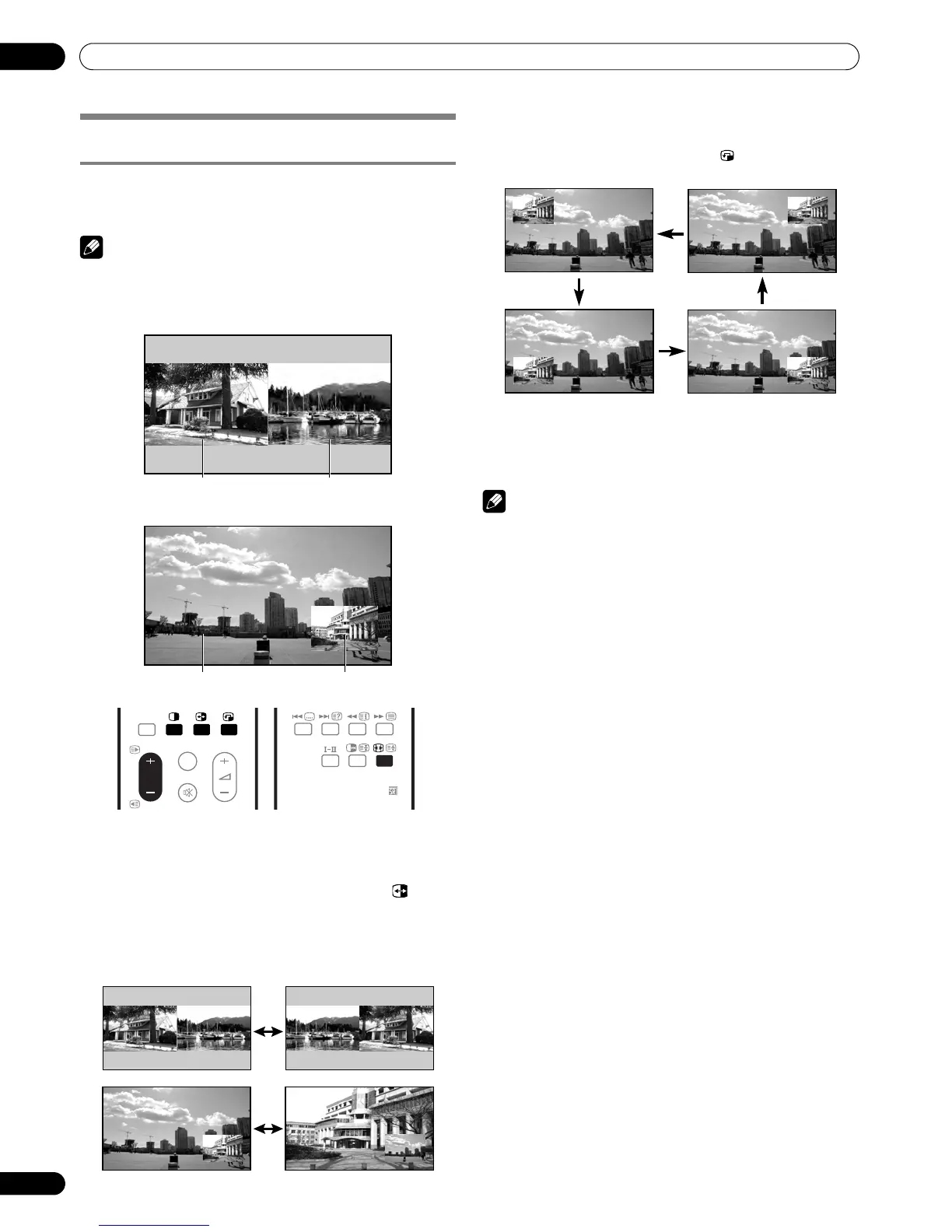
Use the multiscreen functions
Splitting the screen
Use the following procedure to select 2-screen or picture-in-
picture mode.
NOTE
• Displaying a split screen for a long period of time, or for shorter
periods of time everyday, may result in image retention.
1 Press c to select the display mode.
• Each time you press c, the display mode is switched
among 2-screen, picture-in-picture, and single-screen.
• In 2-screen or picture-in-picture mode, press to
switch the position of the 2 screens shown.
The left screen (in the 2-screen mode) or the larger
screen (in the picture-in-picture mode) is the active
screen which will be indicated by “z”. The user is
allowed to operate picture and sound.
• In 2-screen mode, press f to change the size of the left
screen.
• In picture-in-picture mode, press to move the position
of the small screen anti-clockwise.
2 To select the desired input source, press the appropriate
input source button.
• If watching TV programmes, press P +/P – to change the
channel.
NOTE
• The multiscreen function cannot display images from the
same input source at the same time. If you make such an
attempt, a warning message appears.
• The multiscreen function cannot display images from
combinations of two external input sources (Input 1 to 5, PC).
It can display images from the following combinations of
input sources.
- Analogue TV and digital TV
- Analogue TV (or digital TV) and external source
(Input 1 to 5, PC)
• When you press HOME MENU the single-screen mode is
restored and the corresponding menu is displayed.
• When in the 2-screen mode, images displayed on the right
screen may look less fine, depending on the images.
• While in the 2-screen or picture-in-picture mode, the
analogue favourite channel list is not available. While in the
2-screen or picture-in-picture mode, the digital channel list is
not available.
• If you select 1920*1080p@24 Hz for the main screen in the
2-screen or picture-in-picture mode, video images may not
be displayed properly because of the system's capability.
• With headphones connected, you can listen to audio coming
from the sub screen when in the 2-screen or picture-in-
picture mode. For more information, see page 37.
• PAL 60 signals are not suited for image display on the Sub
screen.
2-screen
Picture-in-picture
Main screen Sub screen
Main screen Sub screen
INPUT 5
TV/DTV
P
DVD HDD
DISC
NAVI


 To Next Page
 Loading...