User’s Manual of IVS-H125 Series
51
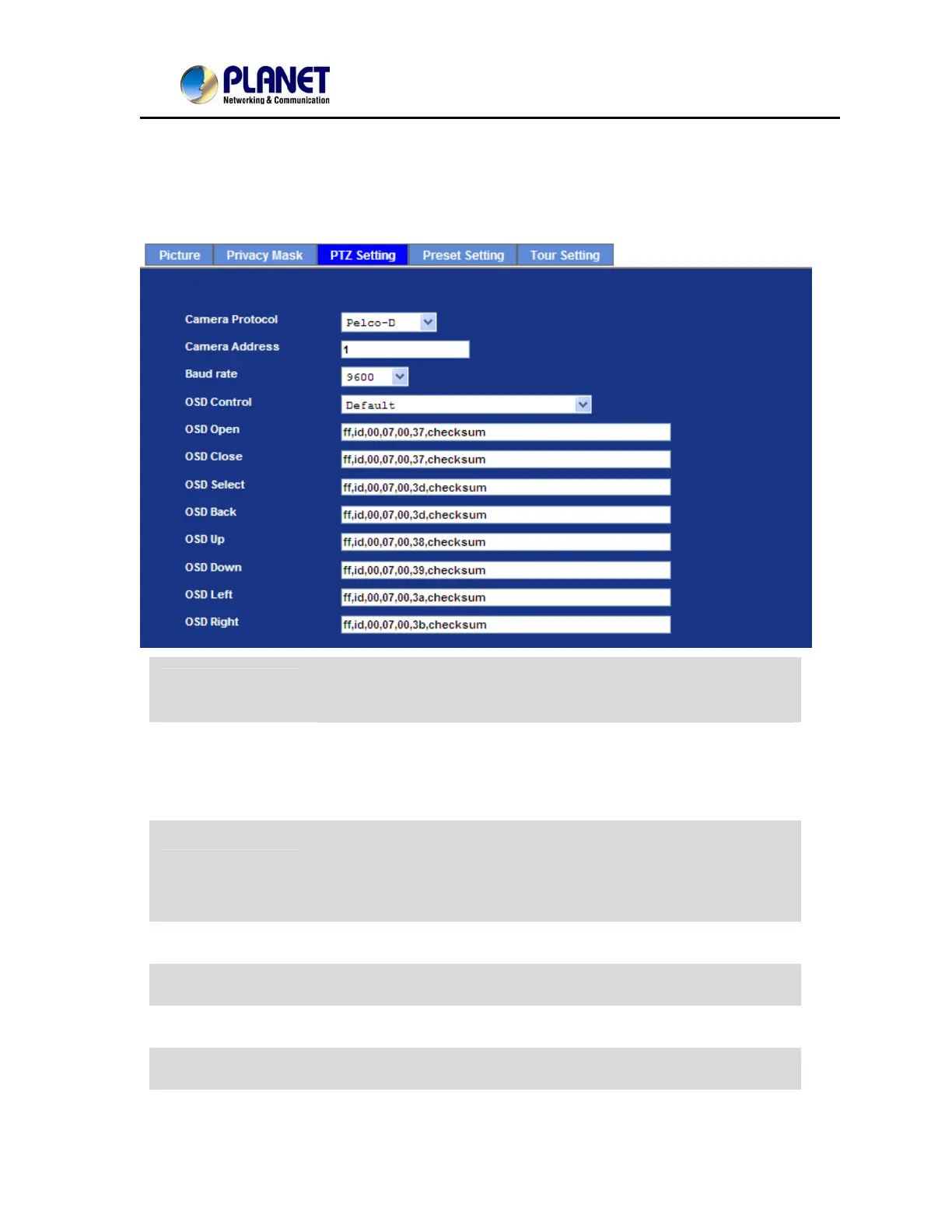
6.2.5. PTZ Setting
This page allow user to modify the RS-485 interface according to the P/T scanner.
Camera Protocol
This device can connect to a PTZ camera or speed dome camera and
controls them thru RS-485 interface.
Camera Address
This is the camera ID set in PTZ camera or speed dome camera.
Note that please DO NOT changes the default value if unnecessary.
If so, user needs to check and set value properly for both sides.
Baud rate
If need to change these parameters, user needs to check and set
value properly for both, network module and P/T scanner.
Note that please DO NOT changes the default value if unnecessary.
If so, user needs to check and set value properly for both sides.
OSD Control
Choose the corresponding model for OSD control
OSD Open
Control commands for Open function.
OSD Close
Control commands for Close function.
OSD Select
Control commands for Select function.


 To Next Page
 Loading...