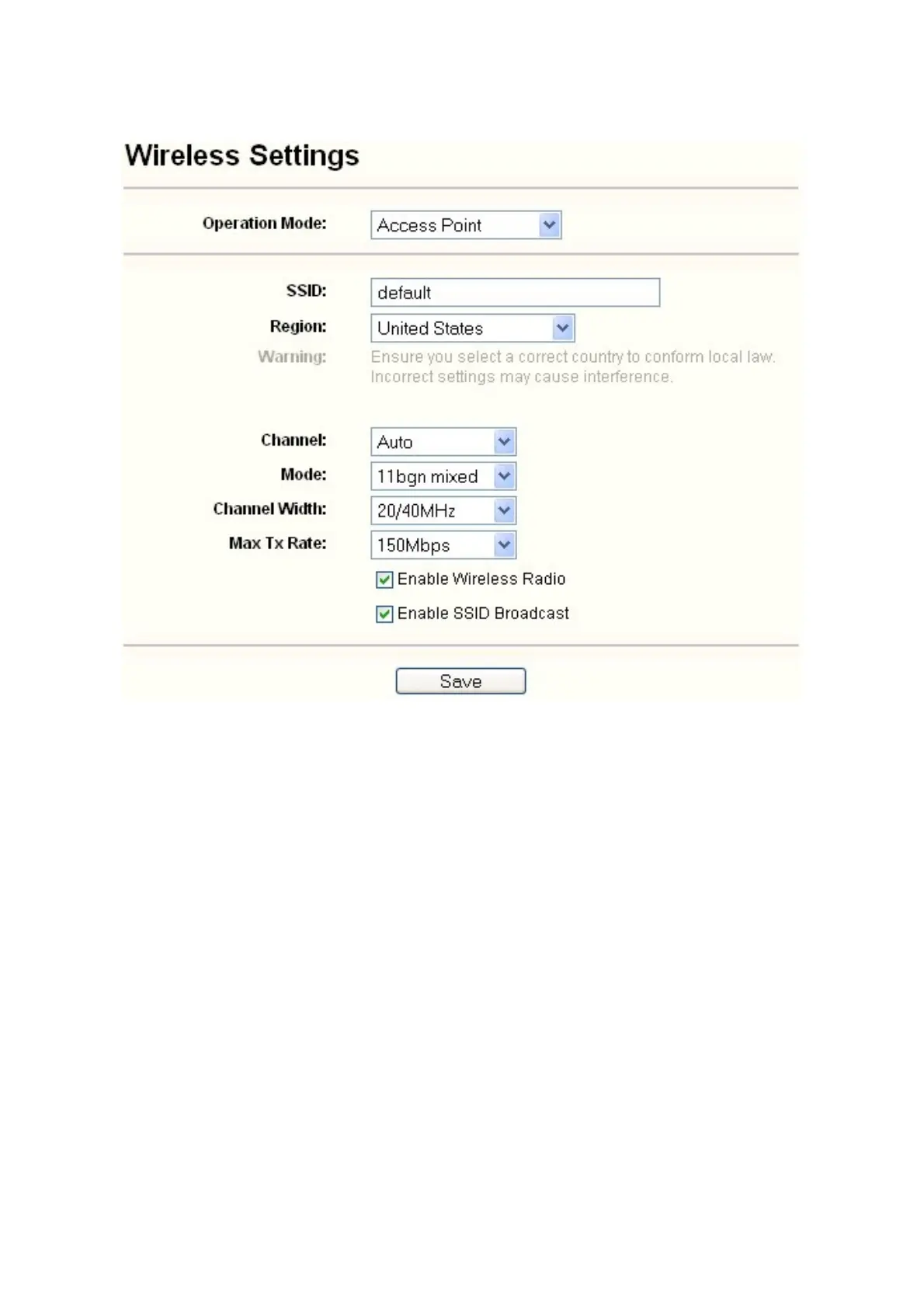
1) Access Point: This mode allows wireless stations to access this device.
Figure 4-8 Wireless Settings in Access Point mode
¾
SSID (Set Service Identifier) - Identifies your wireless network name. Create a name up to 32
characters and make sure all wireless points in the wireless network with the same SSID. The
default SSID is default. This value is case-sensitive. For example, default is NOT the same
as DEFAULT.
¾
Channel - Determines the operating frequency to be used. It is not necessary to change the
wireless channel unless you notice interference problems with another nearby access point.
¾
Mode - Select the desired wireless mode. The options are:
• 11b only - Only 802.11b wireless stations can connect to the AP.
• 11g only - Only 802.11g wireless stations can connect to the AP.
• 11n only - Only 802.11n wireless stations can connect to the AP.
• 11bg mixed - Both 802.11b and 802.11g wireless stations can connect to the AP.
• 11bgn mixed - All 802.11b, 802.11g and 802.11n wireless stations can connect to the
AP.
¾
Channel Width - Determines the channel width to be used. It is unnecessary to change the
default value unless required.
¾
Max Tx Rate - Specifies the maximum transmit rate of the AP through this field.
21



 To Next Page
 Loading...












