User’s Manual of WNRT-617
-30-
Step 2: Press and hold the WPS Button equipped on the adapter directly for 2 or 3 seconds. Or you
can click the WPS button with the same function in the configuration utility of the adapter.
Step 3: Wait for a while until the next screen appears. Click Finish to complete the WPS
configuration.
II. By PIN
If the new device supports Wi-Fi Protected Setup and the PIN method, you can add it to the network by
PIN with the following two methods.
Method One: Enter the PIN of your Wireless adapter into the configuration utility of the Router
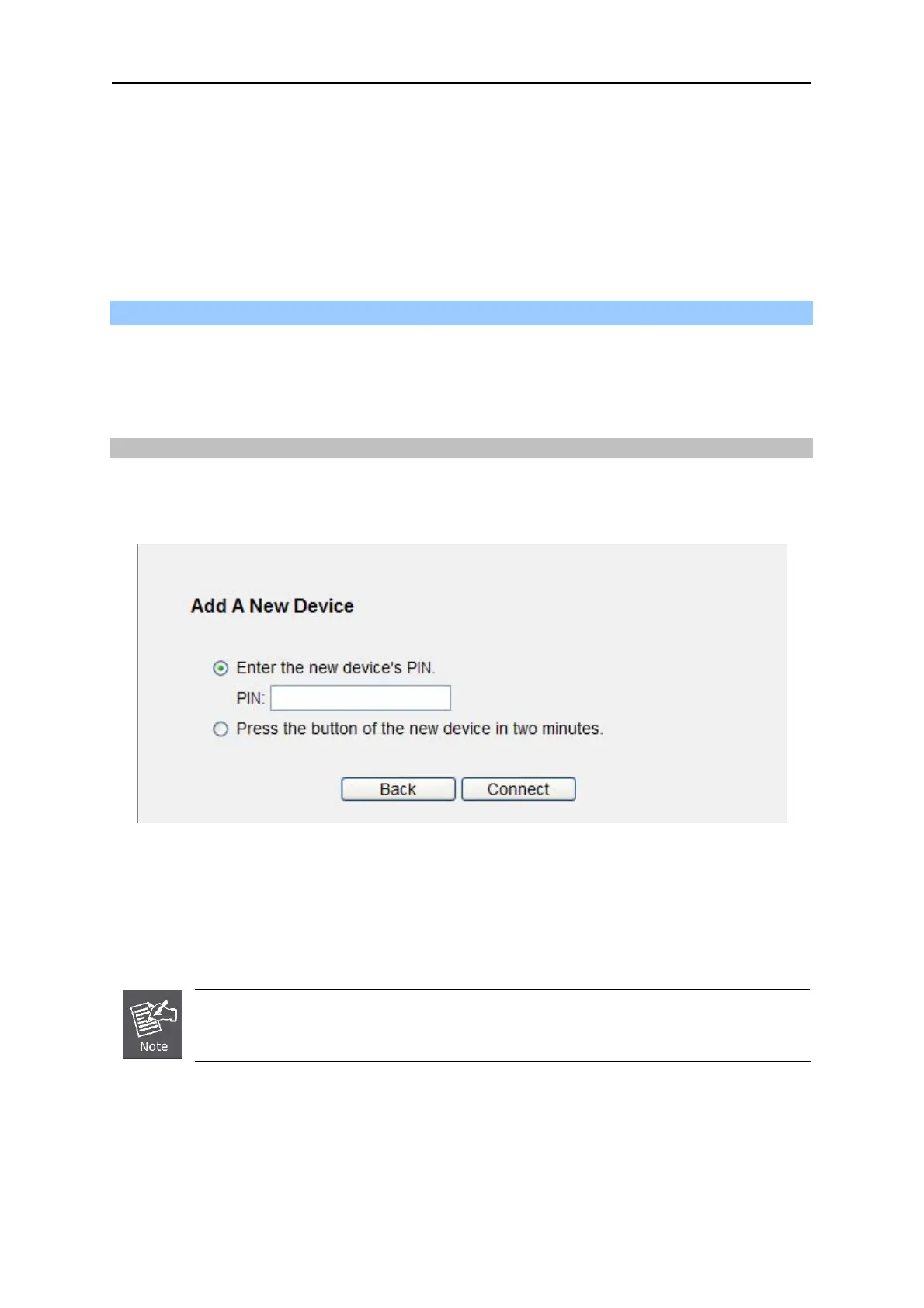
Step 1: Keep the default WPS Status as Enabled and click the Add device button in Figure 5-3,
then the following screen will appear.
Figure 5-6
Step 2: Choose Enter the new device's PIN and enter the PIN code of the wireless adapter in the
field behind PIN in the above figure. Then click Connect.
The PIN code of the adapter is always displayed on the WPS configuration screen.
Step 3: For the configuration of the wireless adapter, please choose the option that you want to
enter PIN into the Router in the configuration utility of the WPS, and click Next.



 To Next Page