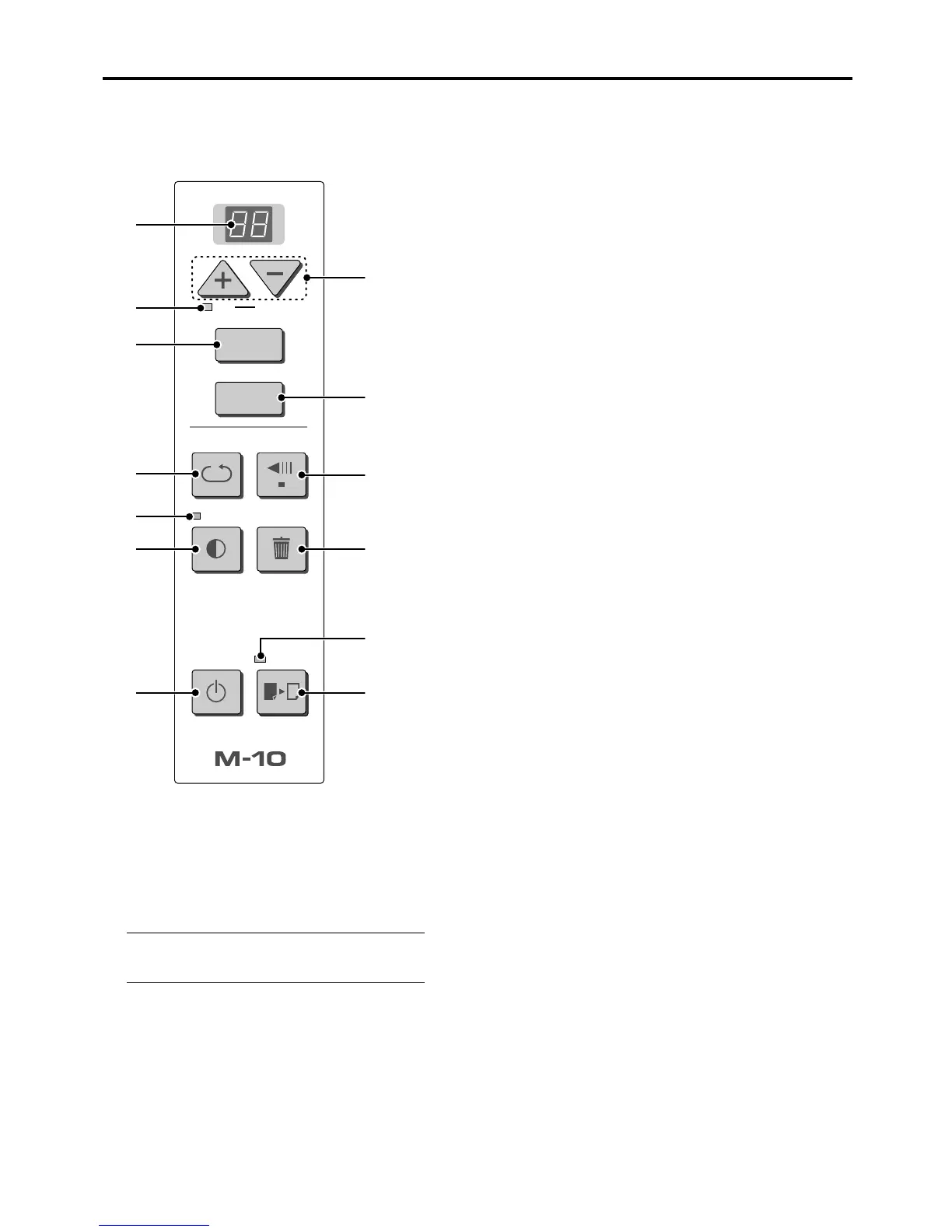
E-10
OK
Cancel
REPEAT
Density
POWER COLOR
MemoryClear
FEED/STOP
COPY
MEMORY
4
7
9
12
3
2
5
13
6
8
11
10
1
When pressing a button, please press the center
area (i.e., the round and protruding portion). Press-
ing the corner will not work.
1 POWER button
Switches the power of the copyboard on and off.
Note
The Power button does not synchronize with the main
power control of the Copyboard.
2 COLOR button
Selects whether to print (or store in memory) in
“color” or “black & white”.
The COLOR lamp lights when “color” is selected.
3 COLOR (mode) lamp
Lights in green when “color” is selected with the
COLOR button.
Copyboard Control Panel
4 + / – buttons (Number of copies)
Pressing the + button or the – button sets the number of
copies to be printed (to a maximum of 20 sheets). The num-
ber of copies appears in the display window.
5 Display window
This 7-segment LED displays the number of copies to be
printed, the memory storage operating condition, and error
information. Please see Page E-21 for details about error
information.
6 COPY button (Print)
Moves a one-screen portion of sheet and reads it, then prints
the number of copies displayed in the display window.
7 MEMORY button (Memory storage)
Moves a one-screen portion of sheet and reads it, then stores
the data on a CompactFlash card.
8 REPEAT button
Prints the previously printed sheet surface one more time.
(The sheet does not move.)
The number of copies can be changed, but the density and
the color/monochrome selection cannot be changed.
9 FEED/STOP button
Scrolls the sheet one screen portion left, then stops auto-
matically. A press of this button while scrolling will stop the
scrolling.
10
Density button (Copy density)
Selects the printing density, either “standard” or “dark”. The
Density lamp lights when “dark” is selected.
11
Density (mode) lamp
Lights in green when “dark” is selected with the Density but-
ton.
12
MemoryClear button
(Total erasure of CompactFlash card)
A press of the MemoryClear button causes the Clear mode
lamp to flash. (The display window indicates “99 (max.)” num-
ber of files in a flashing display.)
A press of the OK (+) button erases all the data in the PVW
folder of the CompactFlash card.
To avoid erasure, press the “Cancel” (–) button. The display
window returns to display the number of print copies. Please
see Page E-19 for details.
13
Clear (mode) lamp
The lamp lights in orange to indicate that the MemoryClear
button has been pressed and the unit is in the erasure mode.



 To Next Page