E-15
OK
Cancel
REPEAT
Density
POWER COLOR
MemoryClear
FEED/STOP
COPY
MEMORY
POWER
FEED/STOP
Use of a CompactFlash card (hereafter abbreviated as a memory card) permits the sheet surface to be stored as
image data.
The stored data can be read by a personal computer and used to make a meeting record, or can be pasted in a
document.
USING COMPACTFLASH CARDS
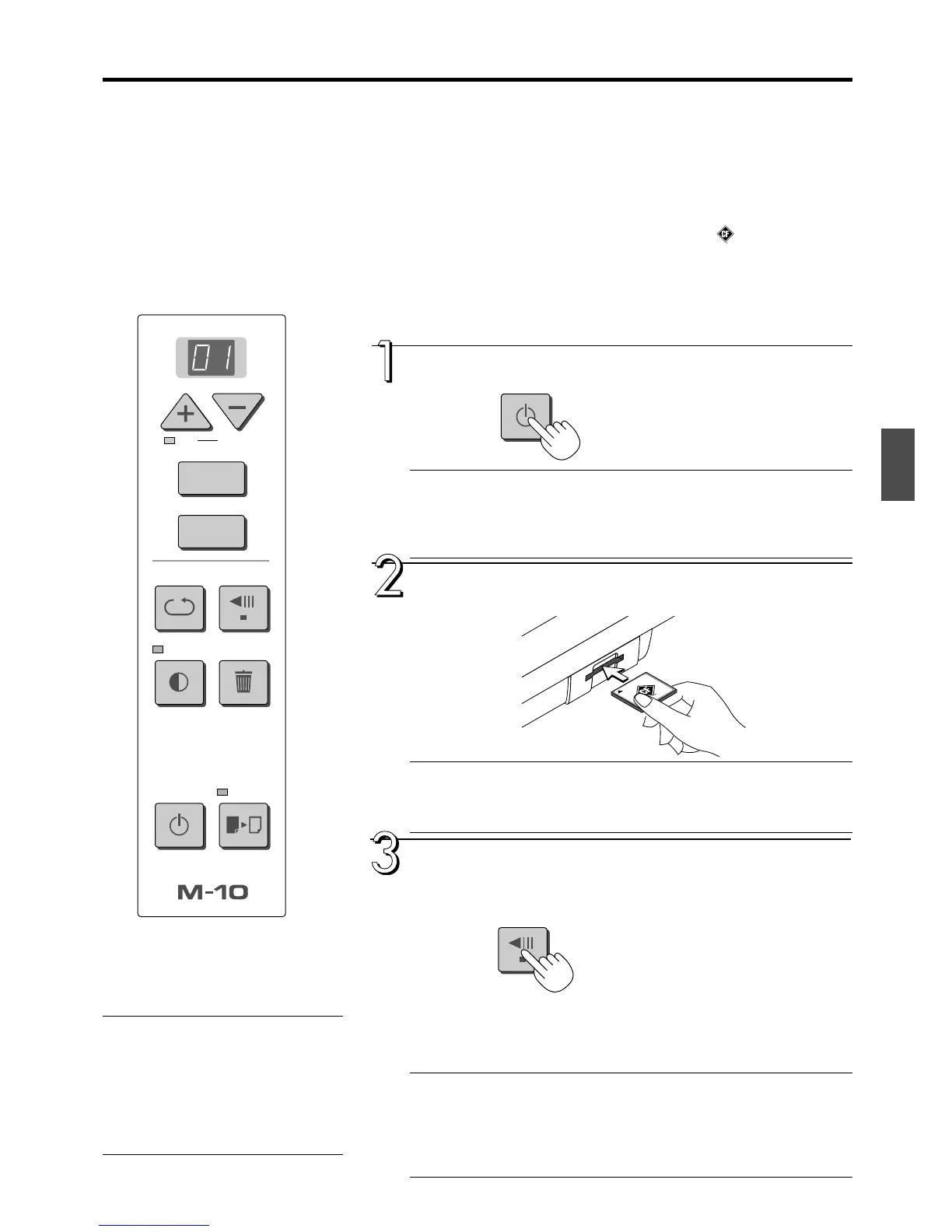
Press the POWER button and switch on the power.
Note
When the POWER button is pressed and the power is turned on, the LED on the
display shows a countdown of approximately 25 seconds, then the LED stops flash-
ing, remaining lit.
The copyboard is checking its status during this time.
Insert the memory card into the card slot of the
copyboard.
CAUTION
Please slowly insert the memory card keeping it level with face up.
The card is designed so that it cannot be inserted backward, but forcing it in will
cause damage.
When the drawing is on the rear sheet, press the
FEED/STOP button to bring out the desired surface
for memory storage.
A press of the FEED/STOP button scrolls the sheet surface one screen
portion left and automatically stops it. (The M-10S takes approximately 15
seconds and the M-10W takes approximately 20 seconds.)
To stop the operation part way through, press the FEED/STOP button again.
Note
• The one-screen portion that is visible is the one that is stored.
•To make fine adjustments to the sheet surface, when the sheet is stopped, move
the sheet slowly by hand. The sheet can be moved either left or right.
• The peripheral area of the sheet surface cannot be stored. Please see “Effective
reading size” on Page E-8.
• Items Required for Using the Memory Function
CompactFlash card: TYPE 1 or TYPE 2 (Optional items), or commercially
available items. (Please use products bearing the CF logo.)
PC card adapter: Optional items or commercially available items
Personal computer equipped with a PC card slot, or a USB card writer/reader
(optional item or commercially available item)
MEMORY STORAGE PROCEDURE
CAUTION
CF Card Adapters
Please note that some of CF card adapters may
have compatibility issues. Please see our home
page for details.
http://www.plus-vision.com
Continued on next page



 To Next Page