E-17
PC-CARD
Adapter
EXAMPLES OF PLAYBACK OF COMPACTFLASH CARDS WITH
A PERSONAL COMPUTER
This example shows how the data held in the memory card is copied to the hard disk of a personal computer, and
deleted from the card.
Methods include the use of Explorer and various other methods.
Please see the instruction manual of your personal computer or the software being used for information about
using your personal computer.
The folder name of the memory card is PVW. The image file name inside the folder is MBxxxxxx.png and xxxxxx
refers to the 6-digit serial number of the memory storage. (Example: MB000001.png)
Preparation of the Memory Card:
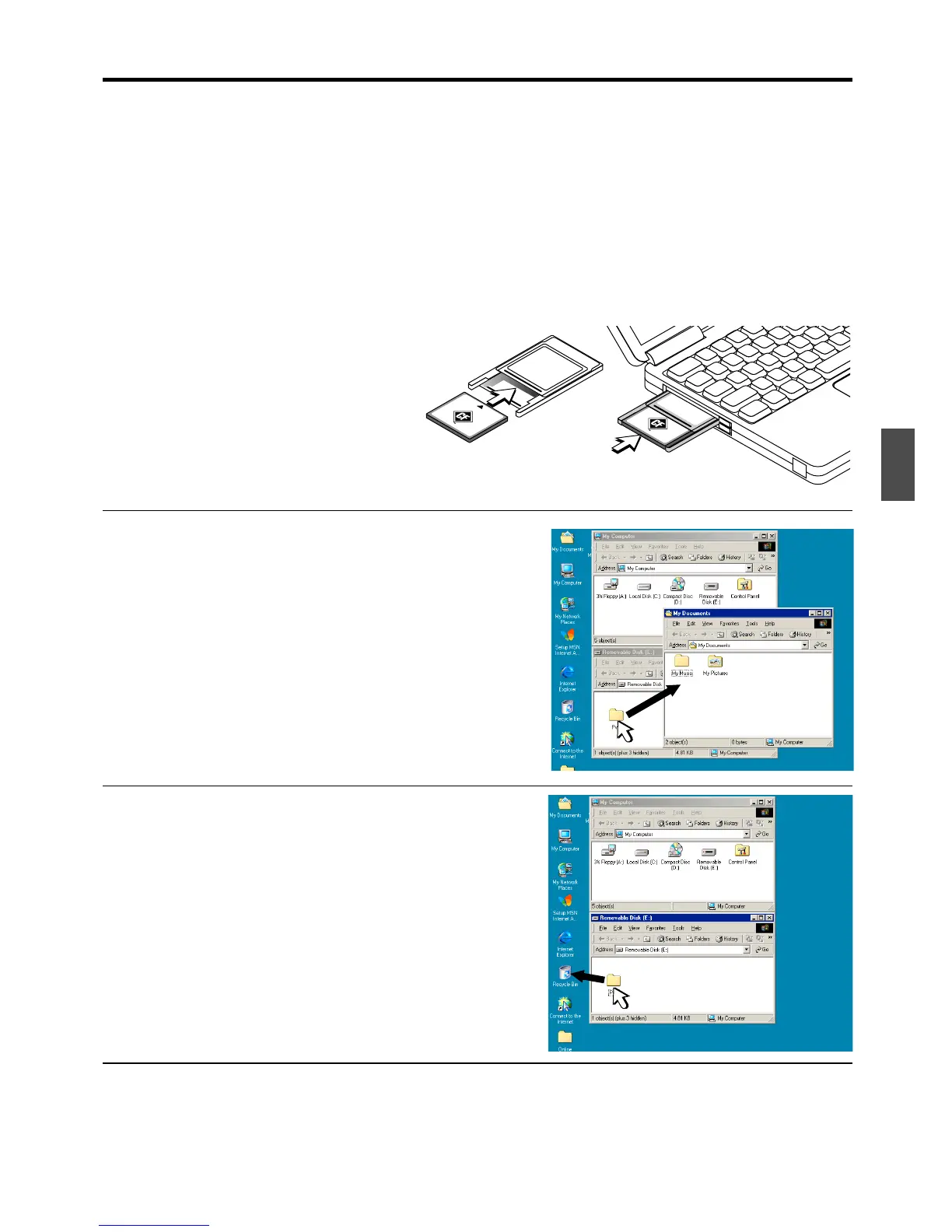
1.Insert the memory card into the PC card
adapter.
2.Insert the PC card adapter into the card
slot of the personal computer.
Save the Image Files of the Memory Card in the
Personal Computer
1.Open “My Computer” and then open the drive icon which
shows memory card.
The folder named “PVW” contains the memory storage data of the copy-
board.
2.Store the “PVW” folder in “My Documents” or another lo-
cation.
All of the data contained in “PVW” will be stored.
Erasing the Image Files of the Memory Card with
the Personal Computer
1.Open “My Computer” and then open the drive icon which
shows memory card.
The folder named “PVW” contains the memory storage data of the copy-
board.
2.Place the “PVW” folder in the “Recycle Bin”, right click on
the icon and select “Empty Recycle Bin” from the pull-down
menu.
All of the data contained in “PVW” will be deleted.
Even when the entire folder is deleted, a new PVW folder will be cre-
ated automatically when CompactFlash card is used again with the
copyboard.
Click and drag to My
Documents
Click and drag to the
Recyle Bin



 To Next Page