E-18
MemoryClear
POWER
OK
Cancel
REPEAT
Density
POWER COLOR
MemoryClear
FEED/STOP
COPY
MEMORY
OK
Cancel
OK
Cancel
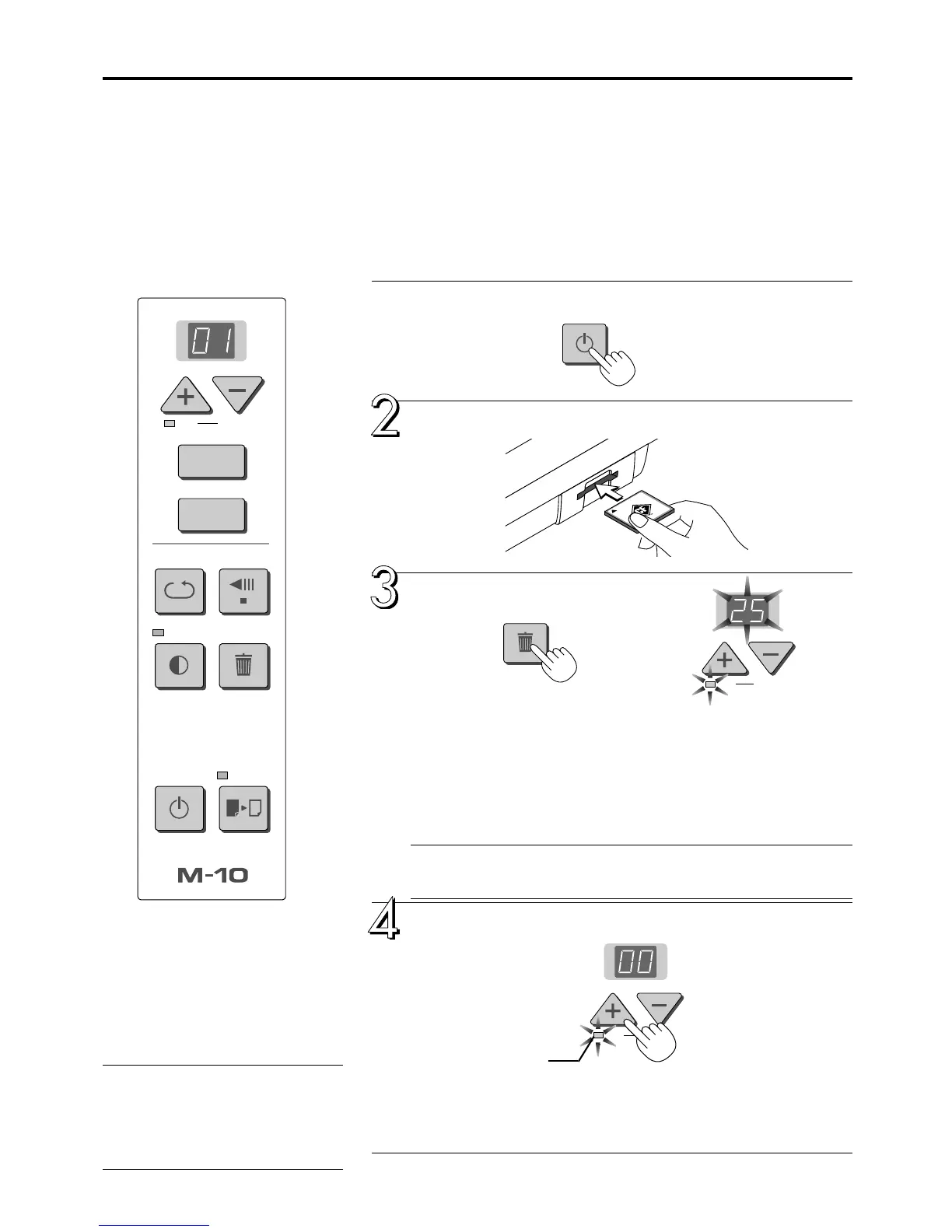
Press the POWER button and switch on the power.
Insert the memory card into the card slot of the
copyboard.
Press the MemoryClear button.
At first the files on the memory card are checked. The display window flashes
during this time. Once the files have been checked, the Clear lamp and the
display window flash. The number on the display window indicates the num-
ber of files stored in the copyboard’s folder (PVW) on the memory card. The
maximum number of files that can be displayed, however, is 99. (“99” is
displayed even if there are more than 99 files.)
At this time, please make sure that it is all right to erase the image data.
To cancel the operation, please press the “–” (Cancel) button.
Note
Depending on the number of files stored on the memory card, some time may be
required for recognition.
Press the “+” (OK) button and erase.
During erasure, “00” will blink in the display window, then will turn on for 3
seconds following erasure and then will return to the number of copies indi-
cation.
This completes the full erasure.
DELETING ALL OF THE MEMORY CARD
DATA WITH THE COPYBOARD
When the memory card has become full, copy the required image data on
the hard disk of a personal computer or on another medium and then insert
the card into the card slot of the copyboard and perform the deleting opera-
tion. All of the image data stored in the PVW folder will be deleted.
To delete using a personal computer, please see Page E-17.
CAUTION
Formatting is not possible with the copyboard.
Files other data stored with the copyboard or
files whose original names have been changed
cannot be deleted with this operation. Delete
such files using your computer.
Clear indicator



 To Next Page