E-25
POWER
COLOR
DensityDensity
QUICK CALIBRATION PROCEDURE
The following describes the procedures to adjust (calibrate) for the optimum reading sensitivity of the copyboard.
Perform the quick calibration procedures described below if ruled lines appear after the fluorescent bulb is re-
placed or when the copyboard is mounted on a wall, etc.
Note
Depending on your copyboard (M-10), it may be necessary to update the program.
For instructions on checking the program version and updating the program, contact your nearby PLUS Vision sales office, dealer, or store.
1. Cleaning the sheet surface
First clean a strip at least 20 cm wide along the left edge of the
sheet surface.
Be sure to wipe completely clean, leaving no traces.
* Wipe the sheet surface with a damp, thoroughly wrung out cloth.
For tough dirt, use diluted neutral detergent, then wipe again using
only water, being sure to remove the detergent completely.
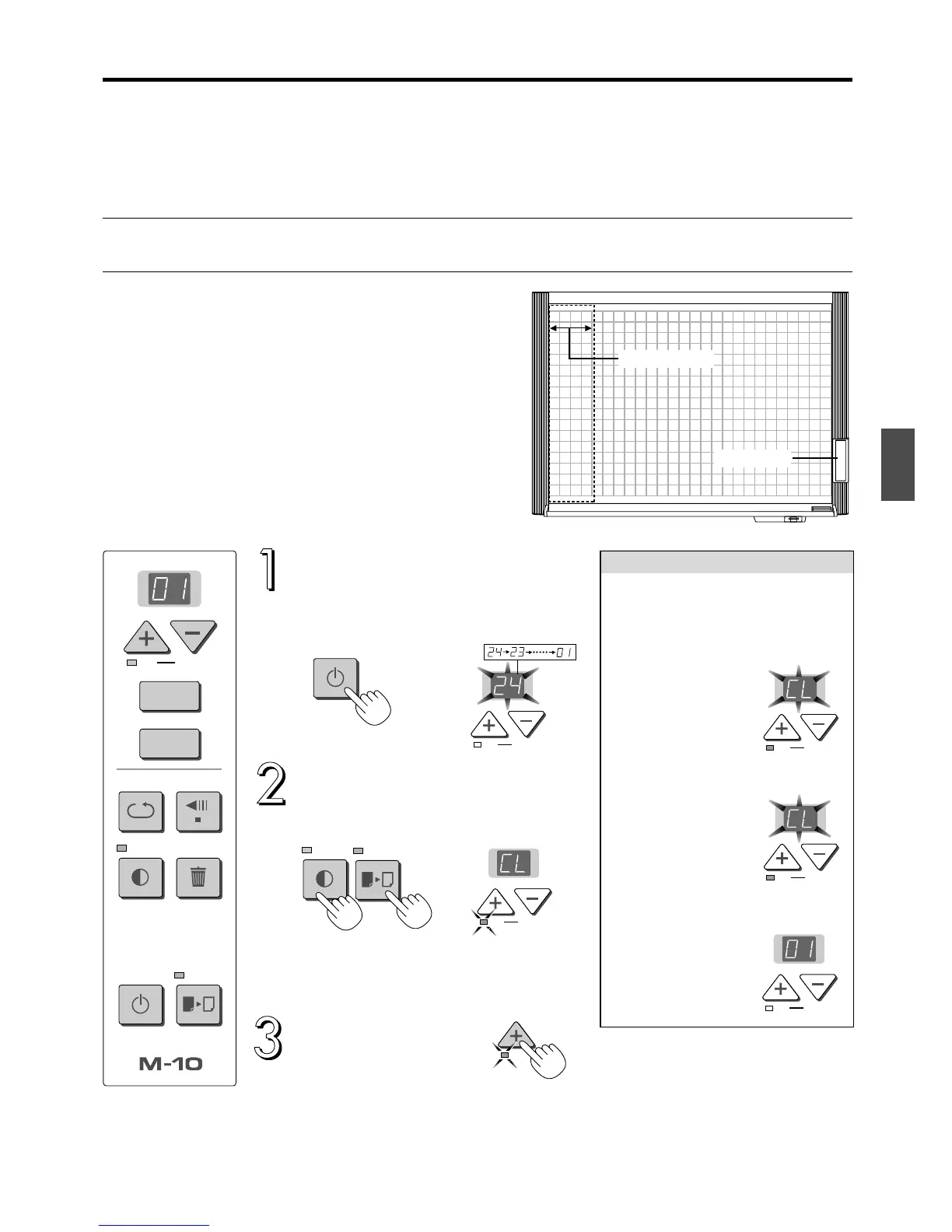
2.Calibration procedures
4 blocks or more
OK
Cancel
REPEAT
Density
POWER COLOR
MemoryClear
FEED/STOP
COPY
MEMORY
Control panel
Press the POWER button to turn
the power on.
After a countdown of approximately 25 seconds,
the LED stops flashing, remaining lit.
OK
Cancel
Press the Density and COLOR
buttons simultaneously.
“CL” appears on the display window and the OK
lamp flashes (orange).
Press simultaneously.
OK
Cancel
Perform step 3 below within 10 seconds of step
2. If not, the operation is canceled.
To cancel immediately, press the Cancel button.
Press the OK button.
Processing starts.
Wait until the process is com-
pleted.
OK
* If calibration is not completed normally, an error number is displayed. Start over. If the error
number is still displayed, contact your store of purchase or a PLUS Vision sales office and
tell them the error number.
*Wait until the sheet is completely dry before using the copyboard.
1. After the OK button is pressed, the
copyboard remains in the stop
mode for about 5 minutes while the
fluorescent bulb stabilizes. Do not
move the sheet manually.
*“CL” continues to
flash at the display
window during this
time.
Process
Control panel
OK
Cancel
2. The sheet moves automatically
(about 3 blocks) and calibration is
performed.
*“CL” continues to
flash until process-
ing is completed.
OK
Cancel
3. Once calibration is completed nor-
mally, the copyboard returns to the
original status.
OK
Cancel



 To Previous Page