14
5. If the USB components on your computer are functioning correctly, they will
automatically detect the scanner causing the Add New Hardware Wizard or
Found New Hardware Wizard to be launched.
Information
If your computer is off when the scanner is
connected, the “Add New Hardware Wizard”
message will not be displayed until the computer
is on and Windows starts.
S
S
t
t
e
e
p
p
4
4
.
.
T
T
e
e
s
s
t
t
i
i
n
n
g
g
t
t
h
h
e
e
S
S
c
c
a
a
n
n
n
n
e
e
r
r
The following describes how you can check if the scanner is properly functioning
with your computer and the scanning software. Before testing your scanner, double
check to make sure that all connections are securely fastened.
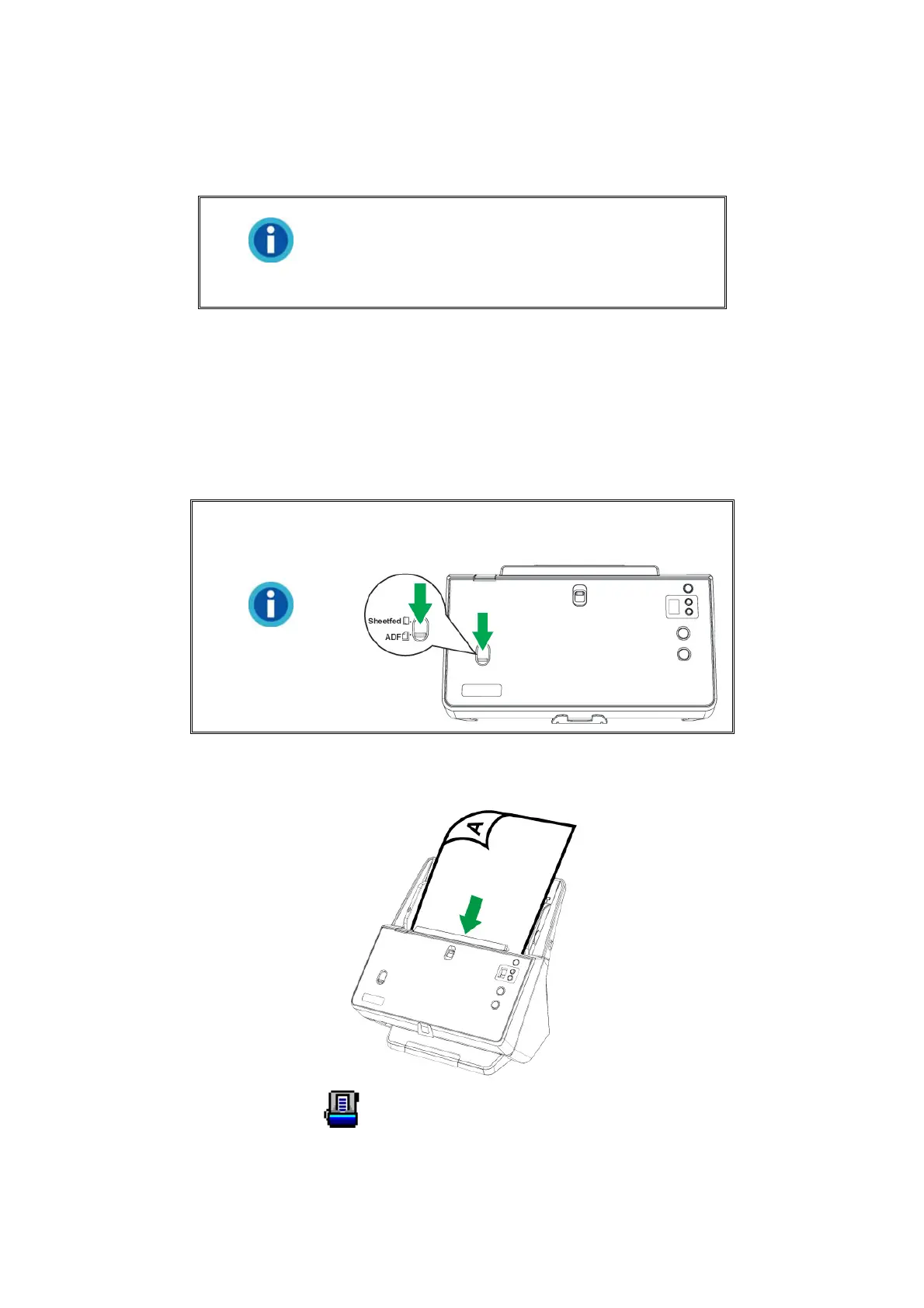
To test the ADF scanning:
Information
Make sure to slide the Sheetfed / ADF scan
switch downward for ADF scanning.
1. Load a document headfirst and face down into the ADF with the text side facing the
paper chute.
2. Double-click the icon
in the Windows system tray.











 To Next Page