24
NOTE! Directional Indicator Lights must indicate Metering Pump direction
when Pump Switch is in the NORMAL position. If not, refer to Trouble
Shooting section.
11. Using the Hydraulic Pressure Control, adjust to the required stall pressure
1
and check
each Material Pressure Gauge.
12. COUNT DOWN COUNTER
NOTE! If this function is not needed, leave it in the off position.
To set the Auto Shut Down Counter:
a. Turn the switch to the on position, the green light will illuminate.
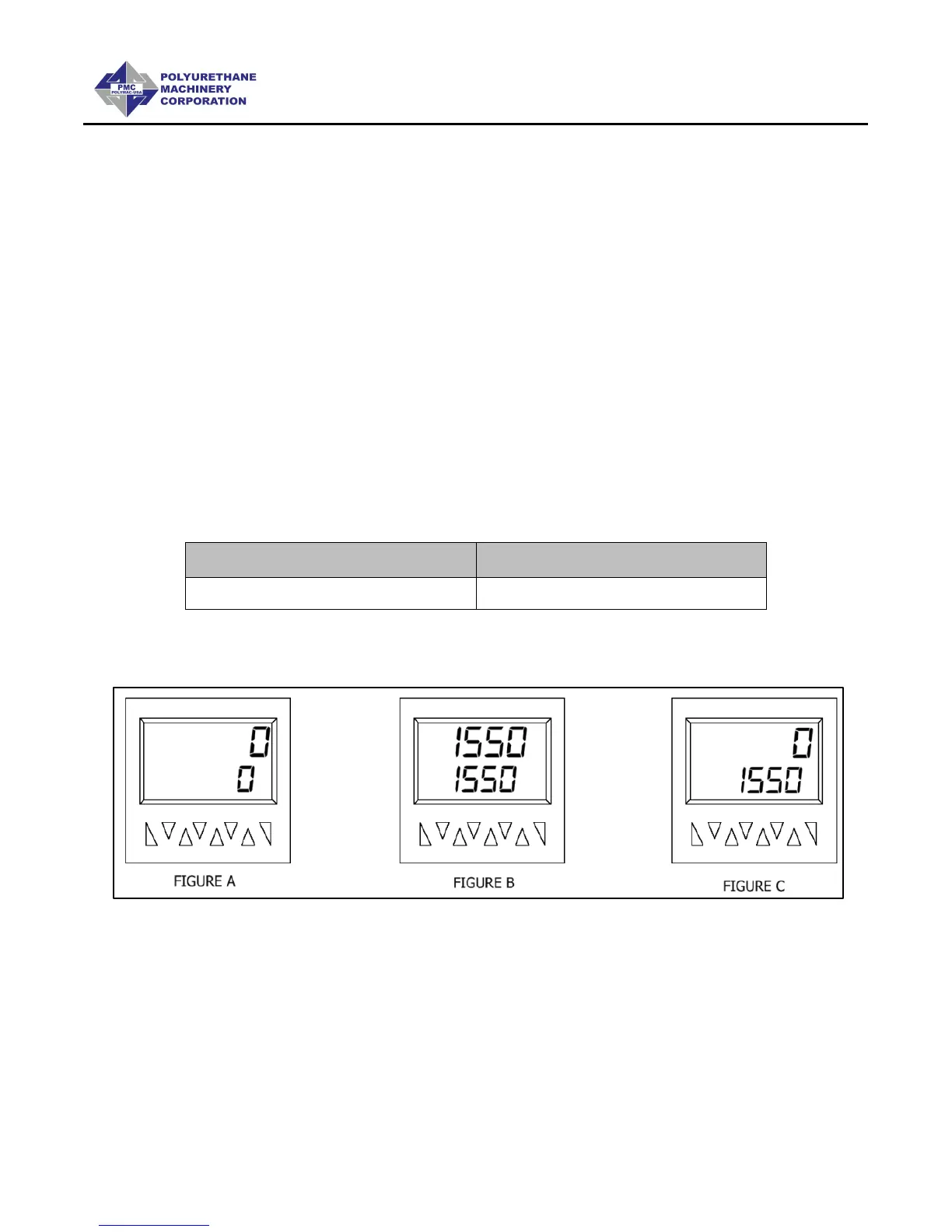
b. Insert the number of cycles desired to disable the pump circuit by pushing in on
the white triangles to set the cycle count. Push in on the red button until the data
is replicated on the top row, the top row will count down. Figure B
16 cycles = 1 gal (3.79 L)
24 cycles = 1 gal (3.79 L)
c. When the counter counts down to zero the machine will stop and the pump
directional light will be off, push in on the red button to reset. Figure C
13. Proceed with Installation and Start-up of the Spray Gun as per the Gun manual.
1
Stall pressure: When materials are at recommended application temperature and Metering
Pumps are pressurized but not moving. This pressure is normally 100 – 200 psi (7-14 Bar)
greater than the developed spray pressure as recommended by the material supplier.



 To Next Page