34
NOTE! IF THE DIRECTIONAL LIGHT IS OFF PROCEED BELOW
NOTE! BEFORE TROUBLESHOOTING, THE REVERSING SWITCH
PLATE MUST BE MOVED AWAY FROM THE SWITCH.
d. Bleed down the chemical pressures.
e. Ensure Pump Switch (X, page 11) is OFF.
f. Turn on the motor (W, page 12).
g. Go to the Directional Valve and locate the Actuation Coils. Located in the middle
of each coil is a small round tab that can be pushed in to manually shift the spool
to move the pumps. If the Reversing plate is all the way to the left, push in on the
right side coil. If it’s all the way to the right, push in on the left side coil.
WARNING! THE MOTOR MUST BE OFF AND THE PUMP
SWITCH IN THE NORMAL POSITION.
h. Take a small screw driver or a thin piece of metal and move it across the front of
each Prox switch. A red light on the back of the switch should illuminate. If not,
replace the switch that does not light.
i. If the Prox switches light up, turn off all power and check for continuity on both
over pressure switches, pin 1 and 2. If the pressure switches are good, go to the
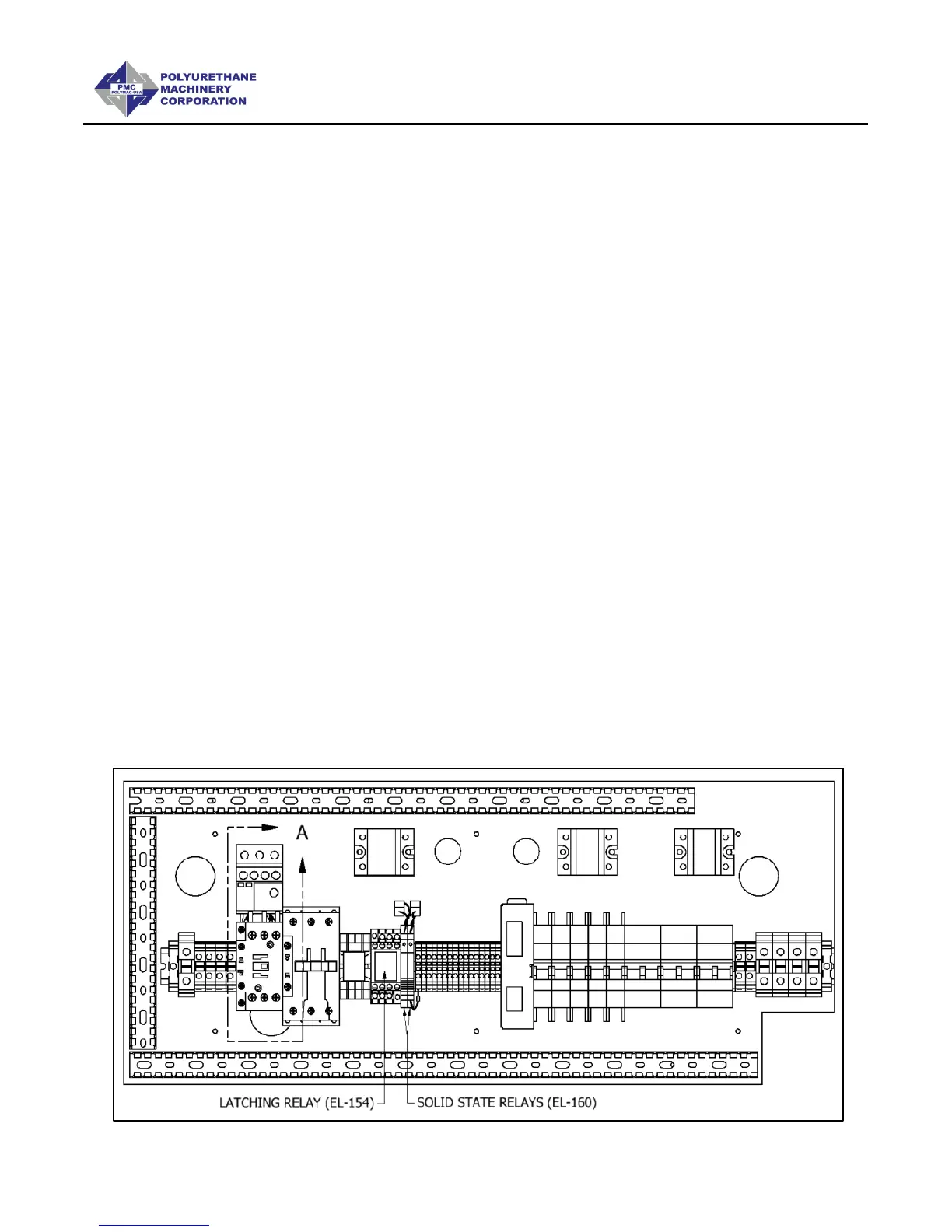
two solid state relays inside the console and interchange them (they can be
pulled from their housing). With the motor OFF and the pump switch in the
normal position, power-up the unit. If the directional light comes on replace the
defective solid state relay. If not, replace the Latching relay.


 To Next Page