48
LAN function 8.5.
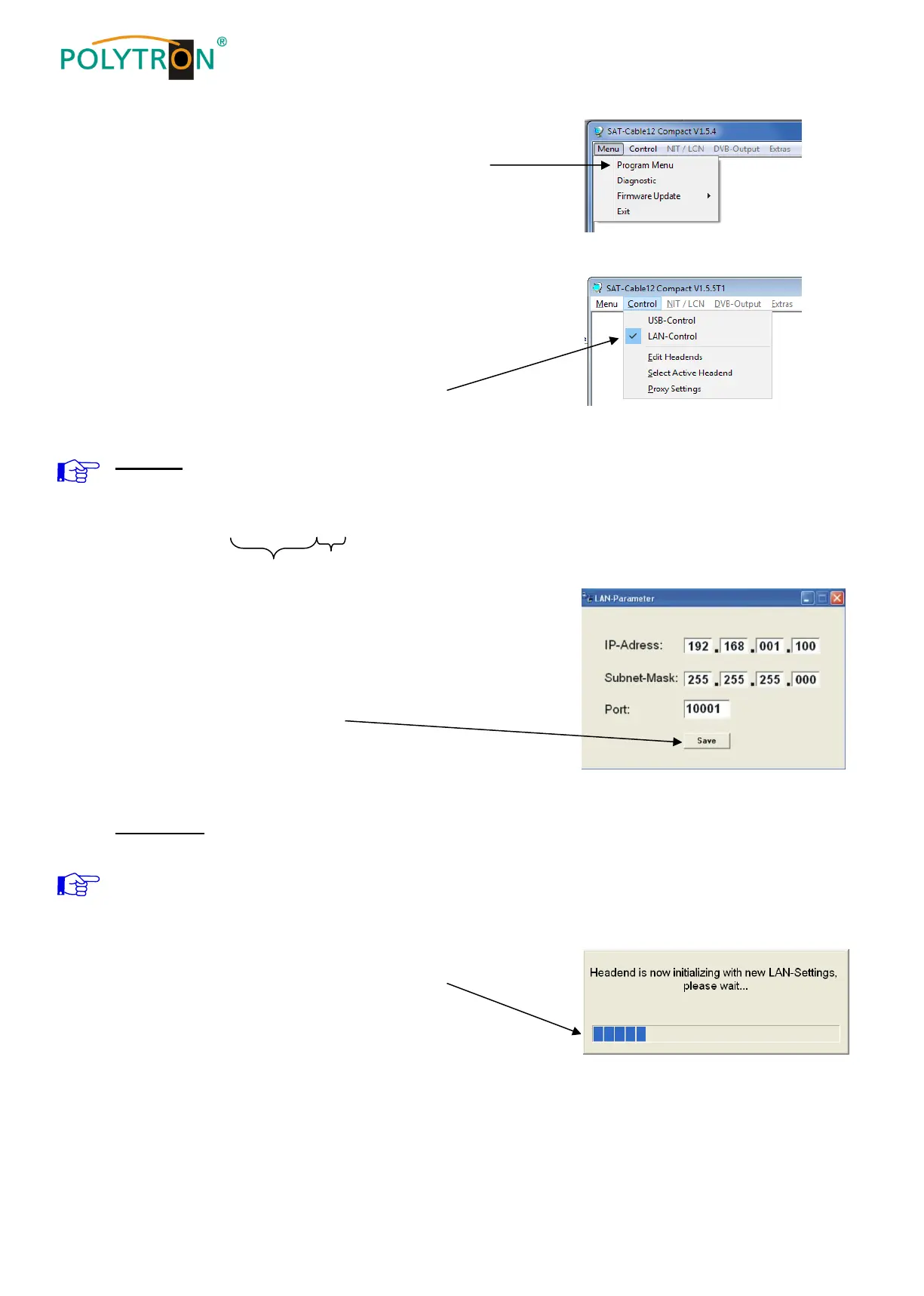
Click on Program Menu to open the programming
environment. The basic settings are loaded and the
user interface is started.
The PCU 4141 possesses the IP address:
192.168.001.227 as a standard setting.
If the system is used in a network with a different
network address, the IP address of the PCU 4141
must be accordingly altered.
This change is carried out under the menu point
LAN-Control.
Example:
The PC operated in the network has the following settings:
IP address: 192.168.001.068
network share host share
The IP address of the PCU 4141 may differ only in the last block
(host share) compared to the connected PC. The figures 0, 255
and all figures already used are not permitted!
Example IP address: 192.168.001.100
All changes are saved with Save.
Please note:
The listed IP addresses are intended as examples.
All addresses must be adapted to the network at the location.
If this information is not known, the responsible
IT specialist should be contacted!
The progress of saving is displayed on the bar diagram.
This process can last up to a minute.


 To Next Page