43
Function "Service List" 8.3.
If certain services within a transponder are not desired at the output, they can be removed. Encoded services
can still be selected for decoding via this function.
8.3.1. Delete and add services (programs)
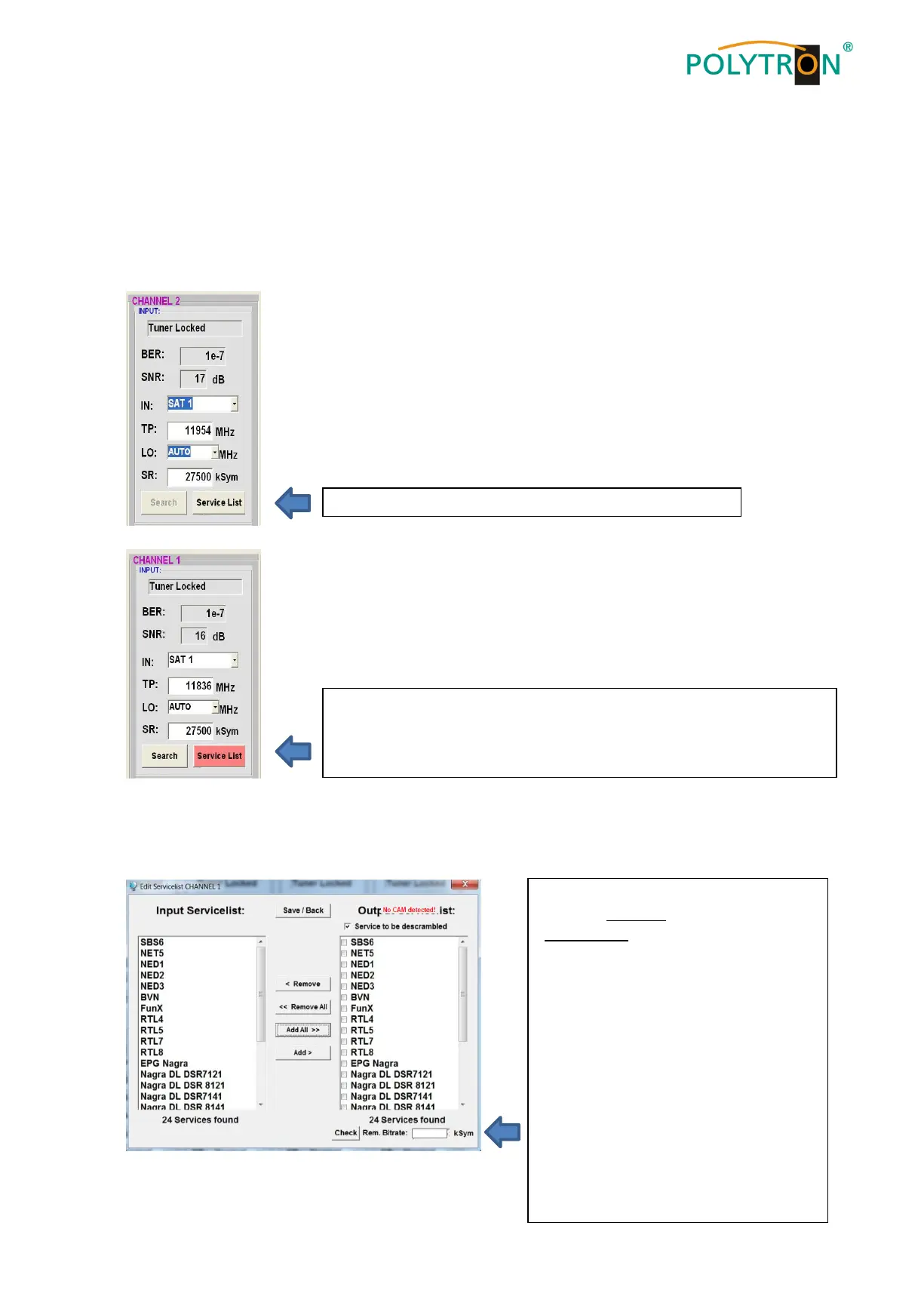
Clicking on this button opens the following window. The list of services available at the input is shown on the
left. On the right, one can see the services contained in the output signal.
The button Service List is only active if the tuner is locked.
If the data rate at the input is higher than the data rate that is possible at
the output due to the set parameters an error message appears and the
button for the Service List turns red. In this case, a reduced selection of
the desired services must be made.
If the data rate at the output is too high,
the word "Overflow" appears in the field
“Rem. Bitrate”. This means that the data
rate is too high for the set parameters,
and services must be removed.
Undesired services can of course also be
deleted if there is no overflow.
The field Bitrate is marked by colors.
Green means: The remaining bitrate is
higher than 10000 kSym.
Yellow means: The remaining bitrate is
less than 10000 kSym.
Red means: The remaining bitrate is less
than 5000 kSym.
Overflow means: The data rate is too
high in accordance to the adjusted
DVB-C or DVB-T parameters.


 To Next Page